What Is a Microcontroller?
A microcontroller (MCU) is a complete, miniature computer built onto a single integrated circuit. Instead of using separate chips for the processor, memory, and input/output circuitry, the way a desktop PC does, a microcontroller packs the CPU, RAM, flash memory, and I/O peripherals onto one small piece of silicon.
Think of it like the difference between a Swiss Army knife and a toolbox. A microprocessor (like the one in your laptop) is powerful, but it needs a toolbox of extra components to do anything useful. A microcontroller is the Swiss Army knife, everything it needs to control one specific device is already built in.
That’s exactly why microcontrollers quietly run:
- Your washing machine’s control panel
- Your car’s power windows and airbag system
- The fitness tracker on your wrist
- Almost every “smart” object you own
Inside a Microcontroller: The Core Components
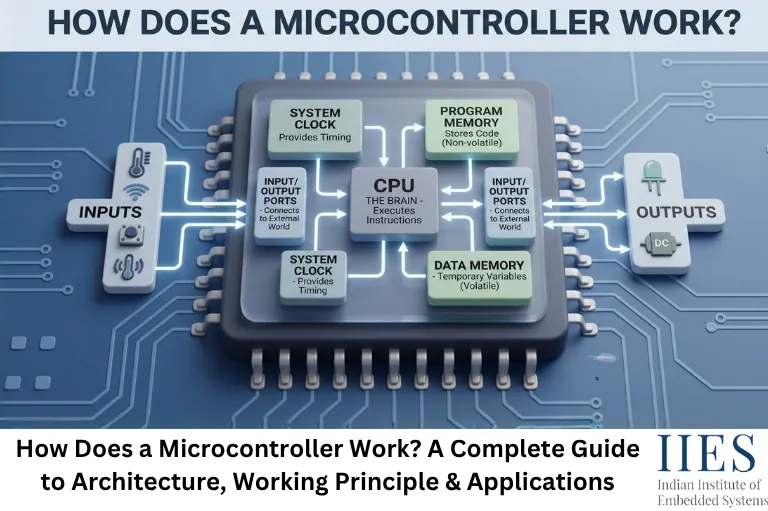
Before you can understand how a microcontroller works, you need to know what’s inside it. Every microcontroller, whether it’s an 8051, a PIC, or an STM32 is built from the same core building blocks.
Component | What It Actually Does |
CPU (Core) | The “brain” – fetches, decodes, and executes every instruction |
Flash / ROM | Non-volatile memory that stores your compiled program (firmware) |
RAM | Volatile memory holding variables and the stack while the program runs |
EEPROM | Small non-volatile memory for data that must survive a power cycle |
GPIO (I/O Ports) | Pins that read switches/sensors or drive LEDs, relays, and motors |
Timers/Counters | Track time, generate delays, and produce PWM signals |
ADC | Converts analog signals (temperature, light, voltage) into digital values |
Communication Interfaces | UART, SPI, and I2C, let the MCU talk to sensors and other chips |
Interrupt Controller | Lets the CPU react instantly to events instead of constantly checking |
Clock / Oscillator | The internal “heartbeat” that times every operation on the chip |
Every one of these plays a direct role in the working cycle below.

How Does a Microcontroller Work? The Fetch-Decode-Execute Cycle
This is the part most tutorials skip and it’s the real answer to “how does a microcontroller work.”
Everything a microcontroller does, blink an LED, read a button, drive a motor, comes down to the same repeating cycle, running millions of times per second:
- Power-On & Reset – When power is applied, a reset circuit initializes the CPU and points the Program Counter to a fixed starting address in flash memory.
- Fetch – The CPU pulls the instruction stored at that address from flash memory over the internal bus.
- Decode – The control unit figures out what the instruction means: a load, an addition, a jump, or a command to set a pin high.
- Execute – The ALU or I/O circuitry carries out the instruction, doing math, moving data, or switching a GPIO pin.
- Store – The result is written back to a register, to RAM, or out to a pin.
- Repeat – The Program Counter moves to the next instruction and the cycle fires again, paced by the clock/oscillator.
A microcontroller running at just 16 MHz can complete this cycle roughly 16 million times every second.
A Real Example: What Happens When an LED Blinks
A familiar snippet of embedded C:
GPIO_SetPin(LED_PIN, HIGH);

delay_ms(500);

GPIO_SetPin(LED_PIN, LOW);

delay_ms(500);
Here’s what’s actually happening in hardware:
- GPIO_SetPin(HIGH) becomes a machine instruction that sets a bit in a port register – raising the voltage on that physical pin and switching on the transistor that lights the LED.
- delay_ms(500) doesn’t “pause” the CPU. It loads a timer register and lets the CPU count clock ticks until 500 milliseconds have passed.
- The same cycle repeats to pull the pin back LOW, turning the LED off.
That’s the entire “magic” behind a blinking LED: register writes, driven by the fetch-decode-execute cycle, timed by a hardware clock.
What About Interrupts?
Real embedded systems can’t just run one loop forever – they need to react to the outside world instantly. That’s what interrupts are for.
When an event occurs – a button press, a finished ADC conversion, an incoming UART byte – the CPU:
- Pauses whatever it’s doing and saves its current state
- Jumps to a dedicated block of code called an Interrupt Service Routine (ISR)
- Executes the ISR
- Returns to exactly where it left off, as if nothing happened
This is how a microcontroller blinks an LED, monitors a sensor, and responds to a button – all seemingly at once.
How a Microcontroller Executes a Program
Consider a simple embedded program:
while (1)

{

    if (button_pressed())

    {

        LED_ON();

    }

    else

    {

        LED_OFF();

    }

}
The microcontroller repeatedly performs the following operations:
- Fetches the program instructions from memory.
- Decodes the instructions.
- Reads the button input.
- Evaluates the condition.
- Controls the LED.
- Repeats the process.
This continuous execution is one of the fundamental principles behind embedded systems.
Role of Clock Signals
The CPU needs a timing reference to execute instructions in an organized sequence.
This timing is provided by a clock signal.
Depending on the microcontroller, the clock may come from:
- Internal oscillator
- External crystal
- External clock source
A higher clock frequency can allow the CPU to execute operations faster, but performance also depends on the processor architecture, instruction set, memory access, peripherals, and software.
Therefore, clock frequency alone does not determine the complete performance of a microcontroller.

How Microcontroller Communicates With Other Devices
A microcontroller rarely works completely alone. It often communicates with sensors, displays, memory chips, motor controllers, and other processors.
Common communication interfaces include:
UART
Used for simple serial communication between devices.
SPI
A fast synchronous interface commonly used with displays, sensors, memory devices, and other peripherals.
I²C
A two-wire communication protocol that allows multiple devices to share the same bus.
CAN
Widely used in automotive and industrial systems where reliable communication between electronic control units is important.
The microcontroller uses these interfaces through dedicated hardware peripherals and firmware.
How PWM Works in a Microcontroller
Pulse Width Modulation (PWM) is another important feature found in many microcontrollers.
PWM rapidly switches a digital output between HIGH and LOW while controlling the proportion of time the signal remains HIGH.
This proportion is called the duty cycle.
For example:
- 25% duty cycle → output is HIGH for a smaller portion of each cycle
- 50% duty cycle → equal HIGH and LOW duration
- 75% duty cycle → output remains HIGH for most of the cycle
PWM is commonly used for:
- Motor speed control
- LED brightness control
- Servo control
- Power regulation
What Happens When a Microcontroller Is Powered On?
When power is applied, the microcontroller does not immediately start executing random instructions.
A simplified startup sequence is:
Power ON → Reset → Startup Code → Program Memory → Main Program
The reset mechanism places the processor into a defined initial state.
The startup code then prepares essential parts of the system before execution reaches the application’s main code.
In a typical C/C++ embedded program, execution eventually reaches a function such as:
int main(void)

{

    // Application code

}
The exact startup process depends on the microcontroller architecture and development environment.
Microcontroller vs. Microprocessor: The Short Version
You’ll often hear these two terms used interchangeably. They’re not the same thing.
| | Microcontroller | Microprocessor |
Integration | CPU + memory + I/O on one chip | CPU only; needs external memory/peripherals |
Best for | Dedicated, single-purpose control tasks | General-purpose computing |
Cost & power | Low cost, low power | Higher cost, higher power |
Example | 8051, STM32, ESP32 | Intel Core i5, AMD Ryzen |
Microcontroller Applications: Where These Chips Actually Show Up
This is the part that makes the theory click. Microcontrollers aren’t an academic topic — they’re the invisible workforce behind nearly every electronic product you touch.
- Consumer electronics – washing machines, microwave ovens, remote controls, digital cameras
- Automotive systems – engine control units, airbag deployment, power windows, infotainment (one of the fastest-growing MCU application areas today)
- Industrial automation – PLCs, conveyor control, robotic arms, factory-floor sensors
- Medical devices – glucose monitors, infusion pumps, wearable health trackers, portable ECGs
- IoT & smart homes – smart thermostats, smart locks, voice assistants, home automation hubs
- Robotics – motor control, sensor fusion, obstacle avoidance, autonomous navigation
- Aerospace systems – flight control computers, navigation and telemetry
Trend worth knowing: Heading into 2026, MCUs are increasingly shipping with built-in AI acceleration for “Edge AI” – letting devices run small machine-learning models directly on the chip instead of sending data to the cloud. It’s already showing up in smart doorbells, predictive-maintenance sensors, and wearables.
Popular Microcontroller Families You Should Know
Family | Bit Width | Known For |
8051 | 8-bit | The classic architecture most engineering courses start with |
PIC (Microchip) | 8/16/32-bit | Widely used in industrial and consumer products |
AVR (Atmel) | 8-bit | Powers the original Arduino Uno |
STM32 (ARM Cortex-M) | 32-bit | Industry-standard choice for professional embedded design |
ESP32 | 32-bit | Built-in Wi-Fi/Bluetooth – dominant in IoT projects |
RP2040 / RP2350 | 32-bit | Raspberry Pi Pico’s MCU – popular for hobbyist and education use |
RISC-V based MCUs | Varies | Open-source architecture; the fastest-growing category in the industry |
Industry estimates suggest ARM Cortex-M-based chips now power roughly two-thirds of embedded applications worldwide, a strong reason to prioritize that architecture early if you’re starting out.
Key Takeaways
- A microcontroller is a complete computer on a single chip, CPU, memory, and I/O all built in.
- It works through a continuous fetch → decode → execute cycle, driven by an internal clock.
- Interrupts let it react instantly to real-world events instead of constantly polling.
- Firmware lives in Flash/ROM; RAM handles temporary data; EEPROM stores data that must survive a power cycle.
- Microcontrollers power everything from washing machines to spacecraft, automotive and IoT are currently the fastest-growing application areas.
- Popular families to know: 8051, PIC, AVR, STM32, ESP32, and the rapidly growing RISC-V ecosystem.
- Versus a microprocessor, a microcontroller trades raw computing power for low cost, low power, and single-chip simplicity, ideal for dedicated control tasks.

Wrapping Up
A microcontroller might be smaller than your fingernail, but it’s running a precise, relentless cycle fetch, decode, execute – millions of times a second to keep your everyday devices working the way they should. Once that cycle clicks for you, everything else in embedded systems interrupts, peripherals, real-time programming starts making a lot more sense.