Why Is Python Important for Web Development?
Python plays an important role in backend development because it provides a large ecosystem of libraries, frameworks, and tools for building web applications.
Instead of manually implementing common functions such as URL routing, request handling, database operations, and authentication, developers can use established frameworks to reduce repetitive development work.

1. Readable Programming Syntax
Python uses a relatively simple syntax compared with many traditional programming languages. This helps beginners understand application logic without spending too much time dealing with complex language structures.
For example, a Python function that processes a request can be written in a few readable lines. Developers can spend more time understanding how the request is validated and how the application should respond.
2. Framework Support
Python offers frameworks for different types of web development projects.
- Django provides a comprehensive framework for database-driven web applications.
- Flask provides a lightweight foundation for flexible web applications and APIs.
- FastAPI focuses on API development, type hints, request validation, and automatic API documentation.
Choosing a framework based on project requirements is more important than selecting one simply because it is popular.
3. Database Integration
Web applications regularly store and retrieve information. Python frameworks can communicate with relational databases such as PostgreSQL, MySQL, and SQLite.
For example, a course registration application can store student details, course information, payment status, and enrolment records in a database.
4. API Development
An Application Programming Interface (API) allows different software applications to communicate.
Python frameworks can create REST APIs that connect websites, mobile applications, IoT platforms, and external services.
This is especially useful when a company needs one backend to serve multiple applications.
5. Integration With Other Technologies
Python can work with cloud services, data processing libraries, machine learning systems, and automation tools.
This makes it useful for applications that need more than ordinary website functionality. For example, a web application can receive sensor readings through an API, process the data using Python, and display the results in a dashboard.
Engineering insight: A well-designed backend should keep business logic separate from the user interface. This makes the application easier to test, maintain, and extend when the frontend or mobile application changes.
Core Concepts of Python Web Development
Before building a web application, developers should understand the main technologies involved.
1. Frontend Development
The frontend is the part of a website that users interact with through their browsers.
It generally involves three technologies:
- HTML: Defines the structure of a webpage, including headings, forms, tables, and buttons.
- CSS: Controls the visual presentation, including colours, spacing, layouts, and responsiveness.
- JavaScript: Adds browser-side interactivity, form behaviour, and dynamic content updates.
Python is not normally used as the primary language for programming the browser interface. Its main role in traditional Python web applications is on the server side.
2. Backend Development
The backend handles the application logic that users do not directly see.
Typical responsibilities include:
- Processing form submissions.
- Checking user credentials.
- Reading and updating database records.
- Applying business rules.
- Managing sessions and permissions.
- Returning HTML pages or JSON responses.
Python frameworks provide the structure needed to implement these responsibilities.
3. HTTP and HTTPS
HTTP stands for Hypertext Transfer Protocol. It defines how browsers and web servers exchange requests and responses.
Common HTTP methods include:
HTTP method | Purpose | Example |
GET | Retrieve information | Display available courses |
POST | Submit new information | Register a student |
PUT | Replace an existing resource | Update a complete profile |
PATCH | Modify selected fields | Change a phone number |
DELETE | Remove a resource | Delete a saved record |
HTTPS uses encryption through TLS to protect communication between clients and servers.
A developer should understand HTTP status codes as well. For example, 200 indicates a successful request, 201 indicates that a resource was created, 400 indicates a bad request, and 404 indicates that a requested resource was not found.
4. Database Management
Databases store information that must remain available after a user leaves a website or closes a browser.
Python applications commonly work with:
- SQLite for lightweight projects and local development.
- PostgreSQL for applications requiring a capable relational database.
- MySQL for relational database-backed applications.
- MongoDB when a document-oriented data model fits the application.
A database is not simply a place to store information. Developers must design tables, relationships, constraints, indexes, and queries properly.
5. Python Libraries and Packages
Libraries provide reusable functionality for application development.
For example, a Python web application might use:
- A web framework for request handling.
- An ORM for database operations.
- A validation library for checking input.
- A testing framework for automated tests.
- A logging library for recording application events.
Using a separate virtual environment for each project prevents dependency conflicts between applications.
How Python Web Development Works
A typical Python web application follows a client-server architecture.
When a visitor opens a website, the browser sends an HTTP request to a web server. The Python application processes the request, communicates with other services when necessary, and sends an HTTP response back to the browser.
Basic Working Architecture
Browser → HTTP Request → Web Server → Python Framework → Application Logic → Database → HTTP Response → Browser
Consider a student visiting a training institute website to check available courses.
- The student opens the course listing page.
- The browser sends a request to the server.
- The Python framework identifies the requested URL.
- The application retrieves course information from the database.
- Python processes the result and prepares a response.
- The browser displays the course information.
The same process applies to features such as login systems, product listings, registration forms, and dashboards.
Important Architecture Components
Web browser: Sends requests and displays the returned content.
Web server: Receives HTTP traffic and communicates with the application server. Nginx is one example of software commonly used in this layer.
Python application: Executes the application’s business logic using Django, Flask, or FastAPI.
Database: Stores application information and provides data when requested.
Application server: Runs the Python web application through an interface such as WSGI or ASGI.
Understanding WSGI and ASGI
WSGI and ASGI define interfaces between Python web applications and the servers that run them.
- WSGI (Web Server Gateway Interface): A standard interface commonly used by synchronous Python web applications.
- ASGI (Asynchronous Server Gateway Interface): Supports asynchronous application handling and protocols such as WebSockets.
Flask is a WSGI-based framework. FastAPI is ASGI-oriented, while Django supports both WSGI and ASGI deployment.
The choice depends on the application’s requirements, particularly how it handles concurrency, long-running connections, and asynchronous operations.
Popular Python Frameworks for Web Development
Python provides several frameworks, but Django, Flask, and FastAPI are three important options for developers entering backend development.
1. Django
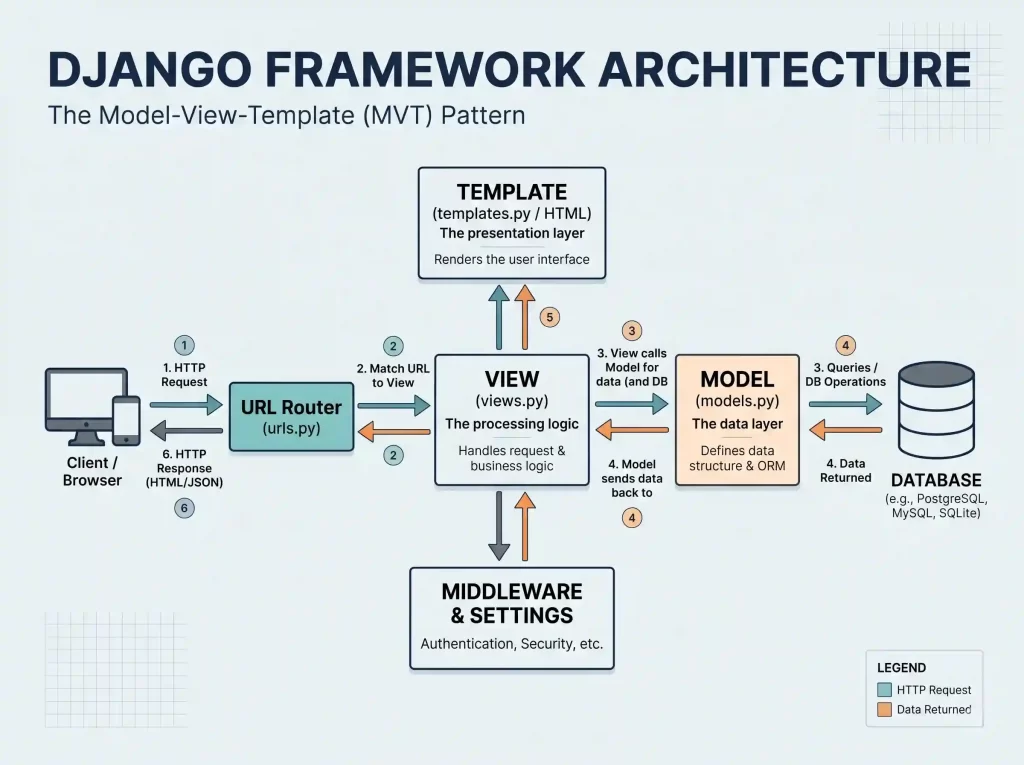
Django is a high-level Python web framework designed to help developers build database-driven web applications using a structured development approach.
It follows the Model-View-Template (MVT) architectural pattern and provides several built-in features.
Important Django features:
- Object Relational Mapping (ORM).
- Built-in authentication system.
- Admin interface.
- URL routing.
- Template engine.
- Form handling and validation.
- Security-related protections.
Django is suitable for projects such as e-commerce platforms, content management systems, educational portals, and business management applications.
Practical example: An institute developing a student management portal may use Django to manage student records, course enrolments, staff accounts, and administrative functions.
When should beginners choose Django?
Choose Django when you want to learn how a complete, structured web application works and need built-in features instead of assembling everything independently.
2. Flask
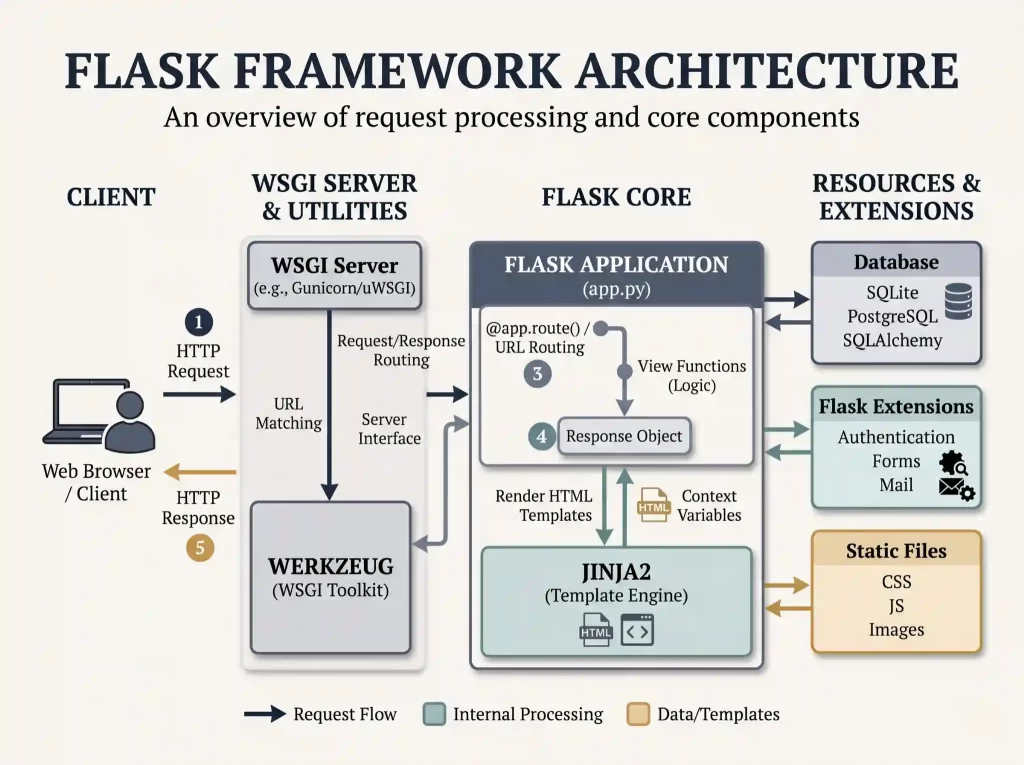
Flask is a lightweight Python web framework that gives developers greater control over application structure and component selection.
Unlike Django, Flask does not provide a complete set of built-in application features. Developers generally choose additional libraries according to project requirements.
Important Flask features:
- Lightweight framework structure.
- URL routing.
- Request and response handling.
- Jinja template integration.
- Extension support.
- Flexible project organisation.
Flask is useful for small and medium-sized web applications, prototypes, and API services.
Practical example: A developer can create a Flask-based backend that accepts student registration details and returns a JSON response to a frontend application.
When should beginners choose Flask?
Flask is a useful starting point when you want to understand how routes, requests, responses, and backend logic work without dealing with a large framework structure immediately.
3. FastAPI
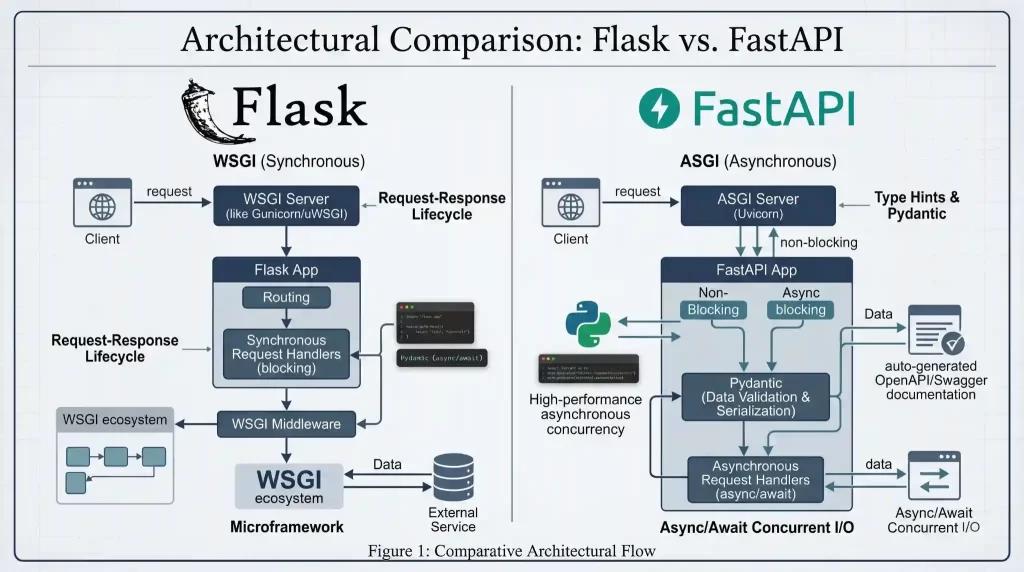
FastAPI is a modern Python framework primarily designed for building APIs.
It uses Python type hints and supports request validation, asynchronous programming, and automatic API documentation through OpenAPI.
Important FastAPI features:
- Type-hint-based development.
- Request and response validation.
- Automatic interactive API documentation.
- Dependency injection.
- Asynchronous request handling.
- OpenAPI support.
FastAPI is useful when developing backend APIs for mobile applications, web frontends, and systems that exchange structured data.
Practical example: An IoT monitoring platform can use a FastAPI backend to receive sensor readings, validate incoming JSON data, and provide the latest readings to a dashboard.
When should beginners choose FastAPI?
Choose FastAPI when your main objective is to build APIs and understand modern Python backend development.
Features of Python for Web Development
Python offers several capabilities that make it useful for backend application development.
1. Cross-Platform Development
Python applications can run on multiple operating systems, including Windows, Linux, and macOS, provided the required Python environment and dependencies are available.
2. Reusable Code
Functions, classes, modules, and packages help developers organise application logic into manageable components.
For instance, authentication logic can be separated from course management logic instead of placing all operations in a single file.
3. Database Connectivity
Python supports database connectivity through framework-specific ORMs and database drivers.
This helps developers perform operations such as inserting records, retrieving information, updating data, and deleting entries.
4. API Integration
Python applications can send requests to third-party services and exchange information using formats such as JSON.
An application might use an external payment gateway, email service, mapping API, or cloud platform.
5. Testing and Debugging Support
Python’s ecosystem includes tools for unit testing, integration testing, logging, and debugging.
These tools help developers identify errors before an application reaches production.
Advantages of Python for Web Development
Python offers several practical advantages:
- Beginner-friendly syntax: Its readable structure makes it easier for beginners to understand backend programming.
- Multiple frameworks: Developers can select Django, Flask, or FastAPI according to application requirements.
- Large ecosystem: Many libraries are available for database connectivity, testing, authentication, and integrations.
- Rapid development: Framework features reduce the amount of repetitive code developers must write.
- API development: Python can connect websites, mobile applications, and external services through APIs.
- Data and AI integration: Backend applications can integrate data processing and machine learning components.
- Community support: Extensive documentation and learning resources are available.
Limitations of Python for Web Development
Python is useful, but it is not the ideal choice for every situation.
1. Performance Considerations
Python can have lower raw execution performance than compiled languages in CPU-intensive workloads.
How to manage it: Profile the application, optimise database queries, use caching, and consider specialised services or compiled components when necessary.
2. Frontend Development Still Requires Other Technologies
Python does not replace HTML, CSS, and JavaScript in conventional browser-based development.
How to manage it: Learn the frontend fundamentals alongside Python backend development.
3. Framework Selection Requires Planning
Different frameworks offer different levels of built-in functionality and flexibility.
How to manage it: Evaluate application size, security needs, team experience, deployment requirements, and long-term maintenance before selecting a framework.
4. Deployment Requires Additional Knowledge
Knowing how to run an application locally does not automatically mean you know how to deploy it safely.
How to manage it: Learn environment variables, application servers, HTTPS, database configuration, logging, and production monitoring.
Real-World Applications of Python Web Development
Python is used in different industries to create web applications, backend services, and data-processing systems.
1. E-Commerce Applications
Python frameworks can handle product catalogues, customer accounts, shopping carts, order management, and payment gateway integration.
For example, a shopping website can use Django to manage product records and customer accounts while communicating with an external payment service.
2. Educational Platforms
Educational institutions can develop portals for admissions, course enrolment, examination records, attendance, and student management.
Python handles backend operations while the frontend provides the interface students and administrators use.
3. Healthcare Applications
Healthcare platforms can use Python backends for appointment booking, patient registration, administrative dashboards, and secure communication between authorised services.
Such applications require careful access control, secure data handling, and compliance with applicable regulations.
4. Industrial Automation
Industrial monitoring platforms can collect equipment data and provide web-based dashboards for operators.
Python can process incoming information, store historical readings, and generate reports.
5. IoT Applications
Python web frameworks are useful for building web services that communicate with IoT devices and gateways.
For example, an ESP32-based temperature monitoring device may publish sensor readings to an MQTT broker. A Python backend can consume the readings, store them in a database, and provide data to a browser dashboard.
Important distinction: Python running on a backend server is different from Python or MicroPython running directly on a supported microcontroller. These are separate deployment environments with different hardware and software constraints.
6. Automotive Applications
Fleet monitoring systems can use Python-based web services to manage vehicle records, receive telematics data, and provide dashboards for tracking operational information.

How to Start Python Web Development
Beginners should follow a structured learning path instead of starting with a large framework immediately.
Step 1: Learn Python Fundamentals
Start with the essential language concepts:
- Variables and data types.
- Operators and expressions.
- Conditional statements.
- Loops.
- Functions.
- Lists, tuples, dictionaries, and sets.
- Object-oriented programming.
- Exception handling.
- Modules and packages.
- File handling.
These concepts are necessary for writing application logic and organising backend code.
Step 2: Understand HTML, CSS, and JavaScript
Learn how webpages are structured, styled, and made interactive.
A Python backend cannot replace the browser technologies required to build conventional web interfaces.
Step 3: Learn HTTP and API Fundamentals
Understand how requests and responses work, how URLs are structured, and why HTTP methods and status codes matter.
Practise sending GET and POST requests using a tool such as Postman.
Step 4: Choose a Python Framework
Start with Flask if you want to understand backend fundamentals with a smaller framework.
Choose Django if your goal is to build complete database-driven web applications.
Choose FastAPI when you are ready to concentrate on API development.
Step 5: Learn Database Management
Start with basic SQL and understand how tables, primary keys, foreign keys, and relationships work.
Practise using SQLite for small projects. Progress to PostgreSQL or MySQL as your projects become more complex.
Step 6: Build Practical Projects
Apply your knowledge through projects such as:
- Student registration system.
- Personal portfolio website with a Python backend.
- Online course management system.
- Product inventory application.
- REST API for an IoT monitoring dashboard.
Step 7: Learn Testing and Deployment
Understand automated testing, Git, Linux fundamentals, application servers, environment variables, database migrations, and HTTPS.
A project becomes much more valuable as a portfolio item when it can be installed, tested, and accessed through a properly deployed environment.
Django vs Flask vs FastAPI: Comparison
Choosing the correct framework depends on the type of application you want to build.
Feature | Django | Flask | FastAPI |
Framework type | Full-stack | Microframework | API-focused |
Main use | Complete web applications | Flexible web apps and APIs | REST APIs and services |
Built-in ORM | Yes | No, extensions available | No, external libraries available |
Built-in admin | Yes | No | No |
Request validation | Forms and framework tools | Extensions or custom logic | Integrated validation |
Async support | Supports async features and ASGI | Primarily WSGI | ASGI-oriented |
Learning approach | Structured | Lightweight | Type-hint and API-focused |
Suitable projects | Portals, CMS, e-commerce | Prototypes, services, smaller apps | API backends, IoT services |
Which Python Framework Should Beginners Learn?
There is no single best framework for every project.
- Choose Flask to understand routing, requests, responses, and basic backend architecture.
- Choose Django to develop complete applications with built-in features and a structured architecture.
- Choose FastAPI to focus on API development, validation, and asynchronous services.
A useful learning sequence is to understand Python fundamentals first, build a small application with Flask, and then explore Django or FastAPI according to your career goals.
Best Practices for Python Web Development
Good development practices help prevent common bugs and make applications easier to maintain.
1. Use Virtual Environments
Keep the dependencies of each project separate.
This prevents conflicts when different applications require different package versions.
2. Organise Project Files
Avoid writing an entire application in one Python file.
Separate routes, configuration, database operations, and business logic as the application grows.
3. Validate User Input
Never trust data received from a browser, mobile application, or external API.
Validate input on the server, including data types, lengths, allowed values, and business rules.
4. Protect Sensitive Information
Do not store passwords, database credentials, secret keys, or API tokens directly in publicly accessible source code.
Use environment variables or an appropriate secrets management system.
5. Use Proper Database Queries
Use framework ORM features or parameterised database queries instead of constructing SQL queries by directly inserting untrusted user input.
This helps reduce SQL injection risks.
6. Implement Authentication and Authorisation
Authentication establishes who a user is. Authorisation determines which actions that user is allowed to perform.
A student account should not automatically have the same permissions as an administrator account.
7. Test Before Deployment
Test successful requests, invalid inputs, missing data, unexpected responses, database failures, and permission restrictions.
8. Follow Security Guidance
Review recognised application security guidance such as the OWASP Top 10. Pay particular attention to access control, security configuration, injection, authentication, and exception handling.
Common Mistakes Beginners Should Avoid
1. Learning Only Python
Why it happens: Beginners sometimes assume that Python alone is enough to build a complete website.
Impact: They may struggle to create interfaces, understand browser behaviour, or connect frontend and backend components.
Professional approach: Learn HTML, CSS, JavaScript, HTTP, and database fundamentals alongside Python.
2. Choosing a Framework Too Early
Why it happens: Developers may select Django or FastAPI simply because they see it frequently in tutorials.
Impact: They may find the framework difficult to understand without knowing the underlying web concepts.
Professional approach: Learn how requests, responses, routes, and databases work before moving into framework-specific features.
3. Ignoring Database Design
Why it happens: Beginners focus on making the application work first.
Impact: Poorly structured databases can lead to duplicate records, inconsistent information, and inefficient queries.
Professional approach: Plan tables, relationships, keys, constraints, and indexes before implementing complex database operations.
4. Running a Development Server in Production
Why it happens: A local application appears to work correctly, so beginners assume the same server is ready for public hosting.
Impact: Development servers and interactive debuggers are not designed to provide production-grade security, stability, and performance.
Professional approach: Use an appropriate production application server and follow the framework’s deployment documentation.
5. Ignoring Error Handling
Why it happens: Beginners mainly test successful requests.
Impact: Unexpected inputs or database failures may cause application crashes or unclear responses.
Professional approach: Validate inputs, handle exceptions carefully, log useful diagnostic information, and return suitable HTTP status codes.
Debugging Tips for Python Web Applications
Debugging is an essential part of backend development. An application may run successfully but still return incorrect information or fail under certain conditions.
1. Check the Terminal Output
When an application returns an HTTP 500 error, start by examining the server logs and traceback.
The traceback usually identifies the file and line where an exception occurred.
2. Check the Requested URL
A 404 Not Found response may occur when the requested URL does not match any registered route.
Check spelling, route definitions, URL prefixes, and trailing slashes.
3. Check the HTTP Method
A 405 Method Not Allowed response usually means that the route does not accept the HTTP method used by the client.
For example, a route designed for POST requests may not accept a GET request.
4. Inspect Request Data
When an application expects JSON, confirm that the client sends valid JSON and uses the appropriate Content-Type: application/json header.
Incorrect request formats can cause validation failures.
5. Check Database Connections
If an application cannot retrieve information, inspect database credentials, connection settings, migrations, and query errors.
Test the database independently when necessary to isolate whether the problem is inside the application or the database layer.
6. Test Individual Components
Use unit tests to check individual functions and integration tests to verify how routes, databases, and external services work together.
Practical debugging tip: Reproduce the issue with the same request data and HTTP method before modifying the code. Changing several components at once makes it harder to identify the actual cause.
Performance Optimization Tips
Performance should be measured rather than guessed.
1. Optimise Database Queries
Avoid retrieving more records or fields than the application needs.
Use suitable indexes, pagination, and ORM query optimisation techniques.
2. Use Caching
Frequently accessed information can sometimes be stored temporarily in a caching system.
Redis is one example of a technology used for application caching.
3. Use Asynchronous Processing Where Appropriate
Asynchronous programming can help applications handle I/O-bound operations efficiently.
However, making every function asynchronous does not automatically improve performance. The application architecture and the libraries being used must support the intended execution model.
4. Move Long-Running Tasks Out of Request Handling
Tasks such as report generation, bulk email delivery, and large file processing may be better handled by background workers.
This helps prevent slow operations from unnecessarily delaying ordinary user requests.
5. Monitor Application Performance
Measure response times, database query duration, error frequency, and resource utilisation.
Tools such as application monitoring systems and profiling utilities help developers identify bottlenecks.
6. Use Efficient Static File Delivery
In larger deployments, static assets such as images, CSS, and JavaScript files can be served through dedicated web servers or content delivery networks.
This reduces unnecessary work for the Python application.
Career Relevance of Python Web Development
Python web development provides a foundation for several software development roles.
Students and professionals can explore career paths such as:
- Python Backend Developer.
- Django Developer.
- Flask Developer.
- FastAPI Developer.
- Python API Developer.
- Web Application Developer.
- Backend Engineer.
Skills Employers Commonly Look For
Learning a framework is only one part of becoming job-ready.
Developers should also practise:
- Python programming and object-oriented programming.
- SQL and database management.
- HTML, CSS, and JavaScript fundamentals.
- REST API development.
- Git and version control.
- Linux and command-line operations.
- Software testing and debugging.
- Authentication and web application security.
- Application deployment and basic cloud concepts.
Projects That Strengthen a Portfolio
A strong project portfolio demonstrates how well a developer can apply technical concepts.
Consider building:
- A student registration and management portal.
- An e-commerce backend with product and order management.
- A course enrolment application.
- A REST API connected to PostgreSQL.
- An IoT dashboard that displays sensor readings.
For engineering students, an IoT monitoring application can be particularly useful because it connects Python backend development with embedded systems, communication protocols, and database management.
Future Trends in Python Web Development
Python web development continues to evolve alongside cloud computing, API-based architectures, and connected devices.
1. API-First Application Development
Modern applications increasingly separate frontend interfaces from backend services.
Python frameworks such as FastAPI support the development of APIs that can serve websites, mobile applications, and connected systems.
2. Cloud-Based Application Deployment
Cloud platforms allow development teams to deploy applications without maintaining every part of the underlying infrastructure themselves.
Developers should understand containers, application servers, environment configuration, monitoring, and cloud networking.
3. AI Integration in Web Applications
Python’s ecosystem makes it practical to connect web applications with machine learning models and AI services.
Examples include recommendation systems, document processing, intelligent search, and automated customer support.
4. IoT and Connected Applications
As connected devices generate data, backend systems are needed to process, store, and display that information.
Python can support data ingestion, API services, device management platforms, and monitoring dashboards.
5. Asynchronous Application Development
Asynchronous programming is useful for applications that perform many I/O operations, communicate with external services, or manage long-lived connections.
Developers should understand when asynchronous programming is beneficial rather than treating it as a universal performance solution.

Conclusion
Python programming for web development offers a practical way to build backend applications, web services, and APIs. Its frameworks, database integration capabilities, and extensive ecosystem make it useful for beginners as well as experienced developers.
However, learning Python alone is not enough to develop complete web applications. A strong foundation should include HTML, CSS, JavaScript, HTTP, SQL, application security, testing, and deployment.
Beginners can start with a small Flask project to understand request handling and API development, then explore Django for complete web applications or FastAPI for API-focused services. Building practical projects and understanding how each component works together is the most effective way to develop real-world backend skills.
For students interested in combining software development with engineering technologies, Python also provides opportunities to work on IoT platforms, industrial monitoring systems, and connected applications.