What Is AArch64 Architecture?
AArch64 is one of the execution states defined in the ARMv8-A architecture.
Instead of simply extending the older 32-bit instruction set, ARM designed a new 64-bit architecture with improved efficiency and cleaner instruction encoding.
Key Characteristics
- 64-bit instruction execution
- 64-bit registers
- Fixed-length 32-bit instructions
- Larger virtual address space
- Improved exception handling
- Better floating-point performance
- Advanced SIMD (NEON) support
- Enhanced security features
Why Is AArch64 Important?
AArch64 has become the standard execution mode for modern ARM processors because it offers several advantages over older 32-bit architectures.
It enables:
- Support for 64-bit applications
- Larger memory addressing
- Better processor performance
- More general-purpose registers
- Improved operating system support
- Enhanced security mechanisms
- Efficient compiler optimizations
- High-performance computing on ARM platforms
ARM Processors That Support AArch64
Many ARMv8-A and ARMv9-A processors support AArch64, including:
- Cortex-A53
- Cortex-A55
- Cortex-A57
- Cortex-A72
- Cortex-A73
- Cortex-A76
- Cortex-X Series
- Neoverse Series
- Apple M1, M2, M3, and newer processors
These processors power smartphones, Raspberry Pi boards, cloud servers, automotive systems, and embedded Linux devices.

Evolution of ARM Architecture
ARM architecture has evolved significantly over the years.
ARM Version | Execution State | Word Size | Major Improvement |
ARMv6 | AArch32 | 32-bit | Mobile processors |
ARMv7-A | AArch32 | 32-bit | Cortex-A series |
ARMv8-A | AArch32 + AArch64 | 32 & 64-bit | Introduction of AArch64 |
ARMv9-A | AArch64 | 64-bit | Security and AI enhancements |
Modern ARM processors can often run both 32-bit and 64-bit software for compatibility.
Why Both 32-Bit and 64-Bit Matter for ARM
Many ARM processors support both execution states.
Execution State | Purpose |
AArch32 | Runs older 32-bit applications |
AArch64 | Runs modern 64-bit applications |
This dual support provides backward compatibility while allowing developers to benefit from modern 64-bit capabilities.
Why This Dual Support Is Useful
- Older software continues to work
- New software can use improved hardware features
- Operating systems can support both application types
- Easier migration from 32-bit systems
ARM64 vs AArch64
Many people use these terms interchangeably, but they have slightly different meanings.
ARM64 | AArch64 |
Marketing/common name | Official ARM architecture term |
Commonly used by Linux and Android | Defined by ARM architecture documentation |
Refers to 64-bit ARM systems | Refers to the 64-bit execution state |
Used in package names and operating systems | Used in technical documentation |
Simple Explanation
- ARM64 is the commonly used name.
- AArch64 is the official architectural name.
- In most situations, both refer to the same 64-bit ARM environment.
Why Do We Have AArch64 and Not Just ARM64?
ARM introduced the name AArch64 to clearly distinguish the execution state from the processor architecture.
ARMv8-A defines two execution states:
- AArch32 → 32-bit execution state
- AArch64 → 64-bit execution state
Using the names AArch32 and AArch64 keeps the terminology consistent across different ARM processor families and architecture versions.
Operating systems and software distributions often use ARM64 because it is simpler and easier to recognize, while ARM’s official documentation uses AArch64.

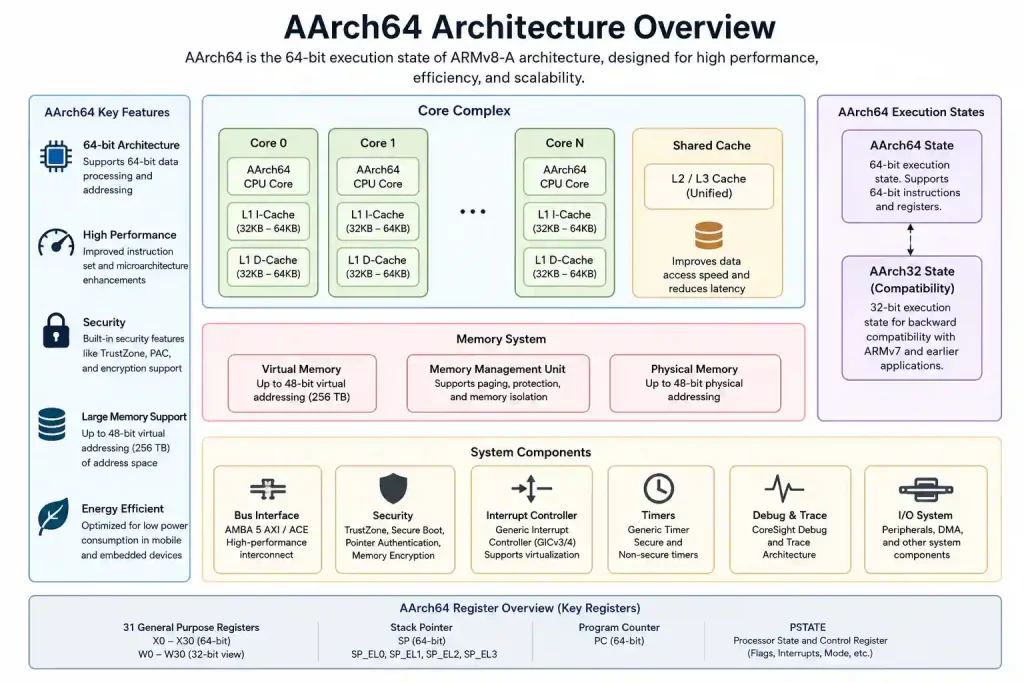
AArch64 Architecture Overview
A typical AArch64 processor consists of several major components.
- Instruction Fetch Unit
- Instruction Decoder
- Register File
- ALU (Arithmetic Logic Unit)
- Floating Point Unit (FPU)
- NEON SIMD Engine
- Load/Store Unit
- Cache Memory
- Memory Management Unit (MMU)
- Branch Prediction Unit
- Exception Handling Logic
Together, these components execute instructions efficiently while supporting multitasking, memory protection, and modern operating systems.
AArch64 Register Set
One of the biggest improvements in AArch64 is the expanded register set.
General-Purpose Registers
Register | Description |
X0–X30 | 64-bit general-purpose registers |
W0–W30 | Lower 32 bits of X registers |
X31 | Stack Pointer (SP) or Zero Register (XZR), depending on instruction |
PC | Program Counter |
Register Usage
- X0–X7 → Function arguments and return values
- X8 → Indirect result location / system use
- X9–X15 → Temporary registers
- X19–X28 → Callee-saved registers
- X29 → Frame Pointer (FP)
- X30 → Link Register (LR)
Floating-Point Registers
Register | Size |
V0–V31 | 128-bit |
These registers are used for:
- Floating-point operations
- SIMD instructions
- Multimedia processing
- DSP applications
Instruction Set Overview
Unlike older ARM architectures, AArch64 uses a cleaner instruction set.
Characteristics
- Fixed 32-bit instruction length
- Load/store architecture
- Three-operand instructions
- Improved immediate values
- Better branch instructions
- Simplified instruction decoding
Common Instruction Categories
- Data Processing
- Arithmetic Operations
- Logical Operations
- Memory Access
- Branch Instructions
- Floating-Point Instructions
- SIMD Instructions
- System Instructions
Memory Model
AArch64 follows a load/store architecture, meaning arithmetic and logical operations work only on registers.
Memory access flow:
Memory

   │

   ▼

Load Instruction

   │

   ▼

Registers

   │

Arithmetic / Logic

   │

   ▼

Registers

   │

Store Instruction

   │

   ▼

Memory
Benefits
- Faster instruction execution
- Simpler processor design
- Better compiler optimization
- Improved pipeline efficiency
- Reduced instruction complexity
Supported Data Sizes
Data Type | Size |
Byte | 8 bits |
Halfword | 16 bits |
Word | 32 bits |
Doubleword | 64 bits |
Quadword | 128 bits |
AArch64 Features
AArch64 introduces several architectural improvements over older ARM execution states.
Key Features
- 64-bit instruction execution
- 64-bit general-purpose registers
- 31 general-purpose registers
- Larger virtual and physical memory support
- Fixed 32-bit instruction encoding
- Improved exception handling
- Advanced SIMD (NEON) support
- Hardware virtualization support
- Enhanced security mechanisms
- Better compiler optimization
- Efficient pipeline execution
How AArch64 Works
When a program runs in AArch64 mode, the processor follows a sequence of operations.
Application

      │

      ▼

Instruction Fetch

      │

      ▼

Instruction Decode

      │

      ▼

Read Registers

      │

      ▼

Execute Instruction

      │

      ▼

Memory Access (if required)

      │

      ▼

Write Result Back

      │

      ▼

Next Instruction
Execution Steps
1. Fetch
- Processor reads an instruction from memory.
- Instruction is loaded into the pipeline.
2. Decode
- Instruction type is identified.
- Required registers are determined.
3. Execute
- ALU or FPU performs the requested operation.
- Branch instructions update program flow.
4. Memory Access
If required:
- Load data from memory.
- Store data back to memory.
5. Write Back
- Result is written into the destination register.
- Processor moves to the next instruction.
AArch64 Exception Levels
Instead of traditional processor modes, AArch64 uses Exception Levels (ELs). There are four exception levels.
Exception Level | Purpose |
EL0 | User applications |
EL1 | Operating system kernel |
EL2 | Hypervisor (Virtual Machines) |
EL3 | Secure Monitor / Trusted Firmware |
EL0 – User Space
Runs normal applications such as:
- Web browsers
- Media players
- Android apps
- Linux applications
Characteristics:
- Lowest privilege
- Cannot directly access hardware
- Depends on the operating system
EL1 – Kernel Mode
Runs the operating system kernel. Responsibilities include:
- Process scheduling
- Memory management
- Device drivers
- Interrupt handling
- File system management
EL2 – Hypervisor
Used for virtualization. Responsibilities:
- Virtual machine management
- Guest operating systems
- Resource allocation
- Virtual CPUs
Common usage:
- Cloud servers
- Embedded virtualization
- Automotive domain controllers
EL3 – Secure World
Highest privilege level. Used for:
- Trusted firmware
- Secure boot
- Cryptographic services
- Secure monitor calls
Privilege Hierarchy
EL3

 ▲

 │

EL2

 ▲

 │

EL1

 ▲

 │

EL0
Higher levels can control lower levels.
Memory Management Unit (MMU)
The MMU converts virtual addresses into physical addresses.
Without an MMU:
CPU

 │

 ▼

Physical Memory
With an MMU:
CPU

 │

 ▼

Virtual Address

 │

 ▼

MMU

 │

 ▼

Physical Address
Benefits of MMU
- Virtual memory
- Memory isolation
- Process protection
- Paging support
- Efficient multitasking
Virtual Memory
Virtual memory allows every process to have its own address space.
Advantages:
- Better security
- Easier application development
- Prevents applications from accessing each other’s memory
- Supports large applications
Cache Memory
Modern AArch64 processors use multiple cache levels.
Cache | Purpose |
L1 Cache | Fastest access |
L2 Cache | Shared cache |
L3 Cache | Large shared cache (high-end processors) |
Benefits:
- Faster memory access
- Lower latency
- Improved overall performance
Pipeline Architecture
Most AArch64 processors use pipelining to execute multiple instructions simultaneously.
Typical stages include:
- Fetch
- Decode
- Execute
- Memory
- Write Back
Benefits:
- Higher throughput
- Better CPU utilization
- Faster execution
Branch Prediction
Branch prediction helps reduce delays caused by conditional instructions. Instead of waiting for a branch decision, the processor predicts the next instruction.
Benefits:
- Fewer pipeline stalls
- Improved execution speed
- Better overall performance
NEON SIMD Engine
NEON is ARM’s SIMD (Single Instruction Multiple Data) engine. It allows one instruction to process multiple data elements simultaneously.
Common applications:
- Image processing
- Video encoding
- Audio processing
- Signal processing
- AI inference
- Machine learning
Example Uses
- Camera applications
- Face detection
- Video streaming
- Audio filters
- Robotics
- Computer vision
Floating-Point Unit (FPU)
The FPU performs floating-point calculations efficiently.
Typical workloads:
- Scientific computing
- Robotics
- Sensor fusion
- Navigation systems
- Machine learning
- Graphics
Security Features
AArch64 includes several built-in security mechanisms.
Memory Protection
Helps prevent unauthorized memory access.
Address Space Layout Randomization (ASLR)
Randomizes memory locations to make attacks more difficult.
Pointer Authentication (PAC)
Available in newer ARM architectures.
Benefits:
- Protects return addresses
- Prevents pointer modification attacks
- Improves software security
Branch Target Identification (BTI)
Protects against branch injection attacks.
TrustZone Support
Separates execution into:
Common uses:
- Mobile payments
- Secure boot
- DRM
- Trusted applications
Virtualization Support
AArch64 provides hardware support for virtualization.
Advantages:
- Multiple operating systems
- Better resource utilization
- Improved isolation
- Lower virtualization overhead
Used in:
- Cloud computing
- Automotive platforms
- Industrial systems
- Networking equipment
Power Efficiency
ARM processors are known for excellent performance per watt.
Reasons include:
- RISC instruction set
- Efficient pipeline
- Low-power design
- Intelligent power management
- Optimized execution units
This makes AArch64 suitable for:
- Smartphones
- IoT devices
- Battery-powered systems
- Edge AI devices
Simple AArch64 Assembly Example
.global _start

_start:

    MOV X0, #10

    MOV X1, #20

    ADD X2, X0, X1

    RET
Code Explanation
Instruction | Description |
MOV X0, #10 | Load 10 into X0 |
MOV X1, #20 | Load 20 into X1 |
ADD X2, X0, X1 | Add X0 and X1, store result in X2 |
RET | Return from function |
Result: X2 = 30
AArch64 vs x86-64
Feature | AArch64 | x86-64 |
Architecture | RISC | CISC |
Instruction Length | Fixed (32-bit) | Variable |
Power Consumption | Lower | Higher |
Performance per Watt | Excellent | Good |
Mobile Devices | Dominant | Rare |
Desktop PCs | Growing | Dominant |
Servers | Rapidly Growing | Widely Used |
Instruction Complexity | Simpler | More Complex |
Decoding | Easier | More Complex |
AArch32 vs AArch64
Feature | AArch32 | AArch64 |
Register Size | 32-bit | 64-bit |
Address Space | Smaller | Much Larger |
Registers | 16 | 31 General-Purpose Registers |
Instruction Set | Older | Redesigned |
Performance | Lower | Higher |
Memory Support | Limited | Large Memory Support |
Compiler Optimization | Good | Better |
Where Is AArch64 Used?
AArch64 powers a wide range of modern computing platforms.
Consumer Electronics
- Smartphones
- Tablets
- Smart TVs
- Streaming devices
- Raspberry Pi
- Industrial gateways
- HMI systems
- Embedded Linux boards
Automotive
- Digital instrument clusters
- Infotainment systems
- ADAS controllers
- Autonomous driving platforms
Industrial Automation
- PLCs
- Robotics
- CNC machines
- Factory automation controllers
Medical Devices
- Diagnostic systems
- Medical imaging
- Patient monitoring equipment
Networking
- Routers
- Switches
- Firewalls
- Telecom infrastructure
Cloud Computing
- ARM-based cloud servers
- Data centers
- Virtual machines
- AI infrastructure
- Edge AI devices
- Vision systems
- AI cameras
- Smart assistants
Best Practices
Follow these practices while learning or developing software for AArch64 systems.
Learn the Architecture First
Understand:
- Register set
- Instruction set
- Calling conventions
- Memory layout
- Exception levels
A strong foundation makes debugging and optimization much easier.
Write Portable Code
- Use standard C/C++ whenever possible.
- Avoid architecture-specific instructions unless necessary.
- Keep hardware-dependent code separate.
Use Compiler Optimizations Carefully
Common optimization levels:
- -O1
- -O2
- -O3
- -Os (Optimize for size)
Always test your application after changing optimization levels.
Follow the ARM Procedure Call Standard (AAPCS64)
Using the correct calling convention helps ensure compatibility between libraries, operating systems, and compilers.
Minimize Memory Access
Memory access is slower than register access.
Good practice:
- Reuse register values.
- Avoid unnecessary loads and stores.
- Keep frequently used variables in registers whenever possible.
Use Official Documentation
Refer to official resources from:
- ARM
- CMSIS
- Linux Kernel Documentation
- GCC Documentation
Official manuals provide the most accurate architectural details.
Performance Optimization Tips
Small optimizations can significantly improve AArch64 application performance.
Reduce Memory Access
Access registers instead of memory whenever possible.
Optimize Loops
- Reduce unnecessary calculations.
- Move constant values outside loops.
- Minimize branch instructions.
Use NEON for Parallel Processing
NEON can greatly improve performance in:
- Image processing
- Audio processing
- Signal processing
- AI inference
Enable Compiler Optimization
Common options: -O2 or -O3. Choose the optimization level based on performance and code size requirements.
Profile Before Optimizing
Use profiling tools to identify actual bottlenecks instead of optimizing code blindly.
Where Can You Learn AArch64?
AArch64 is typically covered as part of advanced embedded systems and Embedded Linux training.
At the Indian Institute of Embedded Systems (IIES), Bangalore, students gain practical exposure to ARM-based development through embedded systems, Embedded Linux, and ARM processor programming. Learning topics such as ARM architecture, C programming, Embedded C, Linux fundamentals, and debugging provides a strong foundation for understanding AArch64-based platforms used in modern embedded applications.
Future Trends
AArch64 continues to evolve with newer ARM architectures. Some key trends include:
- ARMv9 adoption
- AI acceleration
- Edge AI computing
- ARM-based cloud servers
- Automotive domain controllers
- High-performance embedded computing
- Advanced security technologies
- Energy-efficient data centers

Conclusion
Understanding what is AArch64 is essential for anyone working with modern ARM-based systems. As the 64-bit execution state of the ARM architecture, AArch64 introduces a redesigned instruction set, expanded register file, larger memory addressing, improved security, and higher performance compared to AArch32.
From smartphones and Embedded Linux boards to automotive electronics and cloud servers, AArch64 powers many of today’s computing platforms. Building a solid understanding of its architecture, register set, exception levels, and memory model prepares students and developers for embedded software, firmware, Linux, and system programming roles.