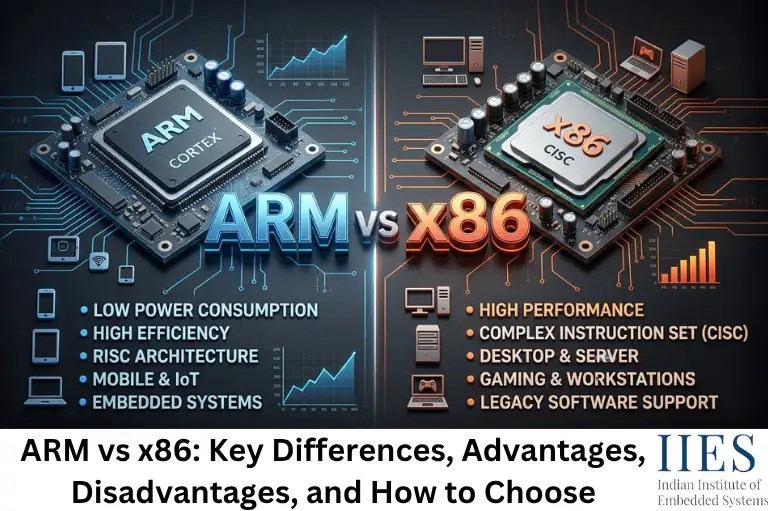
What Is x86 Architecture?
x86 traces back to Intel’s 8086 microprocessor, released in 1978. IBM chose a variant of it for the original IBM PC in 1981, and that single decision locked x86 into desktop computing for the next four and a half decades.
x86 follows a CISC (Complex Instruction Set Computer) philosophy. A single x86 instruction can do a lot of work, read from memory, perform a calculation, and write the result back, all in one instruction. This keeps compiled programs compact but makes the processor’s internal decoder circuitry considerably more complex.
Today, x86 is effectively a two-company market. Intel and AMD hold cross-licenses to each other’s patents, a legacy of a 1980s IBM requirement for a second supplier, but no other company manufactures general-purpose x86 chips. That tight control is a big part of why x86 hardware, firmware, and software have stayed so consistent for so long.
What Is ARM Architecture?
ARM started in 1985 as the Acorn RISC Machine, built by UK-based Acorn Computers for their own desktop line. It didn’t win the desktop war, but its power efficiency made it a natural fit for a market nobody was fighting over yet: battery-powered and embedded devices.
ARM follows a RISC (Reduced Instruction Set Computer) philosophy. Instructions are simple, fixed-length, and mostly execute in a single clock cycle. The processor’s decoder stays lean, which cuts both power draw and die space, the two things that matter most in a microcontroller or a phone.
The bigger difference isn’t technical, though it’s the business model. ARM Holdings doesn’t manufacture chips. It designs the instruction set architecture and core designs, then licenses them to companies like Apple, Qualcomm, NXP, and STMicroelectronics, who build their own silicon around it. That’s why “ARM” shows up inside products from more than a dozen competing manufacturers, while “x86” effectively means Intel or AMD.

Architectural Differences Between x86 and ARM
Strip away the marketing, and the split between ARM and x86 comes down to a handful of concrete engineering decisions.
Instruction set style. ARM uses fixed-length, simple instructions in a strict load/store architecture, where only dedicated load and store instructions ever touch memory. x86 allows variable-length instructions from 1 to 15 bytes, and many of them operate directly on memory. This is the classic RISC vs CISC divide, and it cascades into almost everything else on this list.
Instruction decoding. Because ARM instructions are uniform, the decoder is simple and cheap to build wide, fetching and decoding several instructions per cycle without much overhead. x86 decoders have to figure out where one instruction ends and the next begins before they can even start decoding. Modern x86 chips work around this by translating incoming CISC instructions into simpler internal micro-ops that execute RISC-style, extra work the ARM pipeline never has to do.
Registers. AArch64 (64-bit ARM) exposes 31 general-purpose registers to the compiler. x86-64 exposes 16. More architectural registers mean the compiler can keep more working values on-chip instead of shuttling them to and from cache.
Power design point. ARM cores were engineered from day one around a tight power-performance-area budget, because early customers were battery-powered devices, not desktops. x86 was engineered for peak throughput first, with power efficiency layered on later through heterogeneous performance/efficiency core designs, a page borrowed, more or less, from ARM’s big.LITTLE playbook.
Business and manufacturing model. ARM Holdings licenses its architecture to dozens of companies, who each build custom chips around it. x86 is controlled almost entirely by Intel and AMD. This one decision explains a lot about why ARM shows up in such a wide range of devices.
Aspect | ARM | x86 |
Instruction set type | RISC – simple, fixed-length | CISC – complex, variable-length |
Typical instruction length | 32-bit (or 16-bit Thumb) | 1–15 bytes |
Memory access | Strict load/store only | Many instructions touch memory directly |
General-purpose registers (64-bit) | 31 (AArch64) | 16 (x86-64) |
Design priority | Power efficiency, die area | Raw single-thread performance |
Chip manufacturers | Apple, Qualcomm, Samsung, NXP, STMicroelectronics, and more (licensed) | Intel, AMD (closed duopoly) |
Common home | Microcontrollers, mobile, growing in laptops & servers | Desktops, gaming rigs, enterprise servers |
ARM Advantages
- Power efficiency. ARM’s RISC design and simpler decode logic translate directly into lower power draw per instruction executed, the reason ARM dominates anything that runs on a battery or a coin cell.
- Licensing flexibility. Because ARM licenses its architecture rather than selling chips itself, companies like Apple, Qualcomm, and STMicroelectronics can design fully custom SoCs, adding exactly the NPU, security block, or peripheral set their product needs.
- Scalability across the entire compute spectrum. The same architectural family runs from a Cortex-M0 microcontroller sipping microwatts to Neoverse cores powering AWS Graviton servers, a range x86 simply doesn’t cover.
- Smaller die area, lower cost. Simpler decode logic needs fewer transistors, which keeps manufacturing costs down, a real factor when you’re pricing a microcontroller in cents, not dollars.
- Runs cooler. Lower power draw means less heat to dissipate, which is why so many ARM-based embedded designs get away without a fan or heatsink.
- A mature embedded toolchain ecosystem. GCC’s ARM target, Keil MDK, IAR Embedded Workbench, and mbed are all first-class citizens, most embedded engineering programs teach ARM Cortex-M as the default microcontroller family for exactly this reason.
ARM Disadvantages
- Legacy software compatibility gaps. Decades of x86-only software, from niche industrial tools to certain professional creative suites, still don’t run natively on ARM. Emulation has closed much of this gap, but not all of it, and emulated software rarely matches native performance.
- No mature discrete GPU ecosystem on ARM PCs. As of 2026, ARM-based Windows laptops like the Snapdragon X2 Elite still can’t be paired with a discrete Nvidia GPU, a real limitation for gaming, 3D work, or heavy video editing.
- Hardware fragmentation. Because dozens of vendors build ARM silicon differently, boot processes, firmware, and driver support are far less standardized than the UEFI-based consistency across x86 PCs.
- Per-unit licensing costs. Vendors typically pay ARM Holdings a licensing fee and/or per-chip royalty, usually still cheaper than the alternative at scale, but it’s a real line item.
- Peak performance ceiling. ARM has closed most of the single-thread performance gap with recent Apple Silicon and Snapdragon X2 chips, but the highest-end workstation and server performance crowns are still frequently held by x86.
x86 Advantages
- Unmatched backward compatibility. Software written for x86 twenty years ago often still runs today, a huge advantage for enterprises running legacy industrial control systems, ERP software, or specialized engineering tools never rebuilt for another architecture.
- A standardized platform. UEFI, consistent driver models, and decades of hardware convention mean an x86 PC from any vendor behaves predictably, a level of standardization ARM’s fragmented vendor landscape hasn’t matched yet.
- Full discrete GPU support. Nvidia, AMD, and Intel Arc all build first-class drivers for x86 platforms, making it the only realistic choice today for serious gaming, 3D rendering, or GPU-accelerated video work.
- Mature virtualization and enterprise tooling. Decades of investment in hardware virtualization (Intel VT-x, AMD-V), enterprise management tools, and profiling/debugging software give x86 a depth of tooling newer ARM PC platforms are still catching up to.
- Deep existing software and IT investment. Most enterprise, industrial, and scientific computing software was written and validated for x86 first, migrating it is a cost and risk decision most IT departments aren’t in a hurry to make.
x86 Disadvantages
- Higher power draw. The decode overhead of a CISC design costs real power, which is why you’ll almost never find x86 inside a coin-cell-powered sensor node or a fanless embedded enclosure.
- Larger die area and higher per-chip cost. More complex decode logic means more transistors dedicated to instruction handling rather than compute – a cost that scales badly for cheap, high-volume embedded products.
- A closed, two-vendor ecosystem. With only Intel and AMD building x86 silicon, OEMs can’t license the architecture to build fully custom chips the way ARM licensees can.
- Poor fit for the smallest embedded designs. There’s no x86 equivalent of a Cortex-M0 microcontroller drawing microwatts of power, the architecture wasn’t built to scale that far down.

Examples of ARM and x86 Architectures
Seeing where each architecture actually ships makes the differences click faster than any spec sheet.
Where You’ll Find ARM
- Microcontrollers (embedded & IoT): Cortex-M0/M0+ for the simplest sensor nodes, Cortex-M4 and Cortex-M7 for real-time control, the cores inside STMicroelectronics’ STM32 families, Nordic Semiconductor’s nRF52 series, and NXP’s LPC and i.MX RT lines.
- Single-board computers: The Raspberry Pi’s SoC uses Cortex-A cores, the same design family, scaled up for a full Linux OS instead of bare-metal firmware.
- Mobile SoCs: Qualcomm Snapdragon, Samsung Exynos, and MediaTek Dimensity all build on ARM cores to power the large majority of the world’s smartphones.
- Laptops and desktops: Apple’s M-series (the M5, M5 Pro, and M5 Max as of this writing) and Qualcomm’s Snapdragon X2 Elite and X2 Elite Extreme are pushing ARM into mainstream Windows and macOS machines, with early 2026 benchmarks showing the Snapdragon X2 Elite matching or beating several x86 competitors on multi-threaded workloads.
- Servers and the cloud: AWS Graviton (now in its 4th generation, built on Arm’s Neoverse V2 cores) and Nvidia’s Grace CPU show that ARM has moved well beyond phones and microcontrollers into data-center-scale computing.
Where You’ll Find x86
- Desktops and laptops: Intel’s Core Ultra Series 3 (“Panther Lake,” launched at CES 2026 on Intel’s 18A process) and AMD’s Ryzen AI 300 series (built on the Zen 5 core, with Zen 6 arriving in EPYC server chips later in 2026) still power most Windows PCs.
- Gaming rigs and workstations: Practically every serious gaming PC and GPU-heavy workstation still runs on x86, largely because that’s where the discrete GPU ecosystem lives.
- Enterprise servers and data centers: Intel Xeon and AMD EPYC remain the default for a huge share of enterprise workloads, particularly anywhere legacy x86 software is already deployed.
Worth Watching: RISC-V
There’s a third option quietly gaining ground in embedded design: RISC-V, an open, royalty-free instruction set that any company can implement without licensing fees. You’ll already find it in chips like Espressif’s ESP32-C and ESP32-H series. It’s not a direct replacement for ARM or x86 yet, but it’s worth keeping on your radar when choosing an architecture for a long-term embedded product line.
Choosing Between ARM and x86 Processors: The Role of Software Compatibility
Here’s where a lot of “ARM vs x86” comparisons miss something important for embedded and systems engineers: software compatibility means something different depending on whether you’re deploying to a known target or choosing a general-purpose machine.
If you’re building embedded firmware, compatibility usually isn’t a real obstacle. You choose your microcontroller, install the matching toolchain, GCC’s ARM Embedded target, Keil MDK, or IAR Embedded Workbench, and compile directly for that specific core. There’s no “will my code run” question, because you’re compiling for exactly one target from the start.
If you’re choosing a general-purpose computer, compatibility becomes the central question, because you’re relying on someone else’s compiled binaries running correctly on your chip:
- Operating system support. Linux runs natively and well on both architectures, genuinely the most architecture-agnostic major OS. Windows has supported ARM64 since Windows 10, with steadily improving native app support. macOS has been ARM-native since Apple Silicon launched in 2020.
- Emulation layers bridge the gap, imperfectly. Windows uses an emulator called Prism to run x86 and x64 applications on ARM64 hardware, translating instructions on the fly and caching the results for faster repeat runs. Apple’s Rosetta 2 does the same job on macOS. Both have improved significantly, Prism, for example, added support for AVX2 and related instruction extensions in 2026, unlocking previously incompatible creative and gaming software, but emulated code still generally runs slower than software compiled natively for the chip.
- Containers need architecture awareness too. Multi-arch Docker images need to explicitly target linux/amd64 or linux/arm64, and a container built for one won’t run on the other without emulation or a proper multi-arch build.
- Endianness matters less than it used to, but not zero. Modern ARM implementations default to little-endian, matching x86, which has quietly eliminated one entire historical class of porting bugs.
The practical takeaway: for embedded and firmware work, pick the architecture that fits your power, cost, and performance requirements, compatibility is solved at compile time. For general-purpose computing, weigh compatibility seriously, because it’s still the biggest reason people hesitate to move from x86 to ARM.
Which Is Better: ARM or x86?
There isn’t a universal winner, there’s a better fit for your specific workload.
Choose ARM if you’re:
- Building a battery-powered, IoT, or embedded product where power efficiency and cost matter most
- Designing a custom SoC and want the flexibility to license and modify the architecture
- Prioritizing mobile or laptop battery life over peak GPU or gaming performance
- Deploying at cloud scale, where ARM server instances often deliver strong price-performance for general-purpose workloads
Choose x86 if you’re:
- Running legacy enterprise, industrial, or scientific software that was never ported to ARM
- Building or buying a machine for serious gaming or GPU-heavy creative work
- Managing enterprise IT infrastructure where standardization and mature virtualization tooling matter
- Working in a domain where every tool in your stack already assumes x86
For most embedded systems engineers, the honest answer is that you end up fluent in both, writing firmware for ARM Cortex-M targets while developing and testing on an x86 workstation. Understanding both architectures well, rather than picking a side, is genuinely the more useful skill.

Final Thoughts
The ARM vs x86 debate is no longer simply about “low power versus high performance.”
Modern ARM processors can deliver serious computing performance, while modern x86 processors have become increasingly efficient. The biggest differences often come from the specific implementation, software ecosystem, workload, and platform design rather than the ISA alone.
ARM remains a particularly strong choice for embedded systems, IoT, mobile devices, and efficient computing, while x86 continues to have a major advantage in desktop, gaming, enterprise, and legacy software compatibility.