What Are ESP32 GPIO Pins?
GPIO stands for General Purpose Input/Output. These pins allow the ESP32 to receive signals from external components or send signals to control them.
For example:
- Input: Reading the state of a push button or a digital sensor.
- Output: Turning an LED on or off.
- Analog input: Reading a variable voltage from a compatible sensor.
- PWM output: Controlling LED brightness or generating control signals.
- Communication: Connecting to peripherals through interfaces such as UART, SPI, and I2C.
The ESP32 supports flexible pin multiplexing, which means many GPIO pins can perform more than one function depending on how the pin is configured.
ESP32 GPIO Pin Diagram
An ESP32 pinout diagram shows the location and functions of the pins available on a particular development board. It helps developers identify GPIO numbers, power pins, ground pins, and communication interfaces before connecting hardware.
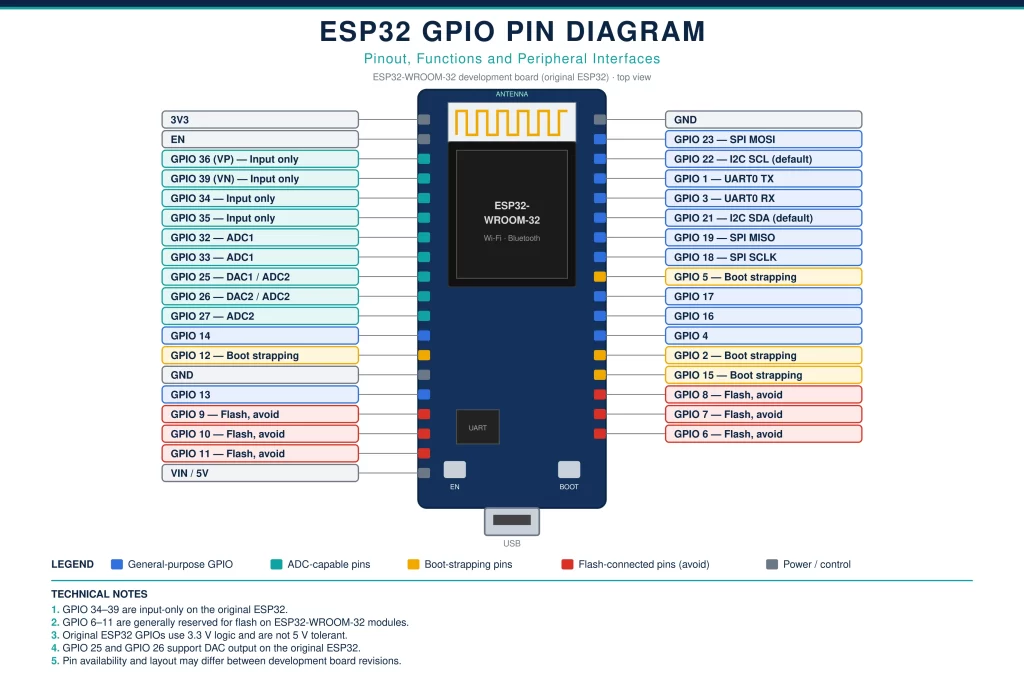
Important: The exact pin arrangement depends on the ESP32 chip and development board. The pin explanations below primarily refer to the original ESP32 family, commonly used on ESP32-WROOM-32 development boards. Always verify the pinout for your exact board.

ESP32 GPIO Pins Explained: Individual Pin Functions
1. ESP32 GPIO 0
GPIO 0 is a multifunction pin that can operate as a general-purpose input/output. It is also a strapping pin, meaning its level during reset helps determine the boot configuration.
Functions:
- Digital input and output
- Boot-mode selection
- General-purpose control signals
Example: GPIO 0 can be used as a button input in a suitable design, but the connected circuit must not interfere with the boot process.
Important: Pulling GPIO 0 LOW during reset typically places the original ESP32 into its serial download mode. Avoid connecting circuits that unintentionally hold this pin LOW during normal startup.
2. ESP32 GPIO 1 (TX0)
GPIO 1 is commonly used as the transmit pin for UART0, which provides serial communication between the ESP32 and a computer.
Functions:
- UART0 transmit (TX)
- Serial debugging output
- General-purpose digital output, subject to other board uses
Example: When you upload a program and view messages in the Arduino IDE Serial Monitor, GPIO 1 may carry the ESP32’s transmitted serial data.
Important: Using GPIO 1 for another device can interfere with serial debugging or communication.
3. ESP32 GPIO 2
GPIO 2 supports digital input/output and can serve as a strapping pin on the original ESP32.
Functions:
- Digital input
- Digital output
- PWM output
- Certain peripheral functions
Example: You can connect an LED to GPIO 2 through a suitable current-limiting resistor and control it using a program.
#define LED_PIN 2

void setup() {
  pinMode(LED_PIN, OUTPUT);
}

void loop() {
  digitalWrite(LED_PIN, HIGH);
  delay(1000);

  digitalWrite(LED_PIN, LOW);
  delay(1000);
}
This program turns the LED on for one second and off for one second. Some development boards have an onboard LED connected to GPIO 2, but this is not universal.
4. ESP32 GPIO 3 (RX0)
GPIO 3 is commonly used as the receive pin for UART0.
Functions:
- UART0 receive (RX)
- Serial communication
- General-purpose input, subject to board configuration
Example: A USB-to-serial interface can send program data to the ESP32 through this pin during uploading or serial communication.
Important: Avoid using GPIO 3 for unrelated signals when you need the default serial interface.
5. ESP32 GPIO 4
GPIO 4 is a general-purpose digital pin that can also support peripheral functions.
Functions:
- Digital input and output
- PWM output
- Peripheral signal routing
Example: GPIO 4 can control a relay-driver input or read a digital sensor output, provided the circuit is electrically compatible.
Always use a suitable driver circuit for loads that require more current than a GPIO can safely supply.
6. ESP32 GPIO 5
GPIO 5 supports general-purpose input/output and is a strapping pin on the original ESP32.
Functions:
- Digital input and output
- PWM output
- Peripheral functions
Example: GPIO 5 can be used to control an indicator LED or a compatible external control input.
Important: Because GPIO 5 participates in boot strapping, attached circuitry should not force an inappropriate level during reset.
7. ESP32 GPIO 6 to GPIO 11
GPIO 6, 7, 8, 9, 10, and 11 are generally connected to the SPI flash interface on common ESP32-WROOM-32 modules.
Functions:
- Internal flash communication
Can you use them as normal GPIO pins? For common ESP32-WROOM-32 development boards, these pins should generally be avoided because they are needed for the module’s flash memory.
Attempting to use them for LEDs, sensors, or other external devices can cause boot failures, crashes, or unpredictable behaviour.
8. ESP32 GPIO 12
GPIO 12 supports digital input/output and other peripheral functions. On the original ESP32, it is also a strapping pin that can affect the flash supply-voltage configuration.
Functions:
- Digital input and output
- PWM output
- Peripheral functions
Example: It may be used as a digital control signal when the hardware design is compatible.
Important: GPIO 12 requires special care during startup. An inappropriate HIGH level during reset can select a flash-voltage configuration that is incompatible with the module, potentially preventing booting.
9. ESP32 GPIO 13
GPIO 13 is a general-purpose digital pin that supports several peripheral functions.
Functions:
- Digital input and output
- PWM output
- SPI-related peripheral routing in suitable configurations
Example: GPIO 13 can be configured as an output to control an LED or as an input to read a compatible digital sensor.
Its final function depends on the firmware configuration and the other peripherals being used.
10. ESP32 GPIO 14
GPIO 14 supports digital input/output and can be assigned to peripheral signals.
Functions:
- Digital input and output
- PWM output
- Peripheral functions, including signals that may be used for JTAG
Example: GPIO 14 can control a digital output device in an IoT prototype.
Check whether the selected pin is already assigned to debugging or another peripheral before using it.
11. ESP32 GPIO 15
GPIO 15 is a multifunction pin and a strapping pin on the original ESP32.
Functions:
- Digital input and output
- PWM output
- Peripheral functions
Example: It can be used as an indicator output or a digital input in a compatible circuit.
Since GPIO 15 participates in boot configuration, check the board’s startup requirements before attaching external hardware.
12. ESP32 GPIO 16
GPIO 16 is commonly available as a general-purpose digital pin on ESP32-WROOM-32 development boards.
Functions:
- Digital input and output
- PWM output
- Peripheral signal routing
Example: GPIO 16 can read a digital sensor or control an LED.
Availability can differ on modules that use certain GPIOs for additional memory or other onboard hardware.
13. ESP32 GPIO 17
GPIO 17 supports general-purpose input/output and can be used for digital control tasks.
Functions:
- Digital input and output
- PWM output
- Peripheral functions
Example: It can operate a digital indicator or provide a logic-level control signal to an external driver.
On the original ESP32-WROOM-32, GPIO 16 and GPIO 17 are generally available, but always check the specific module.
14. ESP32 GPIO 18
GPIO 18 is commonly used as a general-purpose pin and can serve as the default SCLK signal in many VSPI configurations.
Functions:
- Digital input and output
- SPI clock (SCLK) in common configurations
- PWM output
Example: GPIO 18 can provide the clock signal for an SPI-compatible display or sensor when the SPI peripheral is configured accordingly.
If the project uses SPI, do not assign the same pin to an unrelated output without planning the pin mapping.
15. ESP32 GPIO 19
GPIO 19 is a flexible digital pin commonly used as the default MISO signal in many VSPI configurations.
Functions:
- Digital input and output
- SPI MISO in common configurations
- Peripheral signal routing
Example: When communicating with an SPI sensor, GPIO 19 can receive data from the peripheral through the MISO line.
It can be reassigned in suitable configurations if the application does not need the default SPI mapping.
16. ESP32 GPIO 20
GPIO 20 is not available as a normal GPIO on the original ESP32 chip used in common ESP32-WROOM-32 boards.
Important: Some other ESP32 family chips have different pin numbering and capabilities. Do not assume GPIO 20 is available just because a newer ESP32 variant supports it.
17. ESP32 GPIO 21
GPIO 21 is commonly used as the default I2C SDA (Serial Data) pin on many original ESP32 development boards.
Functions:
- Digital input and output
- I2C SDA in common configurations
- Peripheral signal routing
Example: GPIO 21 can carry data between the ESP32 and an I2C temperature sensor, OLED display, or other I2C device.
The I2C pin mapping is configurable in many software frameworks, so GPIO 21 is a common default rather than a universal requirement.
18. ESP32 GPIO 22
GPIO 22 is commonly used as the default I2C SCL (Serial Clock) pin.
Functions:
- Digital input and output
- I2C SCL in common configurations
- Peripheral signal routing
Example: When the ESP32 communicates with an I2C display, GPIO 22 provides the clock signal in a typical default configuration.
GPIO 21 and GPIO 22 are frequently paired for I2C projects, although the software and hardware must be configured consistently.
19. ESP32 GPIO 23
GPIO 23 is commonly used as the MOSI signal in many VSPI configurations.
Functions:
- Digital input and output
- SPI MOSI in common configurations
- PWM output
Example: GPIO 23 can transmit data from the ESP32 to an SPI display or memory peripheral.
It is also suitable for other digital functions when SPI is not using the pin.
20. ESP32 GPIO 24 to GPIO 25
GPIO 24 is not a normal user GPIO on the original ESP32. GPIO 25, however, is a commonly available multifunction pin.
ESP32 GPIO 25 functions:
- Digital input and output
- Analog input through ADC2
- DAC output
- PWM output
Example: GPIO 25 can be used to generate a DAC voltage on the original ESP32, making it useful for certain analog-output experiments.
Important: The original ESP32 has two 8-bit DAC channels, on GPIO 25 and GPIO 26. This feature is not present on every ESP32 family member.
21. ESP32 GPIO 26
GPIO 26 supports digital input/output and has an analog-output capability on the original ESP32.
Functions:
- Digital input and output
- ADC2 analog input
- DAC output
- PWM output
Example: GPIO 26 can generate a variable DAC output for a basic analog-signal experiment or function as a digital control pin.
The DAC output has limitations in resolution, voltage range, and drive capability. It is not a replacement for a high-precision external DAC.
22. ESP32 GPIO 27
GPIO 27 is a general-purpose pin with analog-input and peripheral capabilities.
Functions:
- Digital input and output
- ADC2 analog input
- PWM output
- Peripheral functions
Example: GPIO 27 can read a compatible digital sensor or be configured for an analog measurement where ADC2 restrictions are acceptable.
On the original ESP32, ADC2 has restrictions when Wi-Fi is active. For analog measurements that must work reliably alongside Wi-Fi, an appropriate ADC1 pin is often a better choice.
23. ESP32 GPIO 28 to GPIO 31
GPIO 28, 29, 30, and 31 are not available as ordinary GPIO pins on the original ESP32-WROOM-32 platform.
Pin numbers and exposed GPIOs vary across different ESP32 chips, so use the exact chip datasheet rather than assuming every number in a sequence is available.
24. ESP32 GPIO 32
GPIO 32 is a general-purpose pin with analog-input support on the original ESP32.
Functions:
- Digital input and output
- ADC1 analog input
- Touch-sensing capability on supported original ESP32 configurations
- PWM output
Example: GPIO 32 can read an analog sensor voltage or provide a digital output for an indicator.
ADC1 is especially useful when Wi-Fi is active because it does not have the same Wi-Fi-related ADC2 restriction on the original ESP32.
25. ESP32 GPIO 33
GPIO 33 supports digital input/output and analog input on the original ESP32.
Functions:
- Digital input and output
- ADC1 analog input
- Touch-sensing capability on supported configurations
- PWM output
Example: GPIO 33 can be used to read a compatible analog sensor or generate a PWM signal to control LED brightness.
As with every ADC input, ensure the incoming voltage remains within the permitted input range.
26. ESP32 GPIO 34
GPIO 34 is an input-only GPIO on the original ESP32.
Functions:
- Digital input
- ADC1 analog input
Limitations:
- Cannot be configured as a normal digital output
- Does not have an internal software-enabled pull-up or pull-down like many other GPIOs
Example: GPIO 34 is suitable for reading a sensor’s analog output or detecting a digital signal. An external pull-up or pull-down may be necessary for a stable digital input.
27. ESP32 GPIO 35
GPIO 35 is another input-only pin on the original ESP32.
Functions:
- Digital input
- ADC1 analog input
Example: You can connect a compatible analog sensor output to GPIO 35 and read the voltage using the ADC.
GPIO 35 cannot drive an LED directly because it does not support normal digital output.
28. ESP32 GPIO 36 (VP)
GPIO 36, often labelled VP on original ESP32 boards, is an input-only pin with ADC1 support.
Functions:
- Analog input through ADC1
- Digital input
Example: GPIO 36 can measure a compatible analog sensor signal or read a digital input.
It does not support normal digital output and lacks the usual internal pull-up and pull-down configuration.
29. ESP32 GPIO 37
GPIO 37 is not generally exposed as a usable pin on common ESP32-WROOM-32 development boards. Its availability depends on the particular ESP32 chip and module.
30. ESP32 GPIO 38
GPIO 38 is also not normally exposed as a usable GPIO on common ESP32-WROOM-32 development boards. Check the exact chip documentation before using this number in a design.
31. ESP32 GPIO 39 (VN)
GPIO 39, often labelled VN, is an input-only GPIO with ADC1 support on the original ESP32.
Functions:
- Digital input
- Analog input through ADC1
Example: GPIO 39 can read a compatible sensor signal or measure an analog voltage within the allowed input range.
Like GPIO 34, 35, and 36, it cannot operate as a normal digital output and does not have the standard internal pull-up or pull-down functionality.
ESP32 GPIO Pin Functions at a Glance
The following table summarizes commonly used GPIOs on the original ESP32-WROOM-32 platform. Peripheral functions can be reassigned, and exact availability depends on the module and board.
| GPIO pin | Common functions | Important note |
| GPIO 0 | Digital I/O | Boot strapping |
| GPIO 1 | UART0 TX | Common serial output |
| GPIO 2 | Digital I/O, PWM | Boot strapping |
| GPIO 3 | UART0 RX | Common serial input |
| GPIO 4 | Digital I/O, PWM | General-purpose pin |
| GPIO 5 | Digital I/O, PWM | Boot strapping |
| GPIO 6–11 | Flash interface | Avoid using on common WROOM-32 boards |
| GPIO 12 | Digital I/O, ADC2 | Boot/flash-voltage strapping |
| GPIO 13–15 | Digital I/O, PWM | GPIO 15 is a strapping pin |
| GPIO 16–19 | Digital I/O | Check module availability |
| GPIO 21–23 | Digital I/O, I2C/SPI defaults | Common communication pins |
| GPIO 25–27 | Digital I/O, ADC2 | GPIO 25 and 26 have DAC on original ESP32 |
| GPIO 32–33 | Digital I/O, ADC1 | Useful for analog inputs |
| GPIO 34–39 | Input-only | No normal digital output |

How to Configure ESP32 GPIO Pins in Arduino IDE
Students can configure GPIO pins using the Arduino IDE and the ESP32 board package.
Example 1: Configure a GPIO as an Output
#define LED_PIN 2

void setup() {
  pinMode(LED_PIN, OUTPUT);
}

void loop() {
  digitalWrite(LED_PIN, HIGH);
  delay(500);

  digitalWrite(LED_PIN, LOW);
  delay(500);
}
In this example, pinMode() configures GPIO 2 as an output. digitalWrite() changes its output level, while delay() introduces a pause between transitions.
Example 2: Configure a GPIO as an Input
#define BUTTON_PIN 18

void setup() {
  Serial.begin(115200);
  pinMode(BUTTON_PIN, INPUT_PULLUP);
}

void loop() {
  int buttonState = digitalRead(BUTTON_PIN);

  if (buttonState == LOW) {
    Serial.println("Button pressed");
  }

  delay(100);
}
This example configures GPIO 18 as an input with an internal pull-up. Connect a normally open push button between GPIO 18 and GND. When pressed, the pin reads LOW.
Practical Applications of ESP32 GPIO Pins
ESP32 GPIO pins are used in a wide range of embedded systems and IoT applications.
1. LED Control
GPIO output signals can turn LEDs on and off or control brightness using PWM. This is useful for status indicators and smart lighting systems.
2. Sensor Interfacing
GPIO pins can read digital signals from compatible sensors. Analog-capable pins can measure sensor voltages when the input range and ADC characteristics are suitable.
3. Home Automation
The ESP32 can control relay-driver circuits, read switches, and monitor sensors in smart-home applications. The relay or load should be driven using suitable interface circuitry rather than directly from a GPIO.
4. Display Interfacing
GPIO pins can support I2C and SPI displays, including OLED modules and compatible TFT screens. Correct pin mapping and voltage compatibility are essential.
5. Robotics
GPIO pins can provide logic-level control signals to motor-driver modules, read encoders, and interface with digital sensors. Motors must be powered through appropriate driver circuits.
6. IoT Monitoring Systems
The ESP32 can collect sensor readings and transmit data over Wi-Fi or Bluetooth. GPIO selection matters when combining analog measurements with wireless communication.
Important ESP32 GPIO Limitations
Before selecting pins for a project, students should understand these limitations.
- GPIO voltage: Original ESP32 GPIOs operate at 3.3 V logic and are not 5 V tolerant. Applying 5 V directly can damage the chip.
- Input-only pins: GPIO 34–39 on the original ESP32 are input-only. They cannot be used to drive LEDs or other digital outputs.
- Flash-connected pins: GPIO 6–11 are generally reserved for flash communication on common ESP32-WROOM-32 modules.
- Boot strapping: GPIO 0, 2, 5, 12, and 15 have boot-configuration roles on the original ESP32. External circuits can affect startup if they force unsuitable levels.
- ADC2 and Wi-Fi: On the original ESP32, ADC2 access is restricted while Wi-Fi is active. Consider ADC1 pins for analog measurements that must work alongside Wi-Fi.
- Current limits: GPIOs are designed for logic-level signals, not direct high-current loads. Use a suitable transistor, MOSFET, relay driver, or dedicated driver IC where necessary.
- Board-specific pinout: Not all ESP32 development boards expose the same pins. Always check the official datasheet and board pinout diagram.
Conclusion
Understanding ESP32 GPIO pins is a fundamental step in embedded systems development. GPIO pins allow the ESP32 to interface with LEDs, push buttons, sensors, displays, and communication peripherals, making them essential for IoT and automation projects.
By learning the ESP32 GPIO pin diagram, individual pin functions, input-only limitations, ADC capabilities, and boot-related restrictions, students can select suitable pins and build more reliable projects.
For beginners, starting with an LED output, a push-button input, and a simple sensor interface is a practical way to understand GPIO configuration. As skills improve, these concepts can be applied to wireless monitoring, smart-home systems, robotics, and other embedded applications.