Why Learn Graphics Programming in C?
C programming provides a unique combination of control and performance, making it ideal for graphics-intensive applications. Unlike higher-level languages, C allows developers to manage memory, optimize rendering performance, and access hardware directly—crucial for applications where efficiency is a priority.
Many professional applications are built with C for graphics tasks, such as:
- Video games: Real-time rendering and interactive gameplay.
- CAD software: Precision drawing and modeling.
- Image processing tools: Manipulating pixels and applying visual effects.
- Scientific simulations: Visualizing complex data in 2D and 3D.
By choosing C, you can ensure your applications run faster and can handle complex visual computations efficiently.

Core Concepts in Graphics Programming
To effectively work on computer graphics in C, it’s essential to understand the following core concepts:
1. Points, Lines, and Shapes
The building blocks of graphics programming are simple geometric elements:
- Point: The smallest graphical element, defined by X and Y coordinates.
- Line: Connects two points, often implemented with algorithms like Bresenham’s line algorithm.
- Shapes: Circles, rectangles, polygons, etc., can be drawn using specific library functions.
2. Coordinates and Pixels
All graphical elements are mapped onto a screen using a coordinate system. The origin (0,0) is usually at the top-left corner, and each pixel represents a unit of the screen. Understanding pixel-level manipulation is key for detailed graphics, such as drawing custom shapes or applying effects.
3. Color Representation
Colors in graphics programming are represented using models like RGB (Red, Green, Blue) or HSV (Hue, Saturation, Value). By adjusting color values, developers can create gradients, shading, transparency, and visual effects.
Example:
// RGB color in C using SDL

SDL_SetRenderDrawColor(renderer, 255, 0, 0, 255); // Red color
Setting Up Your Graphics Environment in C
To start programming graphics in C, you need the right environment:
- C Compiler: GCC (GNU Compiler Collection) or any IDE like Code::Blocks.
- Graphics Libraries: Popular options include:
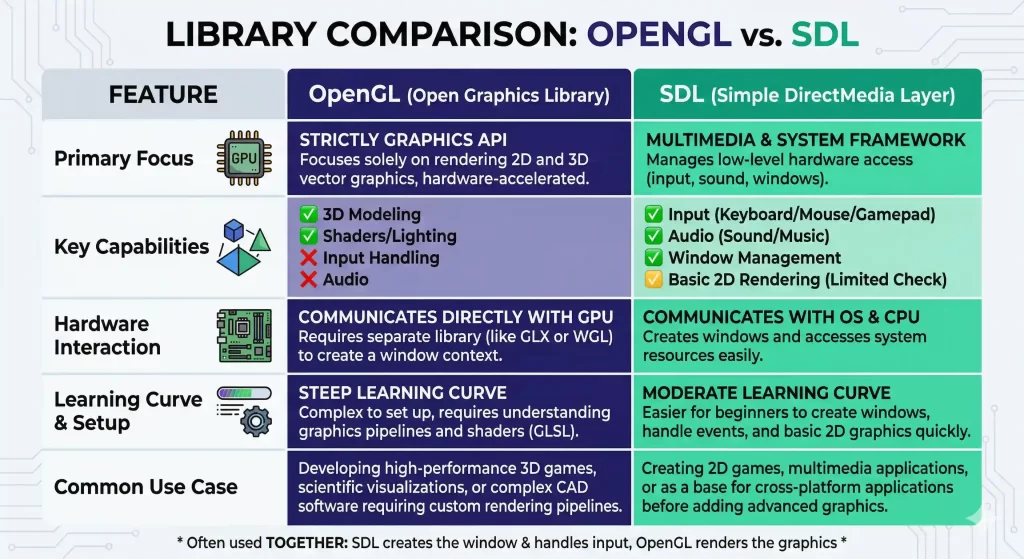
- OpenGL: Cross-platform, supports 2D and 3D graphics.
- SDL (Simple DirectMedia Layer): Great for 2D graphics and game development.
- Graphics.h (legacy): Simple for learning basics, mostly on Windows.
Installing libraries like OpenGL or SDL is straightforward using package managers or official installers. Once set up, you can start creating your first graphical application.
Getting Started with Graphics Output
Once your environment is ready, your first step is to initialize a graphics window and display content. A simple program might involve opening a window and drawing a basic shape.
Example – Drawing a Line Using SDL:
#include <SDL2/SDL.h>

int main() {

   SDL_Init(SDL_INIT_VIDEO);

   SDL_Window *window = SDL_CreateWindow("Graphics in C", 100, 100, 800, 600, 0);

   SDL_Renderer *renderer = SDL_CreateRenderer(window, -1, 0);

   SDL_SetRenderDrawColor(renderer, 0, 0, 0, 255);

   SDL_RenderClear(renderer);

   SDL_SetRenderDrawColor(renderer, 255, 0, 0, 255);

   SDL_RenderDrawLine(renderer, 100, 100, 700, 500);

   SDL_RenderPresent(renderer);

   SDL_Delay(5000);

   SDL_DestroyRenderer(renderer);

   SDL_DestroyWindow(window);

   SDL_Quit();

   return 0;

}

Drawing 2D Shapes and Graphics Examples
In C graphics programming, you often work with basic 2D shapes:
- Rectangles and Squares
- Circles and Ellipses
- Polygons
Advanced examples can include:
- Drawing a house or simple scene.
- Animated bouncing ball using coordinate updates.
- Color-filled shapes with gradients.
Interactive Graphics in C
Adding interactivity makes your programs engaging. You can capture:
- Mouse clicks and drags
- Keyboard input
- Window events
Example: Use SDL event handling to move shapes based on arrow keys.
Code Example – Moving Rectangle:
SDL_Event event;

int x = 100, y = 100;

while(SDL_PollEvent(&event)) {

   if(event.type == SDL_KEYDOWN) {

       if(event.key.keysym.sym == SDLK_RIGHT) x += 10;

       if(event.key.keysym.sym == SDLK_LEFT) x -= 10;

   }

}
Transformations and Animations
Transformations let you translate, rotate, and scale shapes dynamically:
- Translation – Move shapes across the screen.
- Rotation – Rotate objects around an axis.
- Scaling – Increase or decrease the size of objects.
Animations are created by continuously updating object positions or properties in frames, enabling smooth motion.
Example – Bouncing Ball Animation:
- Update Y-coordinate in each frame
- Reverse direction on collision with window edges
Introduction to 3D Graphics in C
While 2D graphics are common, 3D graphics offer more immersive experiences. C programmers use libraries like OpenGL to handle:
- 3D coordinate systems
- Perspective projection
- Lighting and shading effects
Even though 3D graphics are mathematically more complex, the concepts of transformation, scaling, and rotation extend naturally from 2D to 3D, making learning 2D a crucial first step.
Real-World Applications and Projects
Some practical C graphics programming projects you can try include:
- Mini video games (Snake, Tetris, or Pong)
- Graph plotting software (for math functions or scientific data)
- Image processing tools (color filters, edge detection)
- Simulation software (traffic, particle systems)
Statistical Insight: According to industry surveys, interactive and real-time graphics applications account for over 40% of software development in gaming and simulations, highlighting the demand for graphics programming skills.
Common Mistakes Beginners Make in Graphics Programming in C
Even though graphics programming in C is exciting, beginners often make a few common mistakes that slow down their learning progress.
- Not Understanding Coordinate Systems
Many beginners jump into drawing without fully understanding how the coordinate system works. This leads to confusion when objects don’t appear where expected. - Skipping 2D Fundamentals and Jumping to 3D
3D graphics may look more attractive, but without a solid understanding of 2D concepts like pixels, transformations, and rendering, learning 3D becomes much harder. - Ignoring Performance Optimization
Graphics programming requires efficient memory and rendering management. Writing unoptimized code can lead to laggy or inefficient applications. - Not Practicing with Small Projects
Just reading theory is not enough. Beginners who don’t build small projects like drawing shapes or animations struggle to gain real understanding. - Not Exploring Graphics Libraries Properly
Libraries like SDL and OpenGL have rich documentation, but many beginners only use basic functions and miss out on powerful features.
Future Trends in Graphics Programming
With advances in AI and graphics rendering:
- Neural networks can now generate textures and optimize rendering pipelines.
- AI language models and semantic understanding (BERT, entity-based search) are used in content creation for game narratives and automated design.
- Real-time ray tracing and GPU acceleration are becoming standard in both games and simulations.
By learning graphics programming in C, developers can integrate these trends into future projects, such as AI-assisted graphics engines or data visualization tools.

Conclusion
Graphics programming in C opens a world of possibilities for developers looking to create engaging, interactive, and efficient applications. By learning the basics of computer graphics in C, exploring libraries like OpenGL and SDL, and applying transformations, animations, and interactivity, you can create powerful visual experiences.
Whether your goal is to learn graphics in C for games, simulations, or scientific projects, mastering these concepts will enhance your programming skills and keep you aligned with emerging trends in AI-assisted graphics and semantic search technologies. Start with small projects, experiment with 2D and 3D graphics, and explore interactive features to unlock the full potential of graphics programming.