What Is the OSI Model?
The Open Systems Interconnection (OSI) model is a seven-layer conceptual framework developed by the International Organization for Standardization (ISO) to standardize communication between different computer systems and networking devices.
Rather than defining actual communication protocols, the OSI model explains how data should flow from one device to another by dividing network communication into separate functional layers.
Main Objectives of the OSI Model
- Standardize network communication.
- Enable interoperability between different vendors.
- Simplify network design.
- Make troubleshooting easier.
- Improve protocol development.
- Provide a common networking reference.
Characteristics of the OSI Model
- Seven independent layers
- Modular architecture
- Vendor-neutral design
- Conceptual networking framework
- Supports layered communication
- Each layer performs a specific function
- Data moves sequentially through each layer
How Many Layers Are in the OSI Model?
The OSI model contains seven layers, arranged from the user’s application down to the physical transmission medium.
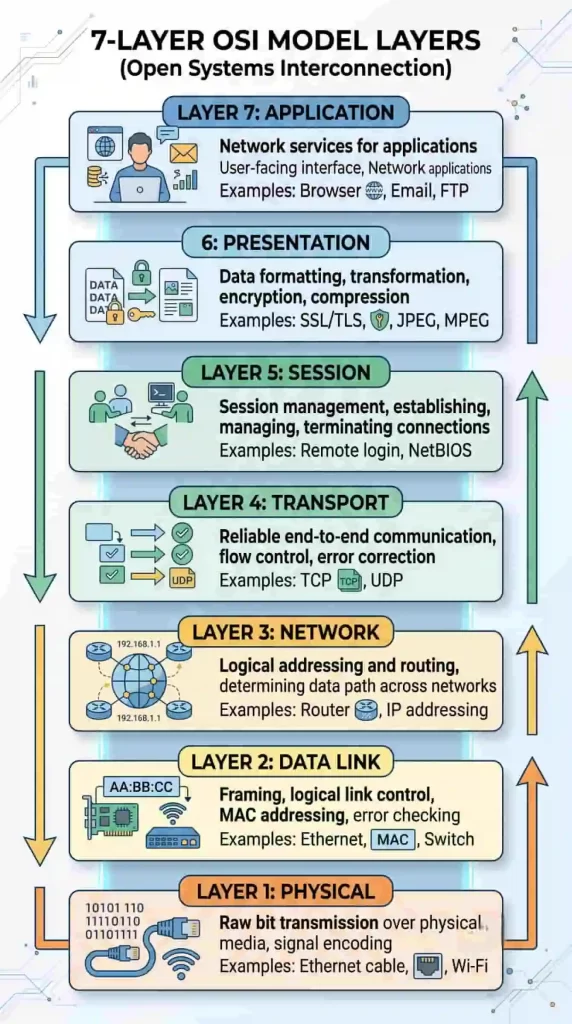
A common way to remember these layers, top to bottom: Application → Presentation → Session → Transport → Network → Data Link → Physical
What Are the Seven Layers of the OSI Model?
7. Application Layer
Function: Provides network services to end-user applications and acts as the interface between software applications and the network.
Common protocols: HTTP, HTTPS, FTP, SMTP, DNS, DHCP
Examples: Opening a website, sending an email, downloading files, video conferencing
6. Presentation Layer
Function: Data translation, data formatting, encryption, decryption, compression
Examples: SSL/TLS encryption, JPEG image formatting, MPEG video encoding, ASCII and Unicode conversion
5. Session Layer
Function: Establishes communication sessions, maintains active sessions, synchronizes data exchange, and terminates sessions after communication.
Examples: Video conferencing sessions, database connections, remote desktop communication
4. Transport Layer
Function: End-to-end communication, segmentation and reassembly, error recovery, flow control, reliable data delivery
Common protocols: TCP, UDP
Examples: Reliable file transfers using TCP, live video streaming using UDP
3. Network Layer
Function: Logical addressing, routing, path selection, packet forwarding
Common protocols: IP, ICMP, OSPF, RIP
Devices: Routers, Layer 3 switches
2. Data Link Layer
Function: MAC addressing, error detection, frame creation, local network communication
Technologies: Ethernet, Wi-Fi (IEEE 802.11), PPP
Devices: Switches, bridges
1. Physical Layer
Function: Transmits raw bits and defines electrical, optical, and mechanical characteristics; handles physical connectivity.
Examples: Ethernet cable, fiber optic cable, radio frequency signals, connectors, voltage levels
Devices: Hub, repeater, network cables, connectors

OSI Model Layer Functions at a Glance
| Layer | Primary Function | Example |
|---|
| Application | Network services for applications | Browser |
| Presentation | Data formatting and encryption | SSL/TLS |
| Session | Session management | Remote login |
| Transport | Reliable communication | TCP |
| Network | Routing and IP addressing | Router |
| Data Link | MAC addressing and framing | Ethernet |
| Physical | Bit transmission | Ethernet cable |
How the OSI Model Works
The OSI model follows a layered communication process where each layer performs a specific task before passing the data to the next layer.
Data Transmission Process (Sending Device)
- The Application Layer creates the user data.
- The Presentation Layer formats, compresses, or encrypts the data.
- The Session Layer establishes and manages the communication session.
- The Transport Layer divides the data into segments and ensures reliable delivery if TCP is used.
- The Network Layer adds IP addressing information and determines the best route.
- The Data Link Layer encapsulates the packet into frames and adds MAC addresses.
- The Physical Layer converts the frame into electrical, optical, or wireless signals for transmission.
At the Receiving Device
- Physical Layer receives the signals.
- Data Link Layer verifies the frame and extracts the packet.
- Network Layer processes the IP packet.
- Transport Layer reassembles the data.
- Session Layer manages the communication session.
- Presentation Layer decrypts or decodes the data if required.
- Application Layer delivers the data to the destination application.
Practical Embedded Systems Example
Consider an ESP32 sending temperature data to a cloud server:
- Application Layer: Generates sensor readings
- Presentation Layer: Converts data to JSON format
- Session Layer: Maintains the communication session
- Transport Layer: Uses TCP for reliable transmission
- Network Layer: Assigns IP addresses and routes packets
- Data Link Layer: Sends Ethernet or Wi-Fi frames
- Physical Layer: Transmits data through Wi-Fi radio signals
This layered approach allows developers to isolate problems efficiently. For instance, if Wi-Fi connectivity is established but the cloud server does not receive sensor data, checking the transport protocol, IP configuration, or application-layer payload is usually more effective than investigating the physical hardware first.
What Is the TCP/IP Model?
The TCP/IP (Transmission Control Protocol/Internet Protocol) model is a practical networking model used for communication over the Internet and most modern computer networks. Unlike the OSI model, which is mainly a reference framework, the TCP/IP model defines the actual protocols that devices use to exchange data.
Developed by the United States Department of Defense (DoD), the TCP/IP model became the foundation of today’s Internet because of its flexibility, scalability, and compatibility across different hardware and operating systems.
Main objectives of the TCP/IP model:
- Enable communication between different types of devices
- Provide reliable data transmission over networks
- Support large-scale Internet communication
- Allow interoperability across different platforms
- Ensure scalable and efficient networking
Characteristics of the TCP/IP model:
- Four-layer architecture
- Protocol-oriented model
- Used in real-world networking
- Supports wired and wireless communication
- Highly scalable
- Platform independent
- Designed for reliable and efficient communication
How Many Layers Are in the TCP/IP Model?
The TCP/IP model consists of four layers, with each layer performing a specific role in transmitting data from one device to another.

Unlike the OSI model, the TCP/IP model combines several OSI layers to simplify network communication.
What Are the Four Layers of the TCP/IP Model?
4. Application Layer
The Application Layer provides network services directly to user applications. It combines the responsibilities of the Application, Presentation, and Session layers of the OSI model.
Functions: Application-level communication, data formatting, session management, authentication, file transfer, email communication, web browsing
Common protocols: HTTP, HTTPS, FTP, SMTP, POP3, IMAP, DNS, DHCP, SSH, Telnet
Examples: Opening a website, sending emails, cloud storage access, online video streaming, remote server login
3. Transport Layer
The Transport Layer ensures end-to-end communication between devices. It is responsible for reliable or fast data delivery, depending on the protocol being used.
Functions: End-to-end communication, data segmentation, flow control, error detection, reliable delivery, port addressing
Common protocols: TCP, UDP
TCP features: Reliable communication, error recovery, packet sequencing, flow control, congestion control
UDP features: Faster transmission, low overhead, no retransmission, suitable for real-time applications
Examples: TCP for web browsing and file downloads; UDP for VoIP, online gaming, and video streaming
2. Internet Layer
The Internet Layer is responsible for logical addressing and routing packets between networks. It determines the best path for data to reach the destination.
Functions: Logical addressing, packet routing, path selection, packet forwarding, fragmentation
Common protocols: IPv4, IPv6, ICMP, ARP, IGMP
Examples: Routing Internet traffic, assigning IP addresses, diagnosing network issues using ICMP (ping)
1. Network Access Layer
The Network Access Layer handles communication over the physical network. It combines the responsibilities of the Physical and Data Link layers of the OSI model.
Functions: Frame creation, MAC addressing, error detection, physical transmission, media access control
Technologies: Ethernet, Wi-Fi, Bluetooth, PPP, DSL, fiber Ethernet
Devices: Network Interface Card (NIC), switch, wireless access point, Ethernet adapter
TCP/IP Layer Functions at a Glance
| TCP/IP Layer | Primary Function | Common Protocols |
|---|
| Application | Network services for applications | HTTP, HTTPS, FTP, DNS |
| Transport | End-to-end communication | TCP, UDP |
| Internet | Routing and logical addressing | IP, ICMP, ARP |
| Network Access | Physical transmission and framing | Ethernet, Wi-Fi |
How the TCP/IP Model Works
The TCP/IP model follows a layered communication process in which each layer performs a specific task before passing data to the next layer.
Data Transmission Process (Sending Device)
- The Application Layer generates data requested by the user or application.
- The Transport Layer divides the data into segments and assigns port numbers.
- The Internet Layer adds source and destination IP addresses and determines the routing path.
- The Network Access Layer converts packets into frames and transmits them over the physical medium.
At the Receiving Device
- The Network Access Layer receives the transmitted frames.
- The Internet Layer verifies the destination IP address.
- The Transport Layer reassembles the received segments.
- The Application Layer delivers the data to the intended application.

TCP/IP Architecture
The TCP/IP architecture is designed using four logical layers, where each layer depends on the services provided by the layer below it.
+-----------------------------+
|     Application Layer       |
+-----------------------------+
|      Transport Layer        |
+-----------------------------+
|       Internet Layer        |
+-----------------------------+
|   Network Access Layer      |
+-----------------------------+
Communication flow: Application → Transport → Internet → Network Access → Network Media
At the destination, the process occurs in reverse order until the application receives the original data.
Features of the TCP/IP Model
- Four-layer networking architecture
- Standard communication model for the Internet
- Supports multiple networking technologies
- Independent of hardware platforms
- Reliable communication using TCP
- High-speed communication using UDP
- Scalable for small and large networks
- Supports wired and wireless communication
- Enables communication between heterogeneous systems
- Easily expandable with new protocols
Advantages of the TCP/IP Model
- Widely adopted across the world
- Proven reliability for Internet communication
- Highly scalable for enterprise and cloud networks
- Supports cross-platform communication
- Flexible protocol architecture
- Efficient routing mechanisms
- Suitable for LAN, WAN, and the Internet
- Easy integration with modern networking technologies
Many embedded devices rely on the TCP/IP model for network connectivity, including:
- ESP32-based Wi-Fi IoT devices
- STM32 Ethernet-enabled controllers
- Raspberry Pi edge computing systems
- Industrial gateways
- Smart meters
- Building automation controllers
- Connected medical devices
- Robotics with remote monitoring
For example, an ESP32 collecting temperature data typically uses:
- Application Layer: MQTT or HTTP
- Transport Layer: TCP
- Internet Layer: IPv4 or IPv6
- Network Access Layer: Wi-Fi (IEEE 802.11)
Limitations of the TCP/IP Model
Although the TCP/IP model is the foundation of modern networking, it has some limitations:
- Less detailed than the OSI model
- Does not clearly separate presentation and session functions
- Layer boundaries are less strict
- Some protocols may overlap across layers
- More difficult for beginners to visualize compared to the OSI model
- Security is implemented through additional protocols rather than built into the model
Practical Consideration
In embedded product development, developers rarely think about every TCP/IP layer individually because networking libraries often handle much of the protocol stack. However, understanding these layers becomes essential when debugging issues such as failed IP address assignment, packet loss, socket connection errors, or communication timeouts.
OSI vs TCP/IP Model Comparison
Although both the OSI and TCP/IP models describe how data is transmitted across a network, they differ in architecture, purpose, and implementation. The OSI model is mainly used as a reference framework for learning and troubleshooting, whereas the TCP/IP model is the practical networking model used by the Internet.
Feature-by-Feature Comparison
| Feature | OSI Model | TCP/IP Model |
|---|
| Full Form | Open Systems Interconnection | Transmission Control Protocol/Internet Protocol |
| Developed By | International Organization for Standardization (ISO) | United States Department of Defense (DoD) |
| Number of Layers | 7 | 4 |
| Model Type | Conceptual reference model | Protocol suite and practical model |
| Primary Purpose | Standardize network communication | Enable real-world Internet communication |
| Protocol Dependency | Protocol independent | Based on TCP/IP protocols |
| Layer Separation | Clearly defined | Some layers are combined |
| Session Layer | Available | Merged into Application Layer |
| Presentation Layer | Available | Merged into Application Layer |
| Physical Layer | Separate | Combined with Data Link Layer |
| Data Link Layer | Separate | Combined as Network Access Layer |
| Internet Usage | Mainly educational and troubleshooting | Used in almost every modern network |
| Flexibility | High | High |
| Complexity | More detailed | Simpler architecture |
| Adoption | Reference model | Industry standard |
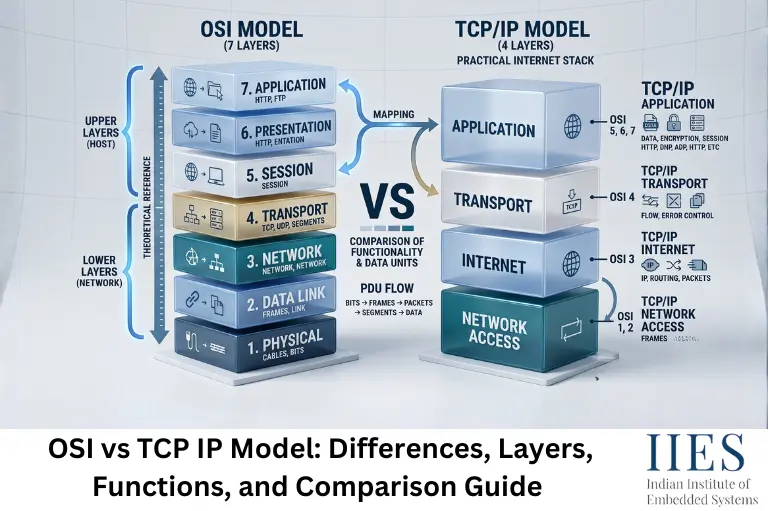
OSI and TCP/IP Layer Mapping
The TCP/IP model combines several OSI layers into fewer layers while maintaining similar functionality.
| OSI Model | TCP/IP Model |
|---|
| Application | Application |
| Presentation | Application |
| Session | Application |
| Transport | Transport |
| Network | Internet |
| Data Link | Network Access |
| Physical | Network Access |
Similarities Between OSI and TCP/IP Models
Although their architectures differ, both models share several common principles:
- Both divide communication into layers
- Both support end-to-end data communication
- Both use encapsulation and decapsulation
- Both improve modular network design
- Both simplify troubleshooting
- Both support interoperability between devices
- Both are based on layered communication
Key Differences Between OSI and TCP/IP Models
1. Number of Layers
The OSI model uses seven layers, offering a more detailed architecture that makes it easier to study individual networking functions. The TCP/IP model uses four layers, which simplifies implementation and is better suited for practical networking.
2. Purpose
The OSI model is designed as a conceptual networking framework, primarily used for learning, designing, and troubleshooting networks. The TCP/IP model is designed for actual communication between devices and forms the foundation of Internet communication.
3. Protocol Support
The OSI model does not define specific communication protocols; it acts as a guideline for network architecture. The TCP/IP model defines protocols such as TCP, UDP, IPv4, IPv6, ICMP, ARP, HTTP, FTP, and DNS.
4. Layer Independence
The OSI model enforces strict separation between layers, with each layer performing a well-defined function. The TCP/IP model’s layers are more flexible, and some responsibilities overlap.
5. Practical Usage
The OSI model is commonly used for academic learning, networking certifications, network troubleshooting, and understanding protocol interactions. The TCP/IP model is commonly used for Internet communication, enterprise networks, cloud computing, IoT devices, embedded networking, and mobile communication.
6. Troubleshooting
The OSI model makes troubleshooting systematic by isolating problems layer by layer:
- No network signal → Physical Layer
- MAC address issue → Data Link Layer
- IP address conflict → Network Layer
- Connection timeout → Transport Layer
- Web application error → Application Layer
In practice, network engineers often describe issues using OSI layers, even though the devices communicate using the TCP/IP protocol stack.
How Data Travels in Both Models
OSI Model: Application → Presentation → Session → Transport → Network → Data Link → Physical
TCP/IP Model: Application → Transport → Internet → Network Access
In both models, data moves from the top layer to the bottom layer before transmission and travels in the reverse order at the receiving device.
OSI vs TCP/IP: Which Model Is Better?
The answer depends on the purpose:
| Requirement | Recommended Model |
|---|
| Learning networking concepts | OSI Model |
| Understanding protocol responsibilities | OSI Model |
| Troubleshooting network issues | OSI Model |
| Internet communication | TCP/IP Model |
| IoT applications | TCP/IP Model |
| Embedded Ethernet devices | TCP/IP Model |
| Cloud networking | TCP/IP Model |
| Industrial communication | TCP/IP Model |
The two models are complementary rather than competing. The OSI model explains how network communication is organized, while the TCP/IP model provides the protocols that make communication possible.
Practical Example: Web Browser Communication
When you enter www.iies.in in a web browser:
OSI Model:
- Application Layer sends the HTTP request.
- Presentation Layer formats and encrypts the data using TLS.
- Session Layer manages the communication session.
- Transport Layer uses TCP for reliable delivery.
- Network Layer routes packets using IP.
- Data Link Layer creates Ethernet or Wi-Fi frames.
- Physical Layer transmits bits over the network medium.
TCP/IP Model:
- Application Layer handles HTTP, HTTPS, and DNS.
- Transport Layer establishes a TCP connection.
- Internet Layer routes packets using IP.
- Network Access Layer transmits frames through Ethernet or Wi-Fi.
OSI vs TCP/IP in Embedded Systems
Modern embedded systems use the TCP/IP model for communication, but understanding the OSI model helps during development and debugging.
Common Embedded Networking Applications
- ESP32 Wi-Fi modules
- STM32 Ethernet controllers
- Raspberry Pi gateways
- Industrial PLCs
- Smart energy meters
- Automotive telematics
- Remote monitoring systems
- Smart home devices
Example: ESP32 Sending Sensor Data
| OSI Layer | TCP/IP Layer | Example |
|---|
| Application | Application | MQTT publishes temperature data |
| Presentation | Application | JSON formatting |
| Session | Application | MQTT session management |
| Transport | Transport | TCP connection |
| Network | Internet | IPv4 packet routing |
| Data Link | Network Access | Wi-Fi frame |
| Physical | Network Access | 2.4 GHz wireless transmission |
When troubleshooting an embedded device:
- If the device cannot join Wi-Fi, start with the Network Access layer.
- If it receives an IP address but cannot reach a server, inspect the Internet or Transport layer.
- If the connection is successful but data is rejected, review the Application layer, such as MQTT topics, HTTP requests, or payload formatting.
Future Trends
IPv6 Adoption
As the number of Internet-connected devices grows, IPv6 adoption continues to increase, providing a significantly larger address space than IPv4.
Expansion of IoT Networks
Smart homes, industrial automation, agriculture, and healthcare are driving rapid growth in connected devices that rely on TCP/IP communication.
High-Speed Industrial Ethernet
Industrial protocols running over Ethernet are becoming more common in manufacturing, robotics, and process control, offering faster communication and improved interoperability.
Edge Computing
Edge devices increasingly process data locally while communicating with cloud platforms through TCP/IP networks, reducing latency and bandwidth usage.
AI-Based Network Management
Artificial intelligence is being used to automate network monitoring, anomaly detection, traffic optimization, and predictive maintenance.

Conclusion
Understanding the OSI vs TCP/IP model is essential for anyone learning computer networking, embedded systems, IoT, or cybersecurity. The OSI model provides a structured framework for understanding network communication, while the TCP/IP model enables real-world data transmission across the Internet.
For students and interview candidates, the OSI model is an excellent tool for learning layer functions and troubleshooting concepts. For developers and networking professionals, the TCP/IP model forms the backbone of modern communication, powering everything from embedded IoT devices to cloud infrastructure.
By understanding how these models relate, how their layers interact, and where common protocols operate, you will be better prepared to design, debug, and maintain reliable networked systems.