What Are Operators in C++?
An operator is a symbol that tells the compiler to perform a specific operation arithmetic, comparison, logic, or something more specialized on one or more operands. Every operator you already use has built-in support for fundamental types like int, float, char, and pointers.
Category | Operators |
Arithmetic | + – * / % |
Relational | == != < > <= >= |
Logical | && || ! |
Bitwise | & | ^ ~ << >> |
Increment / Decrement | ++ — |
Member / Pointer access | -> . .* |
Special | [] () new delete sizeof |
Every one of these already knows how to handle an int or a double. What none of them know, by default, is how to handle a class or struct you define yourself and closing that gap is exactly what operator overloading is for.

What is Operator Overloading in C++?
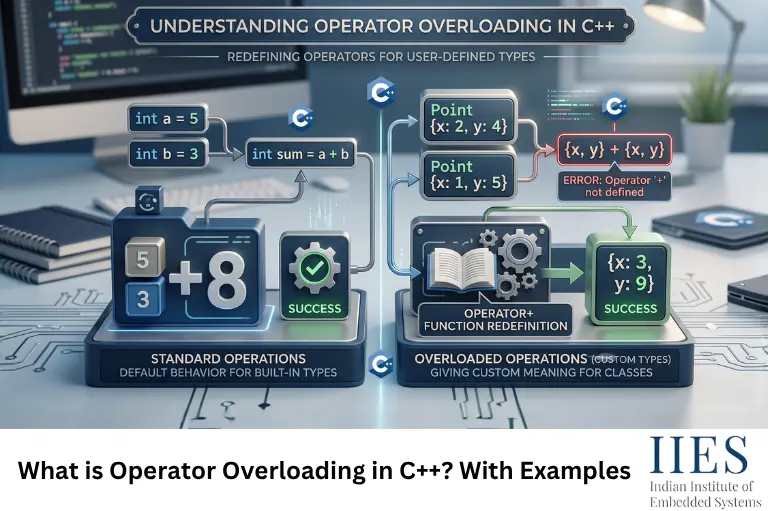
Operator overloading is a C++ feature that lets you give an existing operator an additional, class-specific meaning by writing a function for it. The symbol itself doesn’t change, only its behavior does, and only for the type you defined it for. int + int still performs integer addition; Complex + Complex does whatever logic you write inside your operator+ function.
It’s really a special case of C++’s broader function overloading mechanism. An operator symbol is just readable syntax for calling a specially named function operator+, operator==, operator<<, and so on and the compiler decides which one to call based on the operand types, entirely at compile time. That’s why operator overloading, like function overloading, counts as compile-time (static) polymorphism, as opposed to the runtime polymorphism you get from virtual functions.
Here’s the smallest useful example overloading + for a Complex number class:
cpp
#include

using namespace std;

class Complex {

private:

    float real;

    float imag;

public:

    Complex(float r = 0, float i = 0) : real(r), imag(i) {}

    // Overloading the '+' operator

    Complex operator+(const Complex& obj) {

        return Complex(real + obj.real, imag + obj.imag);

    }

    void display() {

        cout << real << " + " << imag << "i" << endl;

    }

};

int main() {

    Complex c1(3.5, 2.5), c2(1.5, 3.5);

    Complex c3 = c1 + c2;   // calls operator+ internally

    c3.display();           // Output: 5 + 6i

    return 0;

}
A few reasons this is worth the extra code:
- It lets objects of your class use natural, math-like syntax, c1 + c2 instead of c1.add(c2).
- It keeps calling code readable and consistent with how built-in types already behave.
- It’s exactly how the Standard Library gives you str1 + str2 for std::string, cout << x, and iterator comparisons in std::vector, none of that is compiler magic, it’s operator overloading you’re allowed to use too.
How Operator Overloading Works Under the Hood
When you write c1 + c2, the compiler quietly rewrites it as a function call:
cpp
c1 + c2;              // what you write

c1.operator+(c2);     // what actually gets called (member function form)

operator+(c1, c2);    // equivalent call, if operator+ is a non-member function
There’s no special-case compiler behavior beyond that rewrite. a + b is just a more readable way of writing a function call, and the function happens to be named operator+.
Types of Operator Overloading in C++
C++ operators split into two groups based on how many operands they act on, and overloading follows the same split.
Unary Operator Overloading
Unary operators act on a single operand, think unary minus (–), logical NOT (!), and ++/—. Here’s unary minus overloaded for a sensor-style Vector3D class, flipping the sign of every axis:
cpp
class Vector3D {
public:
float x, y, z;
Vector3D(float x = 0, float y = 0, float z = 0) : x(x), y(y), z(z) {}
// Unary minus: negate every axis (e.g. reversing a sensor reading)
Vector3D operator–() const {
return Vector3D(-x, -y, -z);
}
};
Binary Operator Overloading
Binary operators act on two operands, +, –, ==, and most of the operators you’ll actually overload day to day. The Complex example above is binary overloading; here’s another common case, overloading == so two Point objects can be compared directly:
cpp
class Point {
public:
int x, y;
Point(int x, int y) : x(x), y(y) {}
bool operator==(const Point& p) const {
return (x == p.x && y == p.y);
}
};
Syntax for Operator Overloading in C++
Every operator overload follows the same general shape:
cpp
returnType operator symbol(parameter_list) {
// define what the operator should do
}
- operator is a keyword, it’s mandatory, and it’s what tells the compiler you’re defining behavior for an operator rather than an ordinary named function.
- symbol is the operator you’re overloading, +, ==, <<, [], and so on.
- The parameter list depends on whether you implement it as a member function or a non-member function, and on whether the operator is unary or binary:
Operator type | As a member function | As a non-member / friend function |
Unary (e.g. –, ++) | 0 parameters | 1 parameter |
Binary (e.g. +, ==) | 1 parameter | 2 parameters |
The member function form gets one operand for free — the object it’s called on (this) — so it only declares the other operand explicitly. A non-member function has no implicit object, so both operands have to be passed in.
Methods to Implement Operator Overloading in C++
There are two main ways to actually implement an overload, and picking the right one comes down to a single question: is the left-hand operand an object of your class?
Using a Member Function
This is the natural choice whenever the left operand is your class type, and it’s what the Complex operator+ example above already does; it also has direct access to private members without any extra work.
Using a Friend Function
Some operators simply can’t be member functions, because the left operand isn’t your class type. The most common example is << for printing: in cout << c1, the left operand is std::ostream, not Complex, so operator<< has to be a free function, and it needs friend access to reach Complex‘s private data:
cpp
class Complex {
private:
float real, imag;
public:
Complex(float r = 0, float i = 0) : real(r), imag(i) {}
friend ostream& operator<<(ostream& out, const Complex& c);
};
ostream& operator<<(ostream& out, const Complex& c) {
out << c.real << ” + “ << c.imag << “i”;
return out;
}
int main() {
Complex c1(3.5, 2.5);
cout << c1; // only possible because operator<< is a non-member (friend) function
}
Pro tip: If your class already exposes public getters, you don’t need friend at all, a plain non-member function works and keeps your class’s internals a little more locked down. Reach for friend only when the operator genuinely needs private access it can’t get otherwise.
Can We Overload All Operators in C++?
No, not every operator in C++ can be overloaded, and you can’t invent new ones either. Five specific operators are permanently off the table, and the reserved word ** for “power,” which some newcomers expect to overload, doesn’t exist as a C++ operator at all.
Overloadable vs Non-Overloadable Operators in C++
Overloadable operators cover almost everything you’ll actually use:
Category | Operators |
Arithmetic | + – * / % |
Relational | == != < > <= >= |
Logical | && || ! |
Bitwise | & | ^ ~ << >> |
Assignment | = += -= *= /= %= &= |= ^= <<= >>= |
Increment / Decrement | ++ — |
Subscript & Call | [] () |
Pointer access | -> ->* |
Memory management | new delete new[] delete[] |
Others | , (comma), unary & (address-of), type-cast operators, <=> (C++20) |
Non-overloadable operators, just five, and each one is restricted for a structural reason, not an arbitrary one:
Operator | Why it can’t be overloaded |
:: | Scope resolution works on names known at compile time, not on object values |
. | Direct member access has to stay predictable, overloading it would break how the compiler resolves ordinary members |
.* | Pointer-to-member access carries the same restriction as . |
?: | The ternary operator’s short-circuit evaluation can’t be reproduced by an ordinary function call |
sizeof | It’s evaluated from a type’s size at compile time, not from an object’s runtime behavior |
Rules for C++ Operator Overloading
- At least one operand must be a user-defined type. You can’t redefine + for two plain int values, one side of the expression has to be a class or struct you wrote.
- You can’t change an operator’s arity. A unary operator stays unary, a binary operator stays binary. ++ and — look like an exception, but aren’t, see the snippet below.
- Precedence and associativity never change. Overloading + doesn’t make it bind tighter than *, and it doesn’t flip the evaluation order.
- You can’t invent new operator tokens. Only operators C++ already defines can be overloaded.
- Five operators are permanently off-limits: ::, ., .*, ?:, and sizeof.
- Operator functions can’t take default arguments, except operator(), which has no such restriction.
- Except for operator=, overloaded operators are inherited by derived classes. A derived class managing its own resources still needs to define its own operator=.
On rule 2, prefix and postfix ++/— are still unary operators. The int parameter below is never used; it exists purely to give the compiler two distinct signatures to choose between:
cpp
class Counter {
int count = 0;
public:
Counter& operator++(); // prefix: ++obj
Counter operator++(int); // postfix: obj++ — the unused ‘int’ just marks this overload
};

A Real-World Example: Overloading Operators for Embedded Sensor Data
Complex numbers are the textbook example, but the same pattern shows up constantly in embedded and IoT firmware, anywhere you’re working with structured sensor data instead of a single raw value. Here’s a Vector3D class with several operators overloaded together, the way you’d actually write it for, say, an IMU pipeline:
cpp
#include
using namespace std;
class Vector3D {
public:
float x, y, z;
Vector3D(float x = 0, float y = 0, float z = 0) : x(x), y(y), z(z) {}
// Combine two readings, e.g. accelerometer output + a calibration offset
Vector3D operator+(const Vector3D& v) const {
return Vector3D(x + v.x, y + v.y, z + v.z);
}
// Scale a reading, e.g. converting raw ADC counts to g-force
Vector3D operator*(float scale) const {
return Vector3D(x * scale, y * scale, z * scale);
}
// Compare two readings, useful in calibration/test code
bool operator==(const Vector3D& v) const {
return (x == v.x && y == v.y && z == v.z);
}
friend ostream& operator<<(ostream& out, const Vector3D& v) {
out << “(“ << v.x << “, “ << v.y << “, “ << v.z << “)”;
return out;
}
};
int main() {
Vector3D rawReading(512, 498, 505);
Vector3D offset(2, –3, 1);
Vector3D calibrated = rawReading + offset; // operator+
Vector3D inG = calibrated * 0.0048f; // operator*, ADC-to-g conversion
cout << “Calibrated: “ << calibrated << endl;
cout << “In g: “ << inG << endl;
return 0;
}
Nobody wants to write calibrated = rawReading.add(offset) followed by inG = calibrated.scale(0.0048f) when (rawReading + offset) * 0.0048f says the same thing more clearly. Notice this uses the exact same mechanism as Complex, operator+, operator*, operator==, and a friend operator<< for printing. Once you’ve overloaded operators for one class, the pattern transfers directly to any structured type you work with: sensor frames, coordinate systems, fixed-point values, ring-buffer indices, all of it.
Modern C++ – The Spaceship Operator (<=>)
If you’re on C++20 or later, there’s a shortcut worth knowing about. Instead of writing ==, !=, <, <=, >, and >= by hand, you can default the three-way comparison operator once and get all six generated for you:
cpp
#include
class Point {
public:
int x, y;
auto operator<=>(const Point&) const = default;
};
As long as you haven’t separately declared your own operator==, defaulting operator<=> implicitly generates a matching operator== too, so this one line replaces what used to take six separate function definitions.
Overloading operator= and the Rule of Three
One overload deserves special mention: the copy assignment operator, operator=. If your class only holds simple members (int, float, another class), the compiler-generated default works fine. But the moment your class manages a raw pointer, a dynamically allocated buffer, or a hardware handle, say, a custom ring buffer for incoming UART bytes, that default operator= will happily copy the pointer, not the data it points to. Two objects end up aliasing the same memory, and you get a double-free or a corrupted buffer the moment either one is destroyed.
This is the classic case for the Rule of Three: if you find yourself needing a custom destructor, copy constructor, or operator=, you almost always need all three together.
Common Mistakes to Avoid When Overloading Operators
- Forgetting to return by reference from operator<</operator>> — this quietly breaks chaining like cout << a << b.
- Making an operator do something unexpected. Overloading + to perform subtraction “because it compiles” will confuse every future reader of that code, including you in six months.
- Overloading == without != in older codebases, if you provide one, provide its logical counterpart, and keep the two consistent.
- Returning a reference to a local variable. A function like operator+ that builds a new object has to return it by value, never by reference to a local.
- Skipping const. If an operator function doesn’t modify the object it’s called on, mark it const, otherwise it silently won’t work with const objects or const references at all.
Wrapping Up
Operator overloading looks like a syntax trick right up until you need it, and then it’s the difference between combined = reading1.add(reading2) and combined = reading1 + reading2. Once the member-vs-friend distinction and the handful of arity/non-overloadable-operator rules are second nature, the rest is just judgment: which operators genuinely make a class easier to use, and overloading exactly those.