Why is RTOS Important in Embedded Systems?
Many embedded systems operate where even milliseconds of delay can lead to failure. For example:
- Automotive ABS systems must respond instantly to wheel speed changes.
- Medical devices require timely responses to ensure patient safety.
- Industrial automation depends on synchronized communication between sensors and controllers.
An RTOS guarantees that high-priority tasks receive CPU time exactly when needed.

Why Engineers Prefer RTOS
Requirement | Without RTOS | With RTOS |
Multitasking | Difficult | Efficient task scheduling |
Predictable Timing | Not guaranteed | Deterministic execution |
Interrupt Handling | Complex | Optimized |
CPU Utilization | Inefficient | Improved |
Scalability | Limited | Easily expandable |
Maintenance | Difficult | Modular architecture |
Key Takeaways
- Predictable task execution
- Efficient multitasking
- Improved software modularity
- Suitable for safety-critical applications
What is RTOS in Embedded Systems?
A Real-Time Operating System (RTOS) is a specialized operating system designed for embedded systems that must execute tasks within strict timing constraints. It manages CPU time, memory, interrupts, and hardware resources while ensuring high-priority tasks complete predictably within their deadlines. Unlike general-purpose operating systems, which focus on maximizing overall performance, an RTOS guarantees deterministic execution, making it ideal for automotive, medical, industrial automation, robotics, aerospace, and IoT applications.
What is a Real-Time Operating System (RTOS)?
Rather than simply running programs, a Real-Time Operating System (RTOS) controls how and when each task is executed within an embedded system. It intelligently allocates processor time, manages system resources, and coordinates concurrent operations to ensure that time-critical tasks meet their deadlines without compromising overall system stability.
An RTOS provides several essential capabilities, including:
- Priority-based task scheduling
- Efficient CPU and memory management
- Fast interrupt handling
- Task synchronization using mutexes and semaphores
- Inter-Process Communication (IPC)
- Software timers for periodic operations
These capabilities enable embedded systems to deliver predictable performance, efficient multitasking, and reliable operation, even in safety-critical environments.
Engineering Example
Consider a smart washing machine that simultaneously monitors water levels, controls the motor, operates water valves, updates the display, and detects button presses. The RTOS coordinates these activities by allocating processor time according to task priority, ensuring critical operations execute without delay.
Key Takeaways
- Acts as the software layer between hardware and applications.
- Provides scheduling, memory management, interrupt handling, and IPC.
- Enables deterministic execution for real-time embedded applications.
- Improves system reliability, scalability, and responsiveness.
How Does an RTOS Work?
An RTOS divides an application into multiple independent tasks (threads), each assigned a priority.
Task | Priority |
Motor Control | High |
Sensor Reading | High |
CAN Communication | Medium |
LCD Update | Low |
Data Logging | Low |
The scheduler continuously checks which task is ready. If a higher-priority task becomes ready, it immediately performs a context switch, saving the current task state and restoring the next one.
Typical RTOS Execution Flow
Power ON
↓
Initialize Hardware
↓
Create Tasks
↓
Initialize Scheduler
↓
Start Scheduler
↓
Run Highest Priority Task
↓
Interrupt Occurs
↓
Save Context
↓
Execute ISR
↓
Scheduler Selects Next Task
↓
Restore Context
↓
Continue Execution
Key Takeaways
- Applications are divided into independent tasks.
- The scheduler always selects the highest-priority ready task.
- Context switching enables multitasking.
- Proper stack allocation improves system stability.
Architecture of RTOS (Real-Time Operating System)
An RTOS consists of several integrated components that provide deterministic task execution.
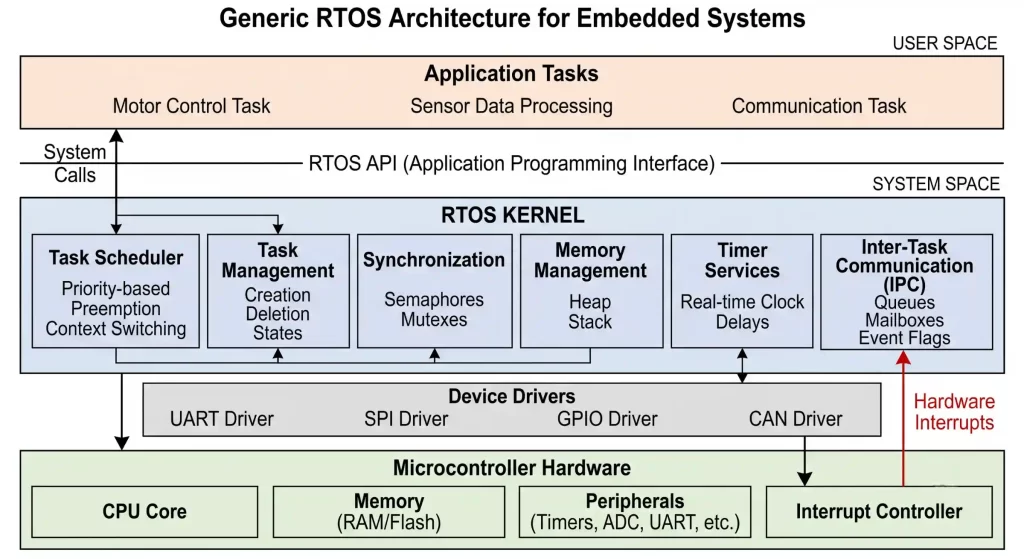
1. Task Management
Task management creates, suspends, resumes, and monitors multiple concurrent tasks.
Each task includes:
- Stack memory
- Priority
- Current state
- CPU context
- Task Control Block (TCB)
2. Scheduler
The scheduler is the core of an RTOS. It:
- Selects the highest-priority ready task
- Performs context switching
- Manages preemption
- Maintains deterministic execution
3. Memory Management
RTOS platforms support:
- Static allocation
- Dynamic allocation
- Fixed memory pools
- Heap management
Efficient memory management improves system reliability.
4. Inter-Task Communication (IPC)
Tasks communicate using:
- Queues
- Mailboxes
- Event Flags
- Pipes
- Shared Memory
IPC enables safe data sharing between tasks.
5. Synchronization Mechanisms
RTOS prevents race conditions using:
- Mutexes
- Binary Semaphores
- Counting Semaphores
- Event Groups
For example, a mutex ensures only one task accesses a UART peripheral at a time.
6. Timer Management
Software timers execute periodic functions without creating extra tasks.
Common uses include:
- Sensor sampling
- LED blinking
- Timeout monitoring
- Communication retries
- Watchdog servicing
Key Takeaways
- RTOS architecture is modular.
- The scheduler is the central component.
- IPC enables safe task communication.
- Synchronization prevents data corruption.
- Efficient memory management improves reliability.
Scheduling Algorithms in RTOS
Scheduling determines which task receives CPU time. The choice of scheduling algorithm depends on application requirements.
1. Preemptive Scheduling
In preemptive scheduling, the RTOS immediately interrupts a lower-priority task when a higher-priority task becomes ready.
Best suited for:
- Automotive ECUs
- Medical devices
- Robotics
- Industrial automation
Advantages
- Fast response time
- Predictable latency
- Ideal for critical applications
Disadvantages
- Higher context-switch overhead
- More complex debugging
2. Cooperative Scheduling
Tasks voluntarily release CPU control after completing their work.
Advantages
- Simple implementation
- Lower overhead
- Easier debugging
Disadvantages
- Poor responsiveness if a task does not yield
- Not suitable for safety-critical systems
3. Round Robin Scheduling
Tasks with the same priority share CPU time using fixed time slices. It is commonly used for background tasks with similar timing requirements.
Key Takeaways
- Scheduling is essential for RTOS performance.
- Preemptive scheduling is widely used in real-time applications.
- Cooperative scheduling suits simpler systems.
- Round Robin improves fairness among equal-priority tasks.
Features of RTOS in Embedded Systems
A Real-Time Operating System provides features that ensure predictable and reliable operation.
1. Deterministic Task Execution
Critical tasks always execute within predictable time limits, making RTOS suitable for safety-critical systems.
2. Multitasking Support
Multiple tasks run concurrently through context switching.
Typical tasks include:
- Sensor reading
- Communication
- Display updates
- Data logging
- Battery monitoring
3. Priority-Based Scheduling
Tasks are assigned priorities based on importance.
Task | Priority |
Emergency Shutdown | Highest |
Motor Control | High |
Sensor Reading | High |
Communication | Medium |
LCD Update | Low |
Data Logging | Lowest |
4. Fast Interrupt Response
RTOS minimizes interrupt latency by executing ISRs quickly and transferring lengthy processing to application tasks.
5. Efficient Context Switching
The RTOS saves and restores task states, enabling efficient multitasking.
6. Inter-Task Communication (IPC)
Common IPC mechanisms include:
- Queues
- Mailboxes
- Message Buffers
- Event Groups
- Shared Memory
7. Synchronization Mechanisms
Shared resources are protected using:
- Mutexes
- Binary Semaphores
- Counting Semaphores
- Event Flags
8. Memory Management
Supports:
- Static allocation
- Dynamic allocation
- Fixed memory pools
- Heap management
9. Software Timers
Software timers execute periodic operations such as:
- LED blinking
- Sensor sampling
- Timeout monitoring
- Communication retries
- Watchdog servicing
Key Takeaways
- Deterministic execution
- Efficient multitasking
- Priority scheduling
- Reliable IPC and synchronization
- Efficient memory management
Types of RTOS
RTOS can be classified based on timing guarantees.
1. Hard Real-Time Operating System
Every deadline must be met. Missing a deadline can cause system failure.
Applications
- Aircraft control
- ABS
- Pacemakers
- Industrial safety systems
Characteristics
- Strict timing guarantees
- Very low latency
- Highly deterministic
2. Firm Real-Time Operating System
Occasional missed deadlines are acceptable, but repeated misses reduce system performance.
Applications
- Multimedia streaming
- Industrial monitoring
- Automated inspection systems
- Smart cameras
3. Soft Real-Time Operating System
Occasional delays are acceptable and do not cause system failure.
Applications
- Smart TVs
- Home automation
- Consumer IoT devices
- Printing systems
Comparison of RTOS Types
Feature | Hard RTOS | Firm RTOS | Soft RTOS |
Deadline Miss | Never Allowed | Occasionally Allowed | Acceptable |
Predictability | Very High | High | Moderate |
Safety Critical | Yes | Sometimes | No |
Complexity | High | Medium | Lower |
Typical Applications | Medical, Automotive | Industrial | Consumer Electronics |
Key Takeaways
- Hard RTOS is used for safety-critical systems.
- Firm RTOS balances performance and timing.
- Soft RTOS prioritizes responsiveness over strict deadlines.
Advantages of Real-Time Operating System in Embedded Systems
An RTOS offers several benefits for embedded applications.
Advantage | Description |
Predictable Timing | Tasks meet deadlines consistently |
Efficient CPU Utilization | Better processor usage |
Modular Design | Applications are divided into independent tasks |
Improved Reliability | Critical tasks receive priority |
Easier Maintenance | Modular firmware simplifies debugging |
Scalability | New features are easier to add |
Better Resource Sharing | Safe communication using IPC |
Faster Development | Standard RTOS APIs simplify development |
Practical Example
In a smart factory controller, separate RTOS tasks can manage:
- Conveyor motors
- Barcode scanners
- Ethernet communication
- HMI
- Emergency stop monitoring
Key Takeaways
- Predictable task execution
- Better software organization
- Improved scalability
- Higher reliability
Disadvantages of RTOS in Embedded Systems
Despite its benefits, RTOS introduces several trade-offs.
Limitation | Impact |
Increased RAM Usage | Each task requires its own stack |
Higher Flash Requirement | RTOS kernel occupies memory |
Greater Software Complexity | Developers must understand multitasking |
Context Switching Overhead | Additional CPU usage |
Synchronization Bugs | Deadlocks and race conditions |
Learning Curve | Requires RTOS expertise |
Key Takeaways
- Increased memory requirements
- Higher software complexity
- Proper synchronization is essential
- Efficient task design minimizes overhead
Challenges of Using RTOS in Embedded Systems
Successful RTOS implementation requires careful firmware design.
Stack Overflow
Each task has its own stack. Insufficient stack memory can cause:
- HardFault exceptions
- Random resets
- Memory corruption
Priority Inversion
Occurs when a low-priority task blocks a higher-priority task. Most RTOS kernels use Priority Inheritance to reduce this issue.
Deadlocks
Deadlocks occur when tasks wait indefinitely for shared resources.
Best Practice: Acquire shared resources in a consistent order.
Heap Fragmentation
Frequent dynamic memory allocation can fragment RAM. Safety-critical systems typically allocate memory during initialization.
Interrupt Design
Keep Interrupt Service Routines (ISRs) short and move lengthy processing to application tasks.
Key Takeaways
- Monitor stack usage.
- Minimize dynamic memory allocation.
- Use synchronization carefully.
- Keep ISRs short.
- Reduce resource contention.
Best Practices for Using RTOS in Embedded Systems
Writing RTOS-based firmware requires more than understanding APIs. A well-designed architecture improves reliability, simplifies debugging, and ensures long-term maintainability. The following best practices are widely adopted in professional embedded software development.
1. Keep Tasks Focused on a Single Responsibility
Each task should perform one well-defined function.
Good Examples:
- Sensor acquisition
- Motor control
- CAN communication
- LCD update
- Data logging
Avoid creating large tasks that handle multiple unrelated operations. Smaller, modular tasks are easier to test, debug, and reuse.
2. Assign Priorities Carefully
Task priorities should reflect the timing requirements of the application—not developer preference.
A typical priority structure:
Priority | Task Example |
Highest | Emergency shutdown, Motor control |
High | Sensor acquisition |
Medium | Communication (CAN, UART, Ethernet) |
Low | User Interface |
Lowest | Data logging |
Engineering Tip: Assigning every task a high priority defeats the purpose of priority scheduling and increases response latency for truly critical operations.
3. Minimize Interrupt Service Routine (ISR) Execution Time
Interrupts should complete quickly.
Inside an ISR:
- Read hardware registers
- Clear interrupt flags
- Notify a task using a queue or semaphore
Avoid:
- Lengthy calculations
- Memory allocation
- Printing debug messages
- Blocking function calls
Short ISRs reduce interrupt latency and improve system responsiveness.
4. Prefer Static Memory Allocation
Dynamic memory allocation during runtime can lead to heap fragmentation and unpredictable behavior.
For safety-critical systems:
- Allocate memory during initialization.
- Use static task stacks where possible.
- Monitor available heap space throughout testing.
5. Monitor Stack Usage
Each RTOS task has its own stack.
Professional developers use stack monitoring APIs to identify tasks approaching stack overflow.
Practical Tip: During testing, intentionally reduce task stack sizes to determine the minimum safe allocation before finalizing firmware.
6. Protect Shared Resources
When multiple tasks access the same peripheral or memory, use synchronization mechanisms such as:
- Mutexes
- Semaphores
- Event Groups
Never rely on timing delays to avoid resource conflicts.
Key Takeaways
- Design modular tasks.
- Assign priorities based on deadlines.
- Keep ISRs short.
- Prefer static memory allocation.
- Continuously monitor stack usage.
- Protect shared resources using RTOS synchronization mechanisms.

Common Mistakes in RTOS Development and How to Avoid Them
Many RTOS-related issues are caused by design decisions rather than software bugs. Recognizing these mistakes early helps improve firmware stability.
Common Mistake | Why It Happens | Professional Solution |
Creating too many tasks | Assuming every function needs its own task | Combine related operations where appropriate |
Oversized task stacks | Guessing stack requirements | Measure actual stack usage |
Undersized task stacks | Ignoring worst-case execution | Use RTOS stack monitoring tools |
Long ISRs | Performing application logic inside interrupts | Move processing to tasks |
Excessive dynamic allocation | Convenience during development | Use static allocation after initialization |
Poor priority assignment | Lack of scheduling analysis | Prioritize based on timing requirements |
Ignoring synchronization | Shared resource access | Use mutexes or semaphores |
Busy waiting | Polling instead of blocking | Use queues, events, or delays |
Engineering Lesson
One of the most common reasons for random firmware crashes is stack overflow caused by recursive functions or large local variables. Instead of allocating large arrays inside tasks, store them in global memory or dedicated buffers.
Key Takeaways
- Avoid unnecessary tasks.
- Measure stack usage instead of guessing.
- Replace busy waiting with RTOS synchronization.
- Keep interrupt handlers lightweight.
- Design for maintainability from the beginning.
Debugging Tips for RTOS-Based Embedded Systems
Debugging multitasking firmware is more challenging than debugging bare-metal applications because multiple tasks execute concurrently.
1. Enable RTOS-Aware Debugging
Most modern IDEs, including STM32CubeIDE, Keil MDK, and SEGGER Ozone, support RTOS-aware debugging.
These tools allow you to:
- View running tasks
- Monitor stack usage
- Inspect task priorities
- Analyze scheduler behavior
2. Use Stack Overflow Detection
Enable stack overflow checking provided by the RTOS.
FreeRTOS, for example, supports stack overflow hooks that notify developers before memory corruption occurs.
3. Monitor CPU Usage
Unexpected CPU utilization often indicates:
- Infinite loops
- Excessive context switching
- Poor scheduling
- Busy waiting
Regular CPU profiling helps identify bottlenecks.
4. Trace Task Execution
Trace tools such as:
- SEGGER SystemView
- Percepio Tracealyzer
provide timeline-based visualization of:
- Task switches
- Interrupt execution
- Scheduler activity
- CPU load
These tools are invaluable when diagnosing timing-related issues.
5. Check Synchronization Objects
Deadlocks and race conditions are difficult to reproduce.
When debugging:
- Verify mutex ownership.
- Inspect semaphore counts.
- Confirm event flags are being set and cleared correctly.
Engineering Insight
If an RTOS application behaves unpredictably only after running for several hours or days, memory corruption, stack overflow, or heap fragmentation is often the underlying cause, not the scheduler itself.
Key Takeaways
- Use RTOS-aware debugging tools.
- Enable stack overflow detection.
- Monitor CPU utilization.
- Analyze task execution using trace tools.
- Validate synchronization mechanisms.
Performance Optimization Tips
Optimizing RTOS performance improves responsiveness and reduces power consumption.
Reduce Context Switching
Every context switch consumes CPU cycles.
Avoid unnecessary task fragmentation and frequent priority changes.
Select Appropriate Tick Frequency
A higher system tick provides better timing resolution but increases CPU overhead.
Many embedded applications use tick rates between 100 Hz and 1000 Hz, depending on timing requirements.
Use Direct Task Notifications
For one-to-one communication, Direct Task Notifications are often faster and require less RAM than queues or semaphores.
Optimize Critical Sections
Keep critical sections as short as possible.
Long critical sections delay interrupts and reduce real-time responsiveness.
Avoid Busy Waiting
Replace polling loops with:
- Queues
- Semaphores
- Event Groups
- Software Timers
Blocking tasks consume no CPU while waiting.
Key Takeaways
- Reduce unnecessary context switches.
- Choose an appropriate tick frequency.
- Use lightweight synchronization methods.
- Keep critical sections short.
- Eliminate busy waiting.
Memory Optimization Tips
Embedded systems often operate with limited RAM, making efficient memory usage essential.
Recommended Practices
- Prefer static memory allocation.
- Share buffers whenever possible.
- Minimize task stack sizes.
- Avoid large local variables.
- Reuse memory pools.
- Use compiler optimization options appropriately.
Engineering Observation
Experienced firmware teams perform RAM budgeting before writing application code. Knowing how much memory each task, queue, and buffer requires prevents unpleasant surprises during integration.
Key Takeaways
- Plan memory usage early.
- Monitor stack and heap continuously.
- Minimize RAM consumption without sacrificing reliability.
Future Trends in RTOS
The role of RTOS continues to evolve as embedded systems become more intelligent and connected.
Edge AI Integration
RTOS platforms are increasingly supporting TinyML and on-device AI inference for low-power applications.
Multi-Core Microcontrollers
Modern microcontrollers now integrate multiple CPU cores, requiring RTOS kernels capable of multicore scheduling and synchronization.
Enhanced Cybersecurity
Future RTOS implementations place greater emphasis on:
- Secure boot
- Trusted firmware
- Hardware isolation
- Memory protection
- Secure communication
Energy-Efficient Scheduling
Tickless idle mode and advanced power management techniques continue to reduce energy consumption in battery-powered devices.
Cloud-Connected Embedded Systems
RTOS platforms are becoming tightly integrated with:
- MQTT
- Matter
- OPC UA
- Edge computing frameworks
- Digital twins
AI-Assisted Firmware Development
AI-powered code assistants are increasingly used to generate boilerplate RTOS code, analyze scheduling issues, and automate documentation. However, engineers must still validate timing behavior, memory usage, and hardware interactions to ensure reliable real-time performance.
Key Takeaways
- RTOS will remain fundamental to intelligent embedded systems.
- AI and Edge computing are expanding RTOS capabilities.
- Security and power efficiency are becoming top priorities.
- Multi-core embedded platforms are driving new RTOS innovations.
Applications and Use Cases of RTOS Embedded Systems
RTOS embedded systems are widely used in applications where predictable response time, multitasking, and reliability are essential. The importance of RTOS in Embedded Systems lies in its ability to execute critical tasks within strict deadlines while efficiently managing system resources.
Today, RTOS powers a wide range of embedded applications across multiple industries:
Industry | Common RTOS Applications |
Automotive | Engine Control Units (ECUs), ABS, ADAS, Airbag Systems |
Medical | Patient Monitors, Infusion Pumps, Ventilators |
Industrial Automation | PLCs, CNC Machines, Industrial Robots |
Consumer Electronics | Smart TVs, Cameras, Printers, Smart Appliances |
IoT & Smart Devices | Wearables, Smart Sensors, Home Automation Gateways |
Aerospace & Defense | Flight Controllers, Navigation Systems |
Robotics | Autonomous Robots, Drones, AGVs |
Telecommunications | Routers, Switches, Network Equipment |
Practical Use Case
A drone flight controller uses an RTOS to run multiple tasks simultaneously, including sensor data acquisition, GPS navigation, motor control, wireless communication, and battery monitoring. The RTOS scheduler ensures flight control always receives the highest priority, resulting in stable and reliable operation.
Key Takeaways
- RTOS is widely used across automotive, medical, industrial, IoT, robotics, and aerospace industries.
- RTOS enables reliable multitasking and deterministic execution.
- The importance of RTOS in Embedded Systems lies in meeting strict timing requirements.
- RTOS embedded systems improve scalability, maintainability, and overall system reliability.

Conclusion
A Real-Time Operating System (RTOS) is the foundation of modern embedded systems that require deterministic execution, efficient multitasking, and reliable resource management. From automotive ECUs and medical devices to industrial controllers and IoT products, RTOS enables developers to build firmware that responds predictably under strict timing constraints.
Choosing the right RTOS involves understanding application requirements, timing constraints, memory limitations, and hardware capabilities. While RTOS introduces additional complexity, the benefits in scalability, maintainability, and reliability make it indispensable for medium to large embedded projects.
For aspiring embedded engineers, mastering RTOS concepts—along with hands-on practice using platforms like FreeRTOS, Zephyr, or CMSIS-RTOS on ARM Cortex-M microcontrollers—is an important step toward building industry-ready firmware development skills.