What Is a Linux File System?
A Linux file system is the mechanism that Linux uses to store, organize, retrieve, and manage data on storage devices. It defines how files and directories are structured, how data is allocated on disk, and how permissions and security policies are enforced.
Unlike operating systems that use separate drive letters, Linux organizes all files under a single hierarchical directory structure that starts from the root directory (/). This unified approach simplifies file management and provides a consistent interface across different storage devices.
The Linux file system performs several essential functions:
- Organizes files and directories
- Manages disk space allocation
- Controls file permissions and access
- Stores file metadata using inodes
- Supports data recovery through journaling
- Provides secure access to system resources
Popular Linux file systems include Ext4, XFS, Btrfs, and ZFS, each designed for different performance, scalability, and reliability requirements.

Linux File System Fundamentals
In Linux the hierarchical file structure has its root directory located at (/) while every file and directory originates there. These functions handle the responsibilities of the file system:
- File organization and storage.
- Access control and permissions.
- Disk management and allocation.
File System Architecture
A Linux file system contains multiple stacked components which work together.
Application Layer: Includes user applications and system utilities interacting with the file system.
The Virtual File System (VFS): Creates one common interface that enables users to work with different file systems (ext4, XFS, Btrfs) equally.
File System Implementation: Handles specific file system logic (e.g., ext4, XFS, or NTFS drivers).
The Block Layer: Provides operations for transferring data between file system and storage devices.
Device Drivers: Interface with physical storage devices like HDDs, SSDs, and USB drives.
Virtual File System (VFS)
The Linux platform uses the Virtual File System (VFS) layer to enable different file system types to operate together as one. It defines standard interfaces for:
- The file system operations (open read write close delete) function through this interface.
- File attributes and metadata management.
- File locking and security features.
Through VFS users obtain standard system access to different file system formats.
File System Types in Linux
The Linux operating system enables users to work with various file system types that provide distinctive features.
- Ext4: The default file system in most Linux distributions; supports journaling and large file sizes.
- XFS: A high-performance file system optimized for parallel processing.
- Btrfs: A modern file system with snapshot and advanced data integrity features.
- ZFS: Known for data integrity, compression, and scalability.
- FAT32/NTFS: Used for compatibility with Windows systems.
Linux File System Components
File systems built within Linux contain three important sections:
- Superblock: Stores metadata about the file system, such as size, status, and inode information.
- Inodes: Contain metadata about individual files, including permissions, owner, timestamps, and disk block locations.
- Data Blocks: Store actual file content.
- Directory Structure: Maps filenames to inodes.
- Journal (if applicable): Maintains a record of file system changes to ensure consistency after crashes.
File System Mounting and Unmounting
To access a file system, it must be mounted to a directory:
mount /dev/sdX /mnt
umount /mnt
Mounting integrates different file systems into the Linux directory structure, making them accessible under a unified namespace.
Through mounting Linux unites different file systems into one directory structure which provides them under a single namespace.
File Permissions and Security
Access control features in Linux protect files by using permissions together with security regulations.
Each file possesses three permission sets which belong to owner, group and others allowing read (r), write (w) and execute (x) rights.
The Linux operating system supports Access Control Lists beyond basic UNIX permissions because they enable detailed authorization control.
Users can benefit from mandatory access control through the security approaches provided by SELinux/AppArmor.
The concepts above provide the foundation of Linux storage management. To understand Linux file system internals more deeply, it is important to examine how each layer processes file operations from the application level down to physical storage hardware.
What Is Virtual File System in Linux and Why Is It Important?
The Virtual File System (VFS) is an abstraction layer that provides a uniform programming interface for different file system implementations.
Without VFS, applications would need separate code paths for Ext4, XFS, FAT32, NTFS, and other file systems. Linux solves this challenge by placing VFS between user applications and actual file system drivers.
How VFS Handles a File Request
When an application opens a file:
- Application calls open()
- System call enters kernel space
- VFS receives the request
- VFS identifies the target file system
- Appropriate file system driver processes the request
- Data is retrieved through the block layer
- Result is returned to the application
This architecture allows developers to interact with files using standard APIs regardless of the underlying storage format.
Definition
Virtual File System (VFS) is a kernel abstraction layer that provides a common interface for multiple file system types while hiding implementation-specific details from applications.
Understanding Linux File System Architecture in Detail
A common interview question is: How does Linux file system architecture actually process data?
The architecture can be viewed as five major layers.
Layer | Primary Function |
Application Layer | User applications and utilities |
VFS Layer | Common file operation interface |
Logical File System | Metadata management |
Physical File System | Storage block handling |
Device Driver Layer | Hardware communication |
Logical File System
Logical File System (LFS) is responsible for managing metadata such as:
- Inodes
- Directory entries
- Permissions
- Ownership information
- File attributes
The logical layer determines where file information exists and how it should be organized.
Physical File System
Physical File System manages actual data placement on storage devices.
Its responsibilities include:
- Block allocation
- Free space management
- Data placement optimization
- Read/write scheduling
Many beginners assume that files are stored sequentially on disk. In practice, modern Linux file systems often distribute blocks across storage locations to improve performance and reduce fragmentation.
What Is the Linux Directory Structure?
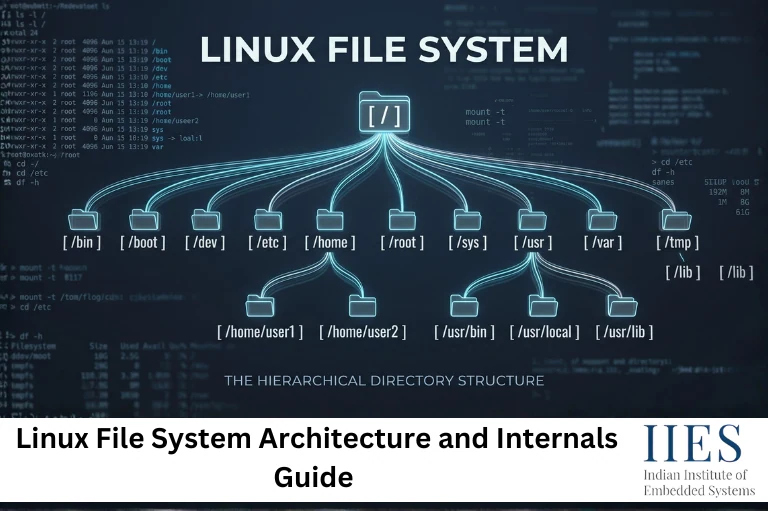
The Linux file system follows a hierarchical structure that starts from the root directory (/). Unlike operating systems that use multiple drive letters, Linux organizes all files, directories, devices, and partitions under a single directory tree.
Definition
The Linux directory structure is a hierarchical organization of files and directories that begins at the root directory (/) and follows the Filesystem Hierarchy Standard (FHS).
Important Linux Directories
Directory | Purpose |
/ | Root directory of the Linux file system |
/bin | Essential user commands |
/boot | Bootloader and kernel files |
/dev | Device files |
/etc | System configuration files |
/home | User home directories |
/lib | Shared libraries |
/proc | Process and kernel information |
/sys | Hardware and kernel data |
/tmp | Temporary files |
/usr | User applications and utilities |
/var | Logs, cache, and variable data |
Why Is It Important?
A standardized directory structure makes Linux easier to manage, troubleshoot, and secure. System administrators know where to find configuration files, logs, and application data regardless of the Linux distribution being used.
For example, configuration files are typically stored in /etc, while system logs are found in /var/log.
How Linux File System Works During File Creation
Understanding file creation reveals how multiple Linux file system components cooperate.
Step-by-Step Workflow
When a user creates a file:
- User issues a create request.
- Kernel receives the system call.
- VFS validates the request.
- File system driver allocates a new inode.
- Free data blocks are reserved.
- Directory entry is created.
- Metadata is updated.
- Journal records the transaction.
- File becomes accessible.
For example:
touch sample.txt
Although this appears simple, the kernel performs multiple metadata operations before the file becomes visible.
Practical Embedded Linux Example
Consider a smart surveillance camera running Embedded Linux.
Every captured video frame generates:
- New file entries
- Metadata updates
- Permission checks
- Storage allocation requests
Efficient file system management directly affects recording reliability and system responsiveness. This is one reason why Ext4 remains widely used in embedded products.

Linux Journaling File System Explained
A Linux journaling file system maintains a transaction log that records pending file system changes before they are committed to disk.
Journaling significantly reduces recovery time after unexpected power failures or system crashes.
What Is Journaling?
Journaling is a crash-recovery mechanism that records file system modifications in a dedicated log before applying them to permanent storage.
Without journaling:
- Corrupted metadata becomes more likely
- File system checks take longer
- Recovery can require manual intervention
With journaling:
- Recovery becomes faster
- Consistency improves
- Data integrity is better protected
How Journaling Works
A simplified journaling process follows these stages:
- Change request arrives.
- Transaction recorded in journal.
- Journal entry written to disk.
- Actual file system update occurs.
- Transaction marked complete.
If power fails midway, Linux replays the journal during the next boot.
This approach dramatically reduces file system corruption risks compared to non-journaled systems.
Journaling Modes
Journaling Mode | Description | Performance |
Journal Mode | Metadata and data are journaled | Lowest |
Ordered Mode | Metadata journaled before data write | Balanced |
Writeback Mode | Metadata journaled only | Highest |
Most Ext4 deployments use Ordered Mode because it provides a strong balance between performance and reliability.
Common Mistakes When Working With Linux File Systems
Engineers frequently encounter file system problems that are preventable.
Mistake 1: Ignoring Available Inodes
Many administrators monitor disk space but forget inode consumption.
A partition can show free storage while refusing new file creation because all inodes have been exhausted.
Fix: Use:
df -i
to monitor inode availability.
Mistake 2: Using Incorrect Mount Options
Improper mount parameters can reduce performance or weaken security.
Fix: Review options such as:
noexec
nosuid
nodev
based on application requirements.
Mistake 3: Disabling Journaling Without Understanding Risks
Some developers disable journaling for performance gains.
In embedded devices with sudden power loss risks, this decision often causes file system corruption.
Fix: Evaluate reliability requirements before changing journaling settings.
Mistake 4: Overlooking Permission Inheritance
Incorrect ownership settings frequently create application failures.
Fix: Verify permissions using:
ls -l
and ownership using:
chown
Commands.
Top Linux File System Interview Questions
Linux file system concepts are commonly asked in Embedded Linux, DevOps, and System Administration interviews.
What Is VFS in Linux?
The Virtual File System (VFS) provides a common interface that allows Linux to support multiple file systems such as Ext4, XFS, and Btrfs.
What Is an Inode?
An inode is a data structure that stores file metadata, including permissions, ownership, timestamps, and block locations.
What Is Journaling?
Journaling records file system changes before they are written to disk, helping recover data after crashes or unexpected shutdowns.
What Is the Difference Between a Hard Link and a Soft Link?
Feature | Hard Link | Soft Link |
Points To | Inode | File Path |
Survives Original File Deletion | Yes | No |
Cross-File System Support | No | Yes |
What Happens During Mounting?
Mounting attaches a file system to a directory within the Linux directory hierarchy, making its contents accessible to users and applications.
What Is the Difference Between Ext3 and Ext4?
Ext4 offers better performance, larger file size support, and improved storage efficiency compared to Ext3, while both support journaling.
File Systems Comparison: Ext4 vs XFS vs Btrfs vs ZFS
Selecting the correct file system depends on workload requirements.
Feature | Ext4 | XFS | Btrfs | ZFS |
Stability | Excellent | Excellent | Good | Excellent |
Performance | High | Very High | Moderate | High |
Snapshots | No | No | Yes | Yes |
Data Integrity | Good | Good | Excellent | Excellent |
Embedded Usage | Very Common | Moderate | Limited | Rare |
Administration Complexity | Low | Low | Medium | High |
When Should You Use Each File System?
Choose Ext4 when:
- Building embedded Linux systems
- Seeking maximum compatibility
- Requiring proven reliability
Choose XFS when:
- Managing large files
- Running enterprise servers
- Handling parallel workloads
Choose Btrfs when:
- Snapshot capability is required
- Advanced storage management is needed
Choose ZFS when:
- Data integrity is the highest priority
- Large storage arrays are involved
Linux Security Features for File Protection
The Linux file system incorporates multiple security mechanisms beyond standard permissions.
Key security features include:
- User and group ownership
- Access Control Lists (ACLs)
- SELinux policies
- AppArmor profiles
- File capability controls
- Immutable file attributes
A practical example is securing configuration files:
chmod 600 config.conf
This allows only the owner to read and modify the file.
For critical infrastructure systems, security frameworks such as SELinux provide mandatory access controls that significantly reduce attack surfaces.
How to Troubleshoot Linux File System Problems
When file system issues occur, a structured troubleshooting approach helps identify problems quickly. Common symptoms include low disk space, failed file creation, mounting errors, and file system corruption.
Step 1: Check Disk Usage
Use the following command to verify available storage space:
df -h
This displays disk usage in a human-readable format and helps identify partitions that are running out of space.
Step 2: Check Inode Usage
Sometimes a system cannot create new files even when storage space is available.
df -i
This command shows inode usage and helps detect inode exhaustion caused by a large number of small files.
Step 3: Verify Mounted File Systems
Check whether storage devices are mounted correctly:
mount
Incorrect mount configurations can prevent applications from accessing files and directories.
Step 4: Inspect Kernel Messages
Review kernel logs for storage-related errors:
dmesg
Look for messages related to disk failures, I/O errors, or file system corruption.
Step 5: Run File System Consistency Checks
If corruption is suspected, use the File System Check utility:
fsck /dev/sdX
Replace /dev/sdX with the appropriate partition. The fsck utility scans and repairs file system inconsistencies, helping restore normal operation after crashes or unexpected shutdowns.
Key Takeaway
A practical Linux file system troubleshooting workflow typically follows this sequence:
Check Disk Space
↓
Check Inodes
↓
Verify Mounts
↓
Review Logs
↓
Run fsck
Following this process helps engineers diagnose most Linux storage and file system problems efficiently, making it a valuable skill for both system administrators and embedded Linux developers.
Trends and Future Relevance of Linux File Systems
Linux storage technologies continue to evolve alongside cloud computing, edge AI, and embedded systems. As of 2025–2026, modern Linux deployments increasingly rely on advanced file systems that provide stronger data integrity, faster recovery, and better scalability.
Several notable trends include:
- Growing adoption of Btrfs in enterprise Linux distributions due to built-in snapshot capabilities.
- Increased use of NVMe SSDs, requiring file systems optimized for high-speed parallel I/O.
- Enhanced integration between Linux file systems and container platforms such as Docker and Kubernetes.
- Expansion of edge AI devices running Embedded Linux, where storage reliability directly impacts system uptime.
- Improved security mechanisms through SELinux, AppArmor, and file-system-level encryption.
For embedded engineers, understanding Linux file system internals is becoming more important as devices generate larger volumes of sensor data and require reliable storage under demanding conditions.

Conclusion
The Linux file system is much more than a mechanism for storing files. It is a layered architecture that manages data organization, metadata handling, security enforcement, disk allocation, and recovery operations.
Understanding concepts such as the Virtual File System (VFS), Logical File System, Physical File System, journaling mechanisms, file permissions, and storage management provides valuable insight into how Linux handles data efficiently and securely.
Whether you are preparing for Linux interview questions, developing embedded Linux applications, or administering enterprise servers, a solid grasp of Linux file system architecture helps you troubleshoot problems faster and design more reliable systems. As Linux continues to dominate embedded systems, cloud infrastructure, and IoT platforms, file system knowledge remains a foundational skill for every Linux professional.