What is Arduino Uno R3?
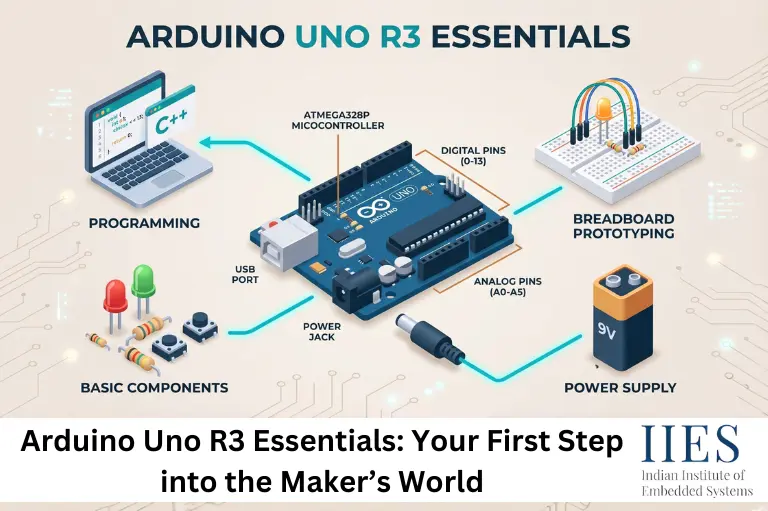
The Arduino Uno R3 is an open-source microcontroller board based on the ATmega328P microcontroller. It was developed to simplify electronics and programming for students, makers, and developers.
The word “Uno” means “one” in Italian, symbolizing the first standardized version of the Arduino platform. The R3 version introduced several improvements in communication, stability, and compatibility.
What makes Arduino unique is its beginner-friendly ecosystem. Unlike traditional embedded development boards that require complicated hardware programming tools, Arduino allows users to write code, upload programs through USB, and test projects within minutes.
Today, Arduino boards are widely used in:
- Robotics
- IoT projects
- Smart home systems
- Industrial prototypes
- Sensor monitoring systems
- STEM education
- Automation projects

Why Arduino Uno R3 Remains Popular in 2026
Despite the rise of advanced boards like ESP32 and Raspberry Pi Pico, Arduino Uno R3 still remains highly relevant.
Key Reasons Behind Its Popularity
Beginner-Friendly Architecture
The board is designed for simplicity. Even users without coding experience can start with simple projects in a few hours.
Arduino has one of the largest electronics communities online. Thousands of tutorials, forums, GitHub repositories, and project guides are available.
Low Cost and High Reliability
The board is affordable, durable, and widely available. Even Arduino clones provide reliable performance for learning.
Huge Sensor Compatibility
Arduino Uno R3 supports a broad range of modules including:
- Ultrasonic sensors
- DHT temperature sensors
- RFID modules
- Servo motors
- LCD displays
- Bluetooth and Wi-Fi modules
Excellent for Embedded Systems Training
Many embedded systems institutes and engineering colleges still use Arduino Uno R3 to teach core concepts like:
- Digital electronics
- Sensor interfacing
- Embedded C programming
- Serial communication
- PWM control
Arduino Uno R3 Features
Understanding the Arduino Uno R3 features is essential before starting projects.
Main Features of Arduino Uno R3
Feature | Specification |
Microcontroller | ATmega328P |
Operating Voltage | 5V |
Input Voltage | 7V–12V Recommended |
Digital I/O Pins | 14 |
PWM Pins | 6 |
Analog Input Pins | 6 |
Clock Speed | 16 MHz |
Flash Memory | 32 KB |
SRAM | 2 KB |
EEPROM | 1 KB |
USB Interface | USB Type-B |
Communication | UART, SPI, I2C |
These specifications make the board ideal for learning embedded systems fundamentals and building medium-scale projects.
Arduino Uno R3 Pin Diagram Explained
The Arduino Uno R3 pin diagram is one of the most important things beginners must understand.
Digital Pins (0–13)
These pins are used for:
- LED control
- Button input
- Relay switching
- Sensor interfacing
Some digital pins also support PWM (Pulse Width Modulation), useful for:
- Motor speed control
- LED brightness adjustment
- Servo movement
PWM-Supported Pins
Analog Pins (A0–A5)
Analog pins read varying voltage levels from sensors like:
- Temperature sensors
- Light sensors
- Gas sensors
- Potentiometers
These pins convert analog voltage into digital values between 0 and 1023.
Power Pins
The board includes:
These help power external modules and sensors.
Communication Pins
Arduino Uno R3 supports multiple communication protocols:
Protocol | Pins |
UART | 0,1 |
SPI | 10,11,12,13 |
I2C | A4,A5 |
These protocols are essential for advanced IoT and sensor integration projects.
Arduino Basics Every Beginner Should Know
Before building projects, understanding basic Arduino concepts is important.
What is an Arduino Sketch?
An Arduino program is called a “Sketch.”
Every sketch contains two core functions:
void setup() {

}

Runs once during startup.

void loop() {

}
Runs continuously after startup.

Your First Arduino Uno R3 Project
The classic LED blinking project remains the best beginner exercise.
Components Required
- Arduino Uno R3
- LED
- 220-ohm resistor
- Breadboard
- Jumper wires
LED Blinking Code
const int ledPin = 13;

void setup() {

 pinMode(ledPin, OUTPUT);

}

void loop() {

 digitalWrite(ledPin, HIGH);

 delay(1000);

 digitalWrite(ledPin, LOW);

 delay(1000);

}
What This Project Teaches
- Digital output
- Timing functions
- Pin configuration
- Basic coding structure
It is the embedded systems equivalent of the “Hello World” program.
Real-World Arduino Uno R3 Applications
One reason Arduino Uno R3 remains popular is its practical use in real-world systems.
Smart Home Automation
Arduino can control:
- Lights
- Fans
- Door locks
- Appliances
using sensors and wireless modules.
Weather Monitoring Systems
Using DHT11 or DHT22 sensors, Arduino can monitor:
- Temperature
- Humidity
- Atmospheric conditions
Robotics
Arduino is widely used in:
- Line-following robots
- Obstacle-avoidance robots
- Robotic arms
- Autonomous vehicles
IoT-Based Monitoring
By integrating Wi-Fi modules like ESP8266, Arduino can upload sensor data to cloud dashboards.
Industrial Prototyping
Many startups use Arduino for rapid prototyping before manufacturing production-grade PCBs.
Arduino Uno R3 vs Other Arduino Boards
Choosing the right Arduino board depends on project requirements.
Board | Best For | Key Advantage |
Arduino Uno R3 | Beginners | Easy learning |
Arduino Nano | Compact projects | Small size |
Arduino Mega | Large projects | More I/O pins |
ESP32 | IoT projects | Built-in Wi-Fi |
Arduino Leonardo | USB HID projects | Native USB support |
For beginners, the Arduino Uno R3 remains the most balanced and recommended option.
Common Mistakes Beginners Make
Learning Arduino becomes easier when you avoid common beginner errors.
Incorrect Board Selection
Selecting the wrong board type in Arduino IDE can prevent uploads.
Always verify:
- Board type
- COM port
- Driver installation
Wrong Wiring Connections
Loose or incorrect breadboard connections cause many project failures.
Tip
Double-check GND and VCC wiring before powering circuits.
Using Insufficient Power
Motors and relays often require external power supplies.
Do not overload Arduino power pins directly.
Ignoring Serial Monitor
The Serial Monitor is extremely useful for debugging sensor readings and communication issues.
Keep Your Wiring Organized
Messy wiring increases debugging time.
Use:
- Color-coded jumper wires
- Breadboards
- Labels
Well-commented code improves readability and future modifications.
Start Small
Do not jump immediately into advanced robotics or IoT projects.
Master:
- LEDs
- Buttons
- Sensors
- Displays
before moving forward.
Learn Embedded C Concepts
Arduino simplifies programming, but understanding embedded C fundamentals gives long-term advantages.
Resources for Further Learning Arduino
If you want to go beyond Arduino basics and build stronger embedded systems skills, these resources are highly recommended for beginners and intermediate learners.
Recommended Books
- Getting Started with Arduino by Massimo Banzi
- Arduino Workshop by John Boxall
- Exploring Arduino by Jeremy Blum
Best Websites
- Arduino Official Website
- Arduino Documentation
- Arduino Forum
- Adafruit Learning System
- SparkFun Tutorials
Best Way to Learn Arduino
The most effective way to learn Arduino Uno R3 is through hands-on projects. Start with simple projects like LED blinking, temperature monitoring, and sensor interfacing before moving into robotics, IoT, and automation systems.
Future of Arduino and Embedded Systems in 2026
The demand for embedded systems engineers continues to rise due to growth in:
- IoT devices
- Smart manufacturing
- Automotive electronics
- Wearable technology
- Industrial automation
Arduino remains one of the strongest learning platforms for entering these industries.
Emerging Trends
AI + Embedded Systems
TinyML allows machine learning models to run on microcontrollers.
Smart Agriculture
Arduino-based monitoring systems are increasingly used in precision farming.
Industry 4.0
Factories use embedded sensors for predictive maintenance and automation.
Low-Power IoT Devices
Energy-efficient Arduino-compatible systems are growing rapidly.
Learning Arduino today can open pathways into advanced domains like:
- Embedded AI
- Robotics engineering
- IoT development
- Automation systems
- Edge computing

Conclusion
The Arduino Uno R3 continues to be one of the most important development boards in embedded systems education and DIY electronics. Its beginner-friendly nature, strong ecosystem, affordability, and flexibility make it the ideal starting point for anyone entering the maker world.
Whether you want to build robotics projects, explore IoT systems, create automation applications, or simply understand electronics better, Arduino Uno R3 provides the perfect foundation.
As technology evolves toward smart systems and connected devices, learning Arduino basics today can become the first step toward a successful career in embedded systems, robotics, and modern electronics engineering.