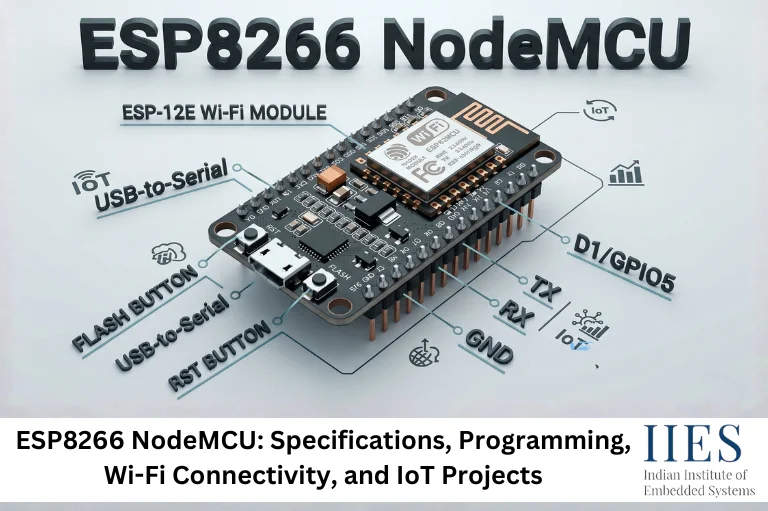
Understanding ESP8266 NodeMCU
What Is NodeMCU?
NodeMCU is an open-source IoT development platform that combines the ESP8266 Wi-Fi microcontroller with a user-friendly development board and firmware environment.
If you’re wondering what is NodeMCU ESP8266 used for, the answer is simple: it enables devices to connect to Wi-Fi networks and exchange data with cloud platforms, mobile applications, and other smart devices.
The ESP8266 NodeMCU provides:
- Built-in Wi-Fi connectivity
- Programmable GPIO pins
- Low-cost IoT development
- Sensor and actuator interfacing
- Cloud communication capabilities
- Arduino IDE compatibility
One of the reasons for its popularity is that developers can quickly move from concept to working prototype without requiring additional networking hardware.

What Are the ESP8266 NodeMCU Specifications?
NodeMCU specifications are often one of the first things engineers evaluate before selecting a development board.
ESP8266 NodeMCU Technical Specifications
Feature | Specification |
Microcontroller | ESP8266EX |
CPU | 32-bit Tensilica L106 |
Clock Speed | 80 MHz (up to 160 MHz) |
Flash Memory | 4 MB |
SRAM | 64 KB Instruction + 96 KB Data |
Operating Voltage | 3.3V |
Wi-Fi Standard | IEEE 802.11 b/g/n |
GPIO Pins | Up to 17 |
ADC Channels | 1 (10-bit ADC) |
Communication | UART, SPI, I2C (software), PWM |
USB Interface | Micro USB |
Programming Support | Arduino IDE, PlatformIO, Lua |
.
ESP8266 NodeMCU Pin Configuration
Understanding the ESP8266 NodeMCU pin configuration is essential when connecting sensors, displays, relays, and communication modules.
Common NodeMCU GPIO Mapping
NodeMCU Pin | GPIO |
D0 | GPIO16 |
D1 | GPIO5 |
D2 | GPIO4 |
D3 | GPIO0 |
D4 | GPIO2 |
D5 | GPIO14 |
D6 | GPIO12 |
D7 | GPIO13 |
D8 | GPIO15 |
RX | GPIO3 |
TX | GPIO1 |
Many beginners assume all GPIO pins behave identically. In practice, several pins influence boot mode selection. GPIO0, GPIO2, and GPIO15 must be used carefully to avoid startup issues.
This is one of the most common hardware mistakes encountered during embedded systems training projects.
ESP8266 NodeMCU Power Supply and Power Consumption
ESP8266 NodeMCU Power Supply Requirements
The NodeMCU operates internally at 3.3V.
Common power supply options include:
- USB power (5V via Micro USB)
- External regulated 5V supply
- 3.3V regulated source
- Battery-powered IoT systems
ESP8266 NodeMCU Power Consumption
The ESP8266 NodeMCU power consumption depends heavily on operating mode.
Mode | Typical Current |
Deep Sleep | 20–100 µA |
Idle Wi-Fi | 15–20 mA |
Active Wi-Fi | 70–170 mA |
Peak Transmission | Up to 300 mA |
From a real project standpoint, inadequate power supply design is one of the biggest reasons NodeMCU projects become unstable. During Wi-Fi transmission bursts, current demand rises significantly, causing resets if the power source cannot deliver sufficient current.
How to Use NodeMCU ESP8266 with Arduino IDE?
One of the major advantages of NodeMCU is its seamless integration with the Arduino ecosystem.
NodeMCU Compatibility with Arduino IDE
NodeMCU Compatibility with Arduino IDE allows developers to leverage thousands of existing libraries and examples.
Step 1: Install Arduino IDE
Download the latest Arduino IDE from the official Arduino website.
Step 2: Add ESP8266 Board Manager URL
Navigate to:
File → Preferences
Add:
http://arduino.esp8266.com/stable/package_esp8266com_index.json
Step 3: Install ESP8266 Board Package
Open:
Tools → Board → Boards Manager
Search:
ESP8266
Install the latest package.
Step 4: Select NodeMCU Board
Choose:
NodeMCU 1.0 (ESP-12E Module)
Your board is now ready for programming.

How to Program ESP8266 NodeMCU?
ESP8266 NodeMCU Programming Basics
Programming NodeMCU involves writing code, compiling it, and uploading it to the board through USB.
Blink Example
void setup() {

 pinMode(LED_BUILTIN, OUTPUT);

}

void loop() {

 digitalWrite(LED_BUILTIN, LOW);

 delay(1000);

 digitalWrite(LED_BUILTIN, HIGH);

 delay(1000);

}
This program blinks the onboard LED every second and is commonly used to verify board operation.
How to Code NodeMCU ESP8266 Effectively
Best practices include:
- Use non-blocking code where possible
- Monitor memory usage
- Avoid unnecessary delays
- Use libraries optimized for ESP8266
- Implement watchdog-safe programming
How to Flash ESP8266 NodeMCU?
Flashing refers to uploading firmware to the ESP8266 memory.
Step-by-Step Flashing Process
- Connect NodeMCU via USB.
- Open Arduino IDE.
- Select the correct COM port.
- Select NodeMCU board.
- Compile the sketch.
- Click Upload.
- Wait for flashing to complete.
If flashing fails:
- Check USB drivers.
- Verify COM port selection.
- Use a data-capable USB cable.
- Restart the board.
How to Connect NodeMCU ESP8266 to WiFi?
Connecting NodeMCU to Wi-Fi is the foundation of IoT development.
Sample Wi-Fi Connection Code
#include

const char* ssid = "YourWiFi";

const char* password = "YourPassword";

void setup() {

 Serial.begin(115200);

 WiFi.begin(ssid, password);

 while(WiFi.status() != WL_CONNECTED) {

   delay(500);

   Serial.print(".");

 }

 Serial.println("Connected");

}

void loop() {}
Common Wi-Fi Issues
- Incorrect SSID/password
- Weak signal strength
- Inadequate power supply
- Firewall restrictions
- Outdated firmware
What Is the NodeMCU IoT Experimenter?
The NodeMCU IoT Experimenter is anyone using NodeMCU as a platform to explore IoT concepts, wireless communication, cloud connectivity, and sensor integration.
Students often begin with:
- LED control
- Temperature monitoring
- Smart irrigation
- Weather stations
- Home automation
As skills grow, projects evolve into industrial monitoring, cloud analytics, and edge computing applications.
Feature | ESP8266 NodeMCU | Arduino Uno |
Wi-Fi | Built-in | External Module Required |
Processor | 32-bit | 8-bit |
Clock Speed | 80/160 MHz | 16 MHz |
Flash Memory | 4 MB | 32 KB |
IoT Ready | Yes | Limited |
Cost | Low | Moderate |
Cloud Connectivity | Native | Requires Add-ons |
When Should You Choose NodeMCU?
Choose ESP8266 NodeMCU if you need:
- Wireless connectivity
- IoT development
- Cloud integration
- Smart automation projects
Choose Arduino Uno when:
- Learning basic microcontroller concepts
- Working with legacy Arduino projects
- Needing 5V logic compatibility
Real-World Applications of ESP8266 NodeMCU
The ESP8266 NodeMCU powers countless IoT applications:
- Smart home automation
- Energy monitoring systems
- Weather stations
- Industrial monitoring
- Smart agriculture
- Security systems
- Environmental sensing
- Remote asset tracking
In a common embedded lab project, developers often use NodeMCU with DHT22 sensors and cloud dashboards to create real-time environmental monitoring systems. This project introduces networking, sensor interfacing, and cloud communication simultaneously.
3 Common Mistakes When Working with ESP8266 NodeMCU
1. Using an Unstable Power Source
Wi-Fi transmissions create sudden current spikes that can cause random resets.
2. Ignoring GPIO Boot Constraints
Certain GPIO pins affect startup behavior and may prevent normal booting.
3. Hardcoding Network Credentials
Store credentials securely whenever possible, especially in production deployments.
ESP8266 NodeMCU Trends in 2025–2026
While newer ESP32 variants continue gaining popularity, ESP8266 NodeMCU remains widely used in education, rapid prototyping, and cost-sensitive IoT applications.
According to industry IoT market reports, Wi-Fi-enabled edge devices continue to grow significantly through 2026 as smart home and industrial IoT adoption expands. NodeMCU remains a preferred entry-level platform because of its low cost, extensive documentation, and large developer community.

Conclusion
The ESP8266 NodeMCU continues to be one of the most accessible and practical platforms for learning IoT development. Its combination of Wi-Fi connectivity, flexible GPIO interfaces, Arduino IDE support, and low cost makes it suitable for beginners and experienced engineers alike.
Whether you’re exploring ESP8266 NodeMCU programming, building smart home automation systems, learning wireless communication, or developing cloud-connected devices, NodeMCU provides an excellent foundation. By understanding its specifications, pin configuration, power requirements, and programming workflow, you can build reliable IoT solutions and gain valuable embedded systems experience.