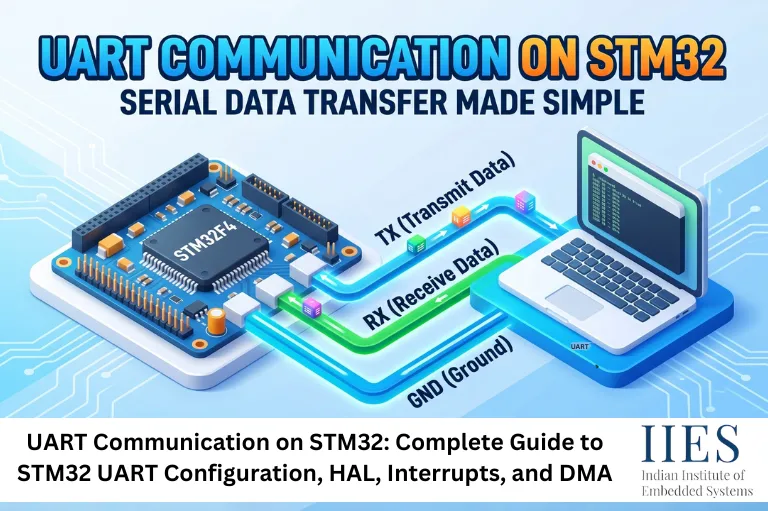
UART (Universal Asynchronous Receiver/Transmitter) is a hardware communication peripheral that allows serial data exchange between devices without requiring a shared clock signal.
Unlike synchronous communication protocols, UART operates asynchronously, meaning both devices agree on predefined communication settings such as:
- Baud rate
- Data bits
- Stop bits
- Parity bits
Typical UART Communication Flow
- Sender transmits data through TX pin
- Receiver accepts data through RX pin
- Both devices use the same baud rate
- Data is transferred frame by frame
Common STM32 UART Applications
- Debugging embedded applications
- GPS module communication
- GSM/GPRS modules
- Bluetooth modules (HC-05, HC-06)
- ESP8266 and ESP32 communication
- Industrial automation systems
- Data logging systems
- Human Machine Interfaces (HMIs)

UART vs USART: What Is the Difference?
One of the most common questions developers ask is:
What is the difference between UART and USART?
Feature | UART | USART |
Communication Type | Asynchronous Only | Asynchronous and Synchronous |
Clock Signal | Not Required | Optional |
Complexity | Simple | More Flexible |
Data Speed | Moderate | Higher Potential |
STM32 Support | Yes | Yes |
UART vs USART in STM32
Most STM32 microcontrollers contain USART peripherals. When used without a clock signal, USART operates exactly like a UART.
Therefore, developers often use the terms STM32 USART and STM32 UART interchangeably.
Why UART Communication Is Important in STM32 Projects
UART remains one of the most widely used STM32 communication protocols because it offers:
Advantages
- Simple implementation
- Minimal hardware requirements
- Low memory overhead
- Excellent debugging capability
- Broad device compatibility
- Support through STM32 HAL libraries
Compared to protocols such as SPI and I2C, UART is often easier for beginners to understand and deploy.
STM32 Communication Protocols Overview
STM32 microcontrollers support several communication interfaces.
Protocol | Speed | Wires Required | Typical Use |
UART | Medium | 2 | Serial communication |
SPI | High | 4+ | Sensors, Displays |
I2C | Medium | 2 | Multiple peripherals |
CAN | High | 2 | Automotive systems |
USB | Very High | 2 | PC connectivity |
Ethernet | Very High | Multiple | Networking |
UART is usually the preferred starting point for embedded communication projects.
Step 1: Setting Up the STM32 Development Environment
Before implementing UART communication on STM32, install the following tools:
STM32CubeIDE
Provides:
- Code editor
- Compiler
- Debugger
- Integrated STM32CubeMX support
STM32CubeMX
Used for:
- Peripheral configuration
- Pin assignment
- Code generation
STM32 HAL Library
The Hardware Abstraction Layer simplifies peripheral programming through ready-made APIs.
Step 2: STM32 UART Configuration Using CubeMX
Create a New Project
- Open STM32CubeIDE
- Select your STM32 board or MCU
- Create a new project
Enable USART Peripheral
Choose:
or any available UART interface.
CubeMX automatically assigns:
Configure UART Parameters
Recommended beginner settings:
Parameter | Value |
Baud Rate | 9600 |
Word Length | 8 Bits |
Stop Bits | 1 |
Parity | None |
Flow Control | None |
This configuration is commonly referred to as:
9600-8-N-1
Generate Initialization Code
After configuration:
- Save project
- Generate code
- Open generated project
STM32CubeIDE automatically creates UART initialization functions.
Step 3: STM32 HAL UART Programming
After generating code, STM32CubeIDE creates a UART handle.
Example:
UART_HandleTypeDef huart2;
UART Transmit Example
Use HAL_UART_Transmit() to send data.

char msg[] = "Hello UART\r\n";

HAL_UART_Transmit(

    &huart2,

    (uint8_t*)msg,

    strlen(msg),

    100

);
UART Receive Example
Use HAL_UART_Receive() to receive data.

uint8_t rxData[20];

HAL_UART_Receive(

    &huart2,

    rxData,

    sizeof(rxData),

    100

);
This simple implementation forms the foundation of most STM32 UART projects.

Step 4: Using UART Interrupts in STM32
Polling methods work well for simple projects but become inefficient in real-time systems.
What Is a UART Interrupt?
A UART interrupt notifies the CPU only when data arrives.
Benefits include:
- Reduced CPU usage
- Better multitasking
- Faster response times
UART Interrupt Receive Example
HAL_UART_Receive_IT(

    &huart2,

    rxBuffer,

    1

);
Interrupt callback:
void HAL_UART_RxCpltCallback(

    UART_HandleTypeDef *huart)

{

    // Process received data

}
When to Use UART Interrupts
- Sensor communication
- Robotics
- Industrial control
- IoT devices
- Real-time applications
Step 5: Implementing UART DMA for High-Speed Communication
For large data transfers, DMA provides the most efficient solution.
What Is UART DMA?
DMA (Direct Memory Access) transfers data between UART and memory without constant CPU intervention.
Benefits:
- Minimal CPU load
- Faster communication
- Improved power efficiency
- Better performance
UART DMA Receive Example
HAL_UART_Receive_DMA(

    &huart2,

    rxBuffer,

    BUFFER_SIZE

);
Best Use Cases for DMA
- Audio streaming
- GPS tracking
- Data logging
- Industrial monitoring
- Wireless communication modules
Real-World STM32 UART Project Example
Smart Temperature Monitoring System
Components:
- STM32F4 MCU
- Temperature Sensor
- USB-UART Converter
- PC Terminal
Workflow:
- Sensor reads temperature
- STM32 processes data
- UART transmits results
- PC displays live readings
Output:
Temperature: 28.5°C
Temperature: 28.6°C
Temperature: 28.4°C
This approach is widely used in industrial monitoring and IoT deployments.
Testing UART Communication on STM32
Hardware Setup
Connect:
STM32 | USB-UART Adapter |
TX | RX |
RX | TX |
GND | GND |
Terminal Software
Popular options:
- PuTTY
- Tera Term
- RealTerm
- Arduino Serial Monitor
Configure the terminal with the same UART settings used in STM32.
Common UART Communication Problems and Solutions
Problem | Cause | Solution |
No Data Received | Wrong wiring | Verify TX/RX connections |
Garbled Characters | Baud mismatch | Match baud rates |
Missing Data | Buffer overflow | Increase buffer size |
Random Errors | Noise | Use shielding |
Application Freeze | Blocking calls | Use Interrupts or DMA |
STM32 UART Best Practices
To build reliable embedded systems:
Recommended Practices
- Use interrupts instead of polling whenever possible
- Use DMA for large data transfers
- Validate incoming data
- Implement timeout mechanisms
- Use circular buffers
- Keep baud rates consistent
- Add error handling logic
- Monitor framing and parity errors
Following these practices improves system reliability and scalability.
Future Trends in STM32 UART Communication (2026 and Beyond)
UART continues to evolve alongside embedded technologies.
Emerging trends include:
AI-Powered Edge Devices
UART remains essential for sensor communication in AI-enabled microcontroller systems.
Industrial IoT
Millions of industrial devices still rely on UART-based communication networks.
Smart Manufacturing
Factory automation systems continue integrating UART with CAN, Ethernet, and wireless technologies.
Low-Power Embedded Systems
Modern STM32 MCUs optimize UART peripherals for ultra-low-power applications.
Despite newer communication standards, UART remains one of the most practical and dependable interfaces in embedded design.

Conclusion
Implementing UART communication STM32 is one of the first and most valuable skills for embedded developers. STM32 microcontrollers provide flexible UART and USART peripherals that can be configured quickly using STM32CubeIDE and the STM32 HAL library.
Whether you’re building simple serial communication systems, industrial automation projects, IoT devices, or high-speed data logging applications, understanding STM32 UART configuration, STM32 HAL UART, UART interrupt handling, and UART DMA communication will help you create efficient and reliable embedded systems.
By leveraging UART effectively, developers can establish seamless communication between STM32 microcontrollers and a wide variety of external devices while maintaining excellent performance and scalability.