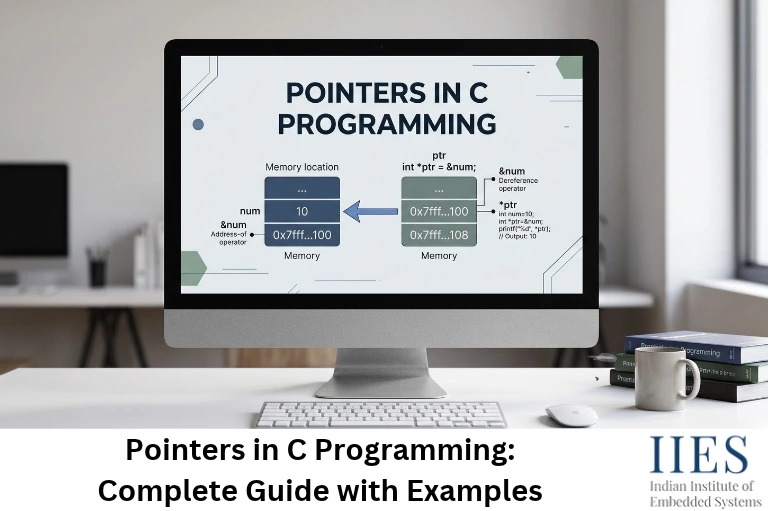
In short: a pointer is a variable that holds a memory address instead of an ordinary value.
Every variable lives at a specific location in memory, and that location has an address. A pointer stores one of those addresses. Here’s an analogy that makes it stick:
- The house is the variable, and the furniture inside is its value
- The house number is the memory address
- A pointer is a sticky note with that house number written on it
- Dereferencing (
*) means walking to the address on the note and opening the door
The sticky note is not the house. But with it, you can find the house, look inside, or rearrange the furniture. That is exactly what a pointer does with data.
Define Pointers in C Programming
In formal terms, a pointer is a derived data type that stores the address of an object or function of a specific type. The type matters for two reasons:
- It tells the compiler how many bytes to read when you dereference the pointer
- It tells the compiler how far to move when you do
p + 1

How a Pointer Looks in Memory
| Address | Content | Name |
|---|
| 0x2000 | 25 | age (an int variable) |
| 0x2004 | 0x2000 | ptr (an int pointer holding the address of age) |
(Addresses are illustrative.)
age holds the value 25ptr does not hold 25. It holds 0x2000, the address of age*ptr means “go to 0x2000 and read what’s there,” which gives 25
Benefits of Using Pointers in C Programming
The benefits of using pointers in C programming show up in almost every serious C project. They are what make C fast, flexible and hardware-friendly.
Advantages of Pointers in C Programming at a Glance
| Advantage | What it means | Where you see it |
|---|
| Efficient data passing | Pass a small address instead of copying a large struct or array | Sending sensor data structures to functions |
| Call by reference | Functions can modify the caller’s variables | swap(), scanf("%d", &x) |
| Dynamic memory | Allocate at run time with malloc(), release with free() | Linked lists, trees, buffers |
| Array and string handling | Walk through elements using pointer arithmetic | Parsing UART data, string functions |
| Direct hardware access | Read and write memory-mapped peripheral registers | GPIO, UART, timers |
| Function callbacks | Store and call functions indirectly | Interrupt tables, state machines, drivers |
| Data structures | Link nodes together | Stacks, queues, RTOS task lists |
Limitations to Keep in Mind
- Uninitialized or dangling pointers cause crashes that are hard to trace
- C does not check bounds, so out-of-range access silently corrupts memory
- Forgetting
free() leaks memory - Deep indirection (
***p) makes code hard to read
None of these are reasons to avoid pointers. They are reasons to use them with discipline, and the rest of this guide shows how.
Declaration and Initialization of Pointers in C
Pointer Declaration Syntax
data_type *pointer_name;
| Declaration | Meaning |
|---|
int *p; | Pointer to an int |
char *pc; | Pointer to a char |
float *pf; | Pointer to a float |
uint8_t *buf; | Pointer to an unsigned 8-bit value (very common in embedded code) |
int *p and int* p mean the same thing. The asterisk binds to the variable name, not the type, and that causes the classic trap below.
Common trap: int* a, b; makes only a a pointer. b is a plain int.
int* a, b;      // 'a' is a pointer, 'b' is a normal int
int *x, *y;     // both are pointers
On a 64-bit PC, sizeof a prints 8 and sizeof b prints 4. Declaring one pointer per line avoids the confusion.
Pointer Initialization in C: 5 Common Ways
#include

int x = 10;
int arr[3] = {1, 2, 3};

int *p1 = &x;                   // 1. address of an existing variable
int *p2 = NULL;                 // 2. explicitly "points to nothing"
int *p3 = arr;                  // 3. array name = address of first element
int *p4 = malloc(sizeof *p4);   // 4. dynamically allocated memory
int *p5 = p1;                   // 5. copy of another pointer
- Never leave a pointer uninitialized. If you don’t have an address yet, set it to
NULL sizeof *p4 stays correct even if you later change the pointer’s type
How to Use Pointer in C: The Two Operators You Need
| Operator | Name | What it does | Example |
|---|
& | Address-of | Gets the address of a variable | &age |
* | Dereference | Accesses the value stored at an address | *ptr |
The * symbol does two jobs. In a declaration it means “pointer to”. In an expression it means “the value at”.
Step-by-Step Example
- Declare a normal variable
- Declare a pointer of the same type
- Store the variable’s address in the pointer using
& - Read or modify the value through the pointer using
*
#include

int main(void)
{
    int age = 25;          // 1. a normal variable
    int *ptr = &age;       // 2. pointer that stores age's address

    printf("Value of age        : %d\n", age);
    printf("Address of age      : %p\n", (void *)&age);
    printf("Value stored in ptr : %p\n", (void *)ptr);
    printf("Value at *ptr       : %d\n", *ptr);       // 3. dereference

    *ptr = 30;             // 4. modify age through the pointer
    printf("age after *ptr = 30 : %d\n", age);

    return 0;
}
Output (your address will differ):
Value of age        : 25
Address of age      : 0x7ffdc2f970fc
Value stored in ptr : 0x7ffdc2f970fc
Value at *ptr       : 25
age after *ptr = 30 : 30
ptr and &age hold the same address*ptr = 30 changed age. Two names, one memory location- Print addresses with
%p and cast to (void *)
Pointer Arithmetic in C
When you add 1 to a pointer, it moves by one element, not one byte. The compiler multiplies by the size of the pointed-to type.
Formula: new_address = old_address + (n × sizeof(type))
char * → p + 1 moves 1 byteint * → p + 1 moves 4 bytes (with a 32-bit int)double * → p + 1 moves 8 bytes
int marks[4] = {10, 20, 30, 40};
int *p = marks;

printf("%d\n", *p);              // 10
p++;                             // moves ahead by one int
printf("%d\n", *p);              // 20
printf("%d\n", *(p + 2));        // 40
printf("%td\n", &marks[3] - p);  // 2 (elements between them, not bytes)
| Operation | Allowed? | Note |
|---|
p++, p-- | Yes | Moves by one element |
p + n, p - n | Yes | Moves by n elements |
p1 - p2 | Yes | Only when both point into the same array. Gives an element count |
p1 < p2, p1 == p2 | Yes | Ordering is only well-defined within the same array |
p1 + p2 | No | Meaningless |
p * 2, p / 2 | No | Not valid on pointers |
Embedded note: int is not the same size everywhere. On an 8-bit AVR (Arduino Uno) it is 2 bytes, so p + 1 moves 2 bytes. On ARM Cortex-M it moves 4. Use fixed-width types like uint16_t and int32_t so your pointer maths behaves the same on every MCU.
*p++, (*p)++ and *++p: Try It Yourself
int a[] = {5, 6, 7};
int *p = a;

int v1 = *p++;     // ?
int v2 = (*p)++;   // ?
int v3 = *++p;     // ?
*p++ reads 5, then moves p to a[1](*p)++ returns 6, and changes a[1] to 7 (the pointer doesn’t move)*++p moves p to a[2] first, then reads 7- Final array:
{5, 7, 7}
One more: with int arr[] = {10, 20, 30}; int *p = arr;, *p + 1 gives 11 (value plus one), while *(p + 1) gives 20 (the next element).
Pointers and Arrays in C
- The array name (in most expressions) becomes a pointer to its first element:
arr is the same as &arr[0] arr[i] is defined as *(arr + i)- Fun fact: because of that,
2[arr] is legal C. Please don’t use it in production code
int data[5] = {2, 4, 6, 8, 10};
int *p = data;

for (int i = 0; i < 5; i++) {
    printf("%d ", *(p + i));    // same as data[i] or p[i]
}
// Output: 2 4 6 8 10
Array vs Pointer: Differences That Matter
| | Array | Pointer |
|---|
| Memory | Fixed block holding all elements | Holds one address |
sizeof | Total bytes (40 for int[10] with 4-byte int) | Size of an address (2, 4 or 8 bytes) |
| Reassignment | Cannot be made to point elsewhere | Can point anywhere |
| As function parameter | Decays to a pointer | Already a pointer |
int arr[10];
int *p = arr;
printf("%zu %zu\n", sizeof(arr), sizeof(p));   // 40 8 on a 64-bit PC
On a Cortex-M you would see 40 4. On AVR you would see 20 2.
Pointers and Strings in C
char name[] = "Embedded";         // array: your own modifiable copy in RAM
const char *msg = "Embedded";     // pointer to a string literal: read-only
char name[] copies the characters into RAM, so you can change themconst char *msg points to a string literal, often stored in flash. Modifying it is undefined behavior: a crash on a PC, a silent failure or fault on an MCU- Strings end with
'\0', and pointer loops rely on it
const char *msg = "Embedded";
int length = 0;

while (*msg != '\0') {
    length++;
    msg++;
}
// length = 8
Functions and Pointers in C Programming
Functions and pointers in C programming work together in four ways: passing by reference, passing arrays, returning results through pointers, and calling functions indirectly through function pointers.
Call by Value vs Call by Reference
C is pass-by-value: a function receives copies of its arguments. To let a function change the caller’s variable, pass the variable’s address.
void swap_wrong(int a, int b)   // receives copies
{
    int temp = a; a = b; b = temp;
}

void swap(int *a, int *b)       // receives addresses
{
    int temp = *a;
    *a = *b;
    *b = temp;
}

int main(void)
{
    int x = 10, y = 20;

    swap_wrong(x, y);
    printf("After swap_wrong: x=%d, y=%d\n", x, y);   // 10, 20 (unchanged)

    swap(&x, &y);
    printf("After swap      : x=%d, y=%d\n", x, y);   // 20, 10
    return 0;
}
swap_wrong swapped its own copies, so the originals stayed untouchedswap received addresses and changed the originals through *a and *b- This is why
scanf("%d", &x) needs the &
Passing Arrays to Functions
int find_max(const int *arr, size_t len)
{
    int max = arr[0];
    for (size_t i = 1; i < len; i++) { if (arr[i] > max) max = arr[i];
    }
    return max;
}

int readings[] = {31, 87, 45, 92, 60};
int peak = find_max(readings, sizeof readings / sizeof readings[0]);   // 92
- The array decays to a pointer, so the function gets an address, not a copy
sizeof(arr) inside the function returns the pointer size, so always pass the length separatelyconst promises the function won’t modify the data, and the compiler enforces it
Returning Multiple Values with Output Parameters
A classic embedded pattern is to return a status and deliver the data through a pointer.
bool adc_read(uint16_t *result)
{
    if (result == NULL) return false;   // always validate
    *result = 512;                      // pretend ADC reading
    return true;
}

uint16_t value;
if (adc_read(&value)) {
    /* use value */
}
Returning a Pointer from a Function
int *bad(void)
{
    int local = 42;
    return &local;      // BAD: local dies when the function returns
}

int *good(void)
{
    static int keep = 42;
    return &keep;       // OK: static storage lives for the whole program
}
- Never return the address of a non-static local variable. Compilers warn:
function returns address of local variable - Safe options:
static storage, a buffer provided by the caller (preferred in embedded), or heap memory the caller frees

Function Pointers in C
A function pointer stores the address of a function so you can call it indirectly.
Syntax: return_type (*name)(parameter_types);
int add(int a, int b) { return a + b; }
int sub(int a, int b) { return a - b; }

int main(void)
{
    int (*operation)(int, int);     // pointer to a function taking two ints

    operation = add;
    printf("add: %d\n", operation(8, 3));   // 11

    operation = sub;
    printf("sub: %d\n", operation(8, 3));   // 5
    return 0;
}
Common trap: int (*op)(int, int) is a pointer to a function. int *op(int, int) is a function that returns an int *. The parentheses matter.
Here is where embedded code uses them, a command table:
typedef void (*cmd_handler_t)(void);

void led_on(void)  { /* GPIO high */ }
void led_off(void) { /* GPIO low  */ }
void status(void)  { /* send status over UART */ }

cmd_handler_t handlers[] = { led_on, led_off, status };

void run_command(uint8_t id)
{
    if (id < sizeof handlers / sizeof handlers[0]) {   // bounds check
        handlers[id]();
    }
}
- Function pointers power callbacks, command tables and state machines
- On ARM Cortex-M, the interrupt vector table is essentially an array of function addresses. The first entry is the initial stack pointer value
Pointer to Pointer (Double Pointers) in C
A pointer to pointer stores the address of another pointer. You declare it with two asterisks.
int x = 7;
int *p = &x;
int **pp = &p;

printf("%d %d %d\n", x, *p, **pp);   // 7 7 7
Read it as a chain: pp → p → x.
Where you’ll meet double pointers:
char **argv in main() (an array of strings)- Functions that must change the caller’s pointer, such as allocating a buffer
- Arrays of strings
- Linked-list head updates
void alloc_buffer(int **buf, size_t n)
{
    *buf = malloc(n * sizeof **buf);   // changes the caller's pointer
}

int *data = NULL;
alloc_buffer(&data, 4);
If alloc_buffer took a plain int *, it would only change a copy of the pointer, and data would stay NULL.
Special Pointers in C: NULL, Void, Wild, Dangling and const
NULL Pointer
- Deliberately points to nothing, and is assigned with
NULL - Check before use:
if (p != NULL) - C23 adds
nullptr, but NULL remains the portable choice for most embedded toolchains - Embedded catch: on many MCUs, address 0 is valid memory (the start of flash or the vector table alias). Dereferencing
NULL may not crash. It may quietly read garbage
Void Pointer
void * is a generic pointer that can hold the address of any data type- It cannot be dereferenced until you cast it to a real type
- Used in
malloc(), memcpy() and callback context arguments - Arithmetic on
void * isn’t standard C (GCC allows it as an extension)
[Internal link: full guide to void pointers in C]
Wild and Dangling Pointers
| Type | How it happens | Fix |
|---|
| Wild pointer | Declared but never initialized (int *p;) | Initialize to NULL or a valid address |
| Dangling pointer | Memory was freed or went out of scope, but the pointer still holds the old address | Set to NULL after free(). Never return a local variable’s address |
int *p = malloc(sizeof *p);
free(p);
p = NULL;    // prevents accidental reuse of freed memory
const with Pointers: Read Declarations Right to Left
| Declaration | Change the value via p? | Change where p points? | Typical use |
|---|
const int *p | No | Yes | Read-only view of data (function parameters) |
int *const p | Yes | No | Fixed pointer to a modifiable location, such as a fixed buffer |
const int *const p | No | No | Read-only lookup table |
- The compiler rejects the forbidden assignments, so mistakes get caught at build time
- For a hardware status register that only the hardware changes, use
const volatile uint32_t *
Dynamic Memory Allocation with Pointers
int *buf = malloc(10 * sizeof *buf);   // 1. allocate
if (buf == NULL) {                     // 2. always check
    /* handle failure */
}
/* use buf[0] ... buf[9] */            // 3. use
free(buf);                             // 4. release
buf = NULL;                            // 5. avoid a dangling pointer
malloc() returns void *, so no cast is needed in C- Related functions:
calloc() (zero-initialized), realloc() (resize) - Embedded caution: heap fragmentation, unpredictable timing and tiny RAM make
malloc() risky. Safety-oriented standards such as MISRA C prohibit it. Prefer static buffers or fixed-size memory pools
[Internal link: memory management in C]
Writing C++? [Internal link: C++ smart pointers] automate most of this cleanup
Pointers in Embedded Systems: Registers, Buffers and Callbacks
If you are learning C for firmware, this is the section that matters most. Pointers are how C code talks to hardware.
Memory-Mapped Registers
On most microcontrollers, peripheral registers sit at fixed addresses in the same address space as RAM. Writing to a register is just writing through a pointer.
#include

#define GPIOA_ODR  (*(volatile uint32_t *)0x40020014UL)

GPIOA_ODR |= (1U << 5);   // set PA5 high (after clock and pin mode are configured)
Break it down:
0x40020014UL is the register address (the GPIOA output data register on STM32F4-class devices; always confirm in your reference manual)(volatile uint32_t *) treats that address as a pointer to a 32-bit volatile value- The leading
* dereferences it, so the macro behaves like a normal variable - PA5 drives the user LED on many Nucleo boards
Why volatile? Hardware can change a register at any moment without your code touching it. volatile stops the compiler from caching the value or optimizing reads and writes away.
Bug pattern: a loop waiting for a status flag works in the debug build, then hangs or gets skipped in the release build. The flag wasn’t volatile, so the optimizer decided the value could never change and removed the check.
Struct Overlay: How GPIOA->ODR Really Works
#include
#include

typedef struct {
    volatile uint32_t MODER;    // offset 0x00
    volatile uint32_t OTYPER;   // offset 0x04
    volatile uint32_t OSPEEDR;  // offset 0x08
    volatile uint32_t PUPDR;    // offset 0x0C
    volatile uint32_t IDR;      // offset 0x10
    volatile uint32_t ODR;      // offset 0x14
} GPIO_TypeDef;

#define GPIOA ((GPIO_TypeDef *)0x40020000UL)

_Static_assert(offsetof(GPIO_TypeDef, ODR) == 0x14, "ODR offset is wrong");

GPIOA->ODR |= (1U << 5); // set PA5 GPIOA->ODR &= ~(1U << 5);   // clear PA5
- The struct members mirror the register layout, and one base-address pointer gives named access to all of them
- This is the pattern behind vendor headers such as CMSIS device files (simplified here)
_Static_assert with offsetof catches layout mistakes at compile time
[Internal link: C structures]
Pointer Size Depends on the Architecture
| Platform | Typical pointer size | Note |
|---|
| 8-bit AVR (e.g., ATmega328P) | 2 bytes | Flash data needs special access (PROGMEM) |
| 8051 (Keil C51) | 1 to 3 bytes | Depends on memory type. Generic pointers are 3 bytes |
| ARM Cortex-M | 4 bytes | 32-bit address space |
| 64-bit PC | 8 bytes | Useful for testing logic on your laptop |
What a Pointer Can Point To on a Microcontroller
| Region | Examples | Watch out for |
|---|
| Flash | const tables, string literals, code | Read-only. Writes fail or fault |
| SRAM | Globals, stack, heap | Limited size. Stack overflow risk |
| Peripheral registers | GPIO, UART, timers | Must be volatile |
| External memory | External SRAM or flash | Access timing and initialization order |
Two Hardware-Specific Traps
- Alignment: casting a
uint8_t buffer to uint32_t * can create an unaligned access. On cores like Cortex-M0/M0+ that triggers a HardFault. Use memcpy() or an aligned buffer - AVR flash vs RAM: on AVR, flash and RAM are separate address spaces. A normal pointer reads RAM. For data stored with
PROGMEM, use pgm_read_byte() and friends
Passing Buffers to Drivers
- UART, SPI and DMA drivers take a pointer plus a length. For example, STM32 HAL’s
HAL_UART_Transmit() takes a pointer to your data and its size - DMA reads the memory directly, so the buffer must stay valid until the transfer finishes. A local array on the stack is a classic dangling-pointer bug
Common Pointer Mistakes (and How to Fix Them)
| Mistake | What goes wrong | Fix |
|---|
| Using an uninitialized pointer | Writes to a random address, causing a crash or silent corruption | Initialize to NULL or a valid address |
Dereferencing NULL | Crash on a PC. On an MCU it may touch real memory at address 0 | Check p != NULL before use |
| Returning a local variable’s address | The pointer dangles as soon as the function returns | Use static, a caller-provided buffer, or heap memory |
| Going past the end of an array | Corrupts neighboring variables | Track the length and check bounds |
Forgetting free() | Memory leak. The heap runs out fast on an MCU | Pair every malloc() with one free() |
Using memory after free() | Undefined behavior | Set the pointer to NULL after free() |
Using sizeof(ptr) as the array size | Returns the pointer size, not the array size | Pass the length separately |
Missing volatile on registers or ISR-shared data | The compiler optimizes accesses away | Declare hardware registers and ISR-shared variables volatile |
Stuck on a pointer crash? [Internal link: C code debugging techniques]
Pointer Best Practices Checklist
- Initialize every pointer at declaration
- Set pointers to
NULL after free() - Validate pointer parameters at function entry
- Use
const for data you won’t modify - Pass a length with every buffer
- Use fixed-width types and
size_t for sizes and indices - Declare one pointer per line
- Keep indirection shallow. Three levels (
***p) usually signals a design problem - Compile with
-Wall -Wextra and treat warnings seriously - On PC builds, use AddressSanitizer (
-fsanitize=address) or Valgrind to catch leaks, overflows and use-after-free - On MCUs, prefer static allocation and mark registers
volatile
[Internal link: embedded C best practices]
Practice Problems
- Swap two numbers using pointers
- Reverse an array in place using two pointers (one at each end)
- Write your own
strlen() and strcpy() using pointers - Write a function that returns both the smallest and largest values of an array through pointer parameters
- Build a command table with function pointers to turn an LED on, turn it off and report status (simulate with
printf)
Once these feel easy, move on to [Internal link: data structures in C programming] and [Internal link: stack in C programming].
Conclusion
Pointers in C programming feel hard mainly because nobody shows you the memory picture first. Once you see variables as addresses and values, everything else follows.
Key takeaways:
- A pointer stores an address.
& gets it and * follows it - Always initialize pointers, and use
NULL when you don’t have an address yet - Pointer arithmetic moves in elements, not bytes
- Arrays, strings, call by reference, output parameters and callbacks all rely on pointers
- In embedded C, pointers are how firmware talks to hardware, and
volatile keeps that conversation honest
Want to practice on real microcontrollers instead of only reading about them? Explore the embedded systems training programs at IIES [link to course page].